I’m blogging early this weekend as I’ve got too many events scheduled! Next Saturday, my blog will be late. I’m blaming it on the time change.
There is nothing worse than trying to solve a brick wall for commonly named individuals. For years, I’ve not been able to go back further than the parents of my 3rd great-grandfather, Edward Adams. Actually, I still don’t know his parents’ names but I definitely know who his grandparents were!
I don’t use DNA much for my own family genealogy because my maternal side were fairly recent immigrants to the U.S. and few have matched me. On my paternal side, I seem to get most matches for my maiden name and I have no brick walls there, going back as far as I could with remaining French and German records. I have tremendous issues, though, with my paternal grandmother’s lines; I was always told she was Irish, English, Welsh, and Scottish. My DNA confirms those ethnicities but the names where I reach a dead end are Adams, Byrd, Cole, Dennis, and Morrison. Too many in the same place at the same time!
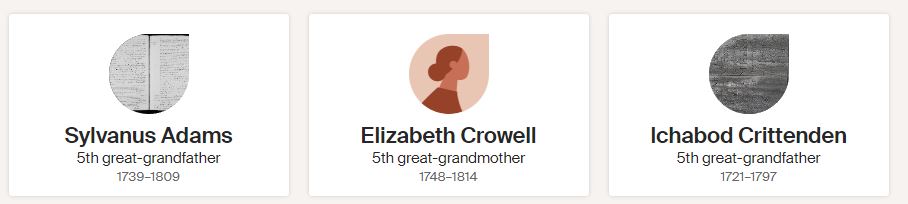
Last month, I was pleasantly surprised when I decided to take a look to see if I had any new matches. I had a hunch that I was related through the Sylvanus Adams line. Although it was just a hypothesis, it made sense as my Edward Adams, who had died intestate (why do all my people do this?!), left behind young children in rural Perry, Ohio in 1822. A man named Evi Adams settled the estate. Evi died soon after Edward. Evi was an interesting name to me so I poked around and found several in New Jersey where Edward’s wife had originated. Now New Jersey is not a small land a mass so I was even more intrigued when I learned the Evi’s were all in Sussex County, the same place as Edward’s wife.
I then made a tree from the youngest Evi I found living there in the late 1700s and based on birth years, it looked plausible that Sylvanus and Elizabeth Crowell Adams could be my 5th great-grandparents.
I attached Edward to one of their sons with a disclaimer that this was just a hypothesis. And there my mystery sat for years! Until February, when finally, along with 7 newfound “cousins” I indeed do link to Elizabeth Crowell and Sylvanus Adams.
But the man I guessed was Edward’s father was not correct. There were gaps in children so I suspected that was where my 4th great-grandfather had once been, perhaps dying young. I found Sylvanus’ will to see if there were additional children or grandchildren of deceased children named but nope, he even left out a known son Isaiah, who had left New Jersey for Ohio. Hmmm, not the same county where Edward was but I still tried to place him as my great-grandfather; it didn’t work.
I then found a further DNA match with an Ichabod and Sarah Sumner Crittenden. I’ve been trying to find which of their daughters married a son of Sylvanus and that’s where things got stopped again. The Crittenden’s were from Connecticut and had a daughter, Hannah, who married James Adams in Massachusetts. Could James be an unnamed son of Sylvanus? Possibly, but the James and Hannah Adams family remained in New England. That could explain why James was not listed in Sylvanus’ will as it appears that only children who were close by to him in New Jersey were named. Then I found a James Adams in Sussex, New Jersey in 1793 but he was married to a Sarah Dunn. Arghhh! But here it gets interesting because Sarah Dunn’s parents were also from Connecticut.
I am THRILLED that I have found Edward’s grandparents after all these years and even happier to know I was correct in guessing who they were. I just wish I could figure out who his parents were.
With the weather outside frightful, I decided it was time for me to clean my computer. I must admit I do not back up as frequently as I should. I did find a way that made the task quick and easy.
First, I never save to my computers. The reason is that I have been burned in the past by them dying unexpectedly. I got into the habit when I was working as a counselor saving to a cloud. Originally, I used a thumb drive but I’ve lost or broken too many and the switch to the cloud made my files accessible anywhere, anytime. I’ve used several cloud companies – OneDrive, Dropbox, and Google Drive. None are perfect but I prefer Dropbox. I do pay for a larger amount of storage. My phone photos go to Dropbox now as they used to go to Google Photos but a year ago, I noticed that some were missing and the transfer stopped entirely last June. My husband’s phone photos go directly to Google Photos but he, too, experienced missing photos.
As I mentioned in last week’s blog, I am having difficulty synching Ancestry.com with RootsMagic8. I tried it again after I blogged and it still didn’t work though I can synch to version 7. I also tried downloading my Ancestry.com tree, which is large, to Legacy Family Tree but was unable to do that, either. I don’t want to post the new tree to MyHeritage.com, which now owns Legacy. I have a tree on MyHeritage that I do not update as I don’t have time to keep all my online trees up to date. I have enough info on FamilySearch, Geneanet, FindMyPast, and MyHeritage to connect with other researchers. I then direct them to Ancestry which is my most accurate tree.
Sidenote: Several readers have commented that they are also experiencing difficulty with RootsMagic8. One recommended looking into Family Historian as an alternative and I plan to do that. Thanks, readers, for your input!
Due to my synching issues, I decided I should also back up my existing Google Photos, my husband’s photos, and Dropbox to a stand-alone hard drive. I had purchased a Backup Plus before I relocated but hadn’t gotten around to using it.
Stand-alone drives aren’t immune to failure, either, as while I was attempting to backup my husband decided he would clean some old drives he had. Three of five would not open. He’s working on it and is fairly good with tech so I’m confident he’ll figure it out. He recommended I save to two different drives, keeping one at our home and another at one of our adult kid’s house. That way, if something happens to one, there is a backup to the backup. Yes, this is paranoia but it is also my life history and that of my ancestors since I’ve gone digital. When tech changes, these drives will have to be updated to whatever device replaces them so know, in the tech world, you aren’t ever done. LOL, kind of like genealogy!
BACKING UP DROPBOX:
I looked everywhere on Dropbox for information on how to back up the files but found nothing. A Google search gave me several methods but none worked for me. It directed me to the ribbon to click on “Backup tab” which I didn’t have. Another suggestion was to go to Settings and click “Preferences” which I also didn’t have.
Determined, I just experimented and discovered it’s super easy – just right-click on a file folder, scroll down to “Send to >” and select where you want the file duplicated. I chose Backup Plus which went to my E drive as that was the name of my stand-alone hard drive. This took some time as I have LOTS of files but it worked well. Once in a while, the program would stall as it could not find address info. I clicked “Okay” to transfer without the data. I was able to open the file from the stand-alone hard drive with no problem.
BACKING UP GOOGLE PHOTOS TO DROPBOX:
The time spent on the transfer depends on how much media you have. I have tons since I began using Google Photos in the early 2000s.
First, to access your photos, click on the grid symbol
on the ribbon on the right side of your main Google search page.
Select “Google Photos”
Find Settings, mine is on the ribbon on the top right, the middle gear symbol:
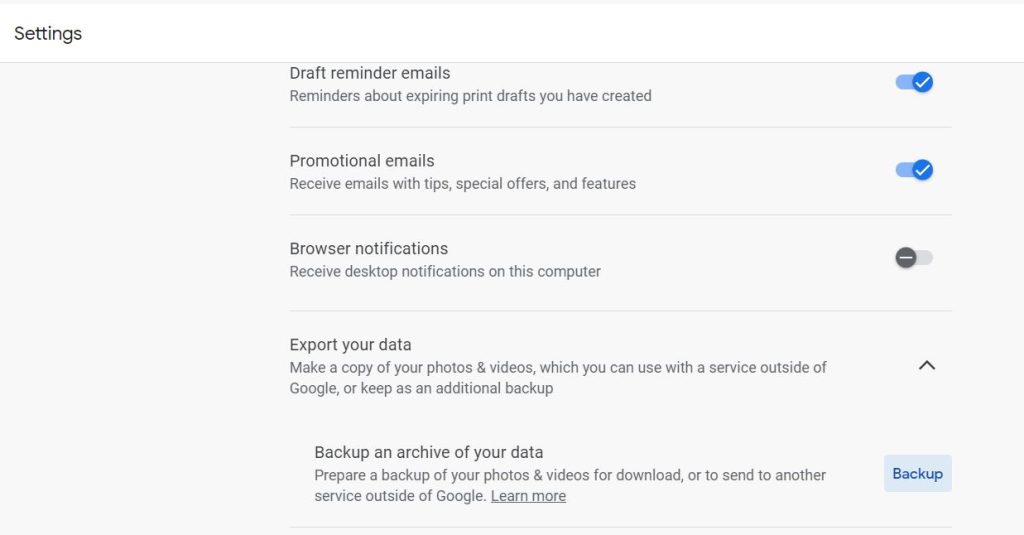
Scroll WAY DOWN to find “Export your data”:
Click Backup.
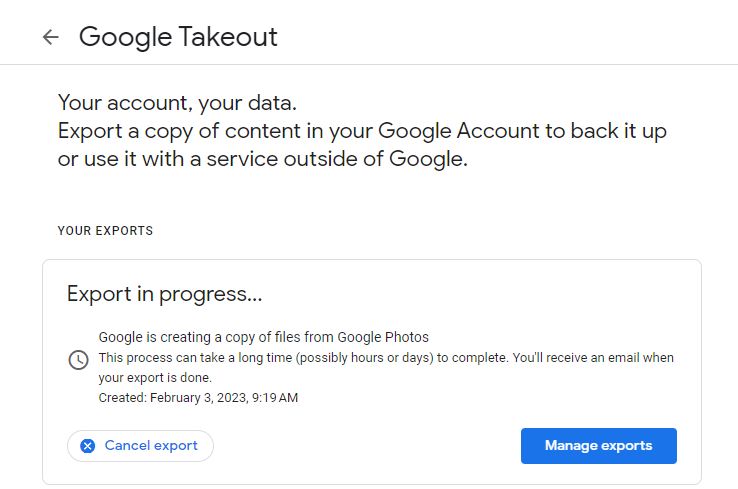
The page will show you that the “Export is in progress…”:
I haven’t gotten the email yet. I probably should not have tried to export both my and my husband’s photos simultaneously.
When I receive the email I will save it to Dropbox and then, follow my instructions above on how t save it to my external hard drive.
BACKING UP WEBSITES:
If you have a website, you might also like to save its content. I periodically do that by using a product called UpdraftPlus Backup Restore. I’m not providing the instructions here because I have an older version I probably should update. Sigh, tech is constantly changing!
Now that my files are in tip-top shape I’m ready to spend time on what I really love to do – find and analyze records!
I’m not one for making New Year’s resolutions. Instead, I think about tasks I’d like to complete, improve upon, or try out. If you need some ideas to jump-start your genealogy this year here goes:
Organize – During the colder months it’s always a good time to go through your accumulated family paraphernalia. You may have an “ah-ha” moment and get a clue for further research. If you scan your items, you’ll get extra security knowing the record resides in more than one location.
Research – Go through your family tree and make a list of items you are missing, such as the burial location or marriage place of an ancestor. You can use the notes section of the software program you are using or save it in a Word document by location. That way, if you happen to visit the area in the upcoming year, you’ll know what you need to research.
Reach Out – Connect with far-flung families either online or by snail mail. It’s easy to find a family by seeing who else has your ancestors in their public trees. Then, look for them on Facebook or contact the family to see if they might have a way to reach the individuals. You never know who may have important family information until you ask.
Explore – The world is reopening so if you’ve put off a long-planned trip to an ancestral town, now’s the time to visit it. I was disappointed to learn that an earthquake had devastated my maternal’s side cemetery in Europe. If I had been able to go as planned in 2020 I would have been able to see it as it was when my ancestors lived in the area.
Gain New Ideas – read a journal or magazine that you didn’t previously subscribe to. Check out the prior years’ indexes to see if the surname you’re researching was mentioned. Many can be viewed for free from your local library or through Kindle. Even if you don’t find your family mentioned, techniques you might not have tried may be mentioned that can help you get over your brick wall.
Add On – look over your tree and add missing spouses or children. Search for a marriage record to unveil a woman’s maiden name then check out other trees who may have listed her. Look at census records and church records to find more children for the couple.
Keep Growing – identify an area you are uncomfortable with. Perhaps it is a location or time period you don’t have much knowledge about. Check out Wikipedia, Youtube, your local library, or reach out to a genealogy or historical society that specializes in the information you need.
Document Today! – Today is tomorrow’s history. Begin a journal, upload the photos from your phone and make sure they are saved, and update your tree with any special events (marriages/new births/deaths, etc.) that may have occurred in the past year. Trust me, you won’t remember the graduation date in a few years so record it now while it’s still in your calendar and fresh in your mind.
Future Plan – Are you the keeper of the family archives? If so, do you have them stored effectively? In case of emergency, will they be protected? Who will you bequeath them to one day? Now’s the time to make decisions on how you’ll preserve for the future.
Enjoy the Moment – Family history can be frustrating, a study in patience, and expensive. All the more reason to celebrate your great find. If you’ve been searching for a deed, will, or DNA connection and you discover it this year, definitely take a moment to savor the find. Do a happy dance, share with those who understand, or simply cry. Yep, cry. Tears of joy are a great release and you deserve it.
Here’s to 2023 – health, happiness, and historical finds!
Last week I began the saga of how I finally broke through two brick walls; I had two baptismal certificates but could find no information on what had become of the individuals. My goal has always been to find closer family and return the certificates. You can catch up on the story by reading Part 1 here.
TALK IT OUT
I shared what I had found with my family and my concern I didn’t have the right man. My husband said, to his knowledge, none of his family had ever lived in northwestern Indiana. This conversation led to a list of places he knew his family had lived – Fayette County in the 1820s, the Elkhart/South Bend area since the 1830s, Porter and Lake counties since the 1850s. I clearly remembered he had some relatives in the late 1800s in the Muncie and Bloomington areas but Garrett, nope, never heard of that. Only, I had, but didn’t remember!
In the conversation we had about people moving about I recalled a letter his grandmother had received from someone about a motorcycle trip that they had taken to North Dakota. I decided to go back through the old letters to find out who that person was. While doing that, I solved my brick wall. . .
TRANSCRIBE
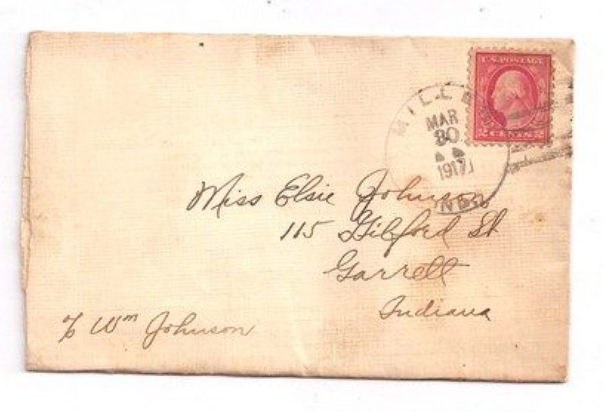
The envelope I found (shown above) shocked me as it was written to his grandmother who was living in Garrett in c/o Wm. Johnson. I immediately showed my husband and he said, “No way.” I then discovered I had a letter written from Garrett to a “Dear Sister” in 1911.
After transcribing the letter, I analyzed it for further clues. The problem with the letter, however, was that there was no envelope, it was signed by “Anna and Dickie” and written to “Dear Sister.” Most of the letters in the collection were written to Elsie Johnson Harbaugh, Oskar’s half-sister, so that was likely who the sister was. The marriage license for Oskar was to a woman named Anna Blair, so the writer may have been Anna but who was Dickie? No Oskar, Willie, or William is ever mentioned in the letter.
RESEARCH OTHERS LISTED
Clearly, the letter was not written by Oskar as the letter writer stated:
1. “I have six brothers, all married.” Anders and Thilda’s sons were Johan, Carl, Oscar, Charlie, Willie, and Andrew. Those are 6 boys, however, the letter writer would not have included himself in the count of people he had to write to and why would he inform his half-sister of his siblings as she would have already known that information?
2.“I have one brother in Chicago, has lived there, for more than six years, ever since he was married, he is an electrician.” I had no idea where most of the children from the first marriage lived. Their sister, Ida, lived in Chicago with her husband, Charles Johnberg, in 1920. The couple married in Porter County, Indiana in 1917. They would not have been in Chicago together in 1912 when the letter was written.
3. “also one sister and two other brothers that are single.” The sons from the first marriage had four full sisters–Anna, Ida, Selma, and Nellie, who had probably died by the time the letter was written, and three half-sisters–Helen, Elsie, and Ruth, so this did not fit with Oskar or one of his siblings being the letter writer.
4.“I live right across the street from my Mother, or I don’t know what I would do.” The mother of the sons died in 1891.
It was time to research Anna Blair who married William Johnson in Garrett, DeKalb, Indiana in June 1911. From the 1920 US federal census, William was shown working in Garrett as a brakeman on the railroad. The letter mentions that Dickie worked on the railroad. William was living with his wife, Anna, son Eugene, and brother Andrew, who likely was the Anders Teodor I had a baptism certificate for. Next door to the couple is Fred and Josephine Blair, likely the parents of Anna Blair. Researching Anna further showed that indeed, her parents were Fred and Josephine Blair. Anna did have six married brothers with one who lived in Chicago and was an electrician. In 1911, she also had a sister and two brothers who were single. Her siblings were William, Franklin, Fredrick, John, Andrew, Leo, Oscar, Claude, and Hattie. She also noted that she lived right across the street from her mother which the census supports. So, Anna Blair, wife of William Johnson, was writing the letter probably to Elsie, William’s half-sister.
GET CREATIVE WITH NAMES
But I still didn’t know who Dickie was! Anna and William’s son was named Eugene in the 1920 census. Was Oskar-Willie-William-also being called Dickie?! I decided to further research Eugene.
An Indiana birth certificate shows that the son was named Eugene Richard Johnson. Dickie was probably the child’s nickname based on his middle name. Perhaps Oskar liked the name and Anna was using it for him, too. I’m beginning to think it was a family tradition to just pull a name out of nowhere and begin using it.
As I continued to research the family to discover what became of them, as I was hoping I could find a living relative to return the baptism certificate to, I discovered that Anna was listed as a widow in the 1930 US Federal census. I have been unable to find a death certificate for Oskar, though, through newspaper research, found that he died in 1929 in South Bend, Indiana. He had left railroad work after representing his fellow employees and was unsuccessful in negotiating with management to remove armed guards from the trains in Garrett. At the time of his death, he was working as a welder in an automobile plant. At age 41, he died of a heart attack. Anna returned with Dickie to live in Garrett. It was there she had Oskar entombed in a mausoleum in a Roman Catholic Cemetery. Oskar’s baptism certificate was for the Lutheran faith. The cemetery was established for Roman Catholics in the late 1800s, however, it did accept other Christian denominations for separate burials. Don’t discount a burial in a cemetery of another faith! Remember, if there was no pre-planning the dead don’t get any say in where they are laid to rest. Interestingly, Oskar lies in the mausoleum which I’ve been told by the present owners, is not their responsibility and they don’t know who actually owns it. It is also a mixed burial site, meaning anyone of any faith is buried there. The records for the mausoleum are also missing so I can’t find who paid for the burial. I also can’t enter it as when we tried to visit it was locked. The present owners of the cemetery, the Roman Catholic Church, do not have a key and didn’t know that the door locked. Sigh!
The tombstone and findagrave.com memorial for Oskar is listed as Wm. O. Johnson. So, the records were now showing that Oskar Wilhelm Johannesson in 1886 became Willie Jonshon in 1900 and by 1911 William Johnson. In 1917, his wife was referring to him as Dickie in family correspondence but the 1920 census shows him as William Johnson. When he was buried, his wife had his tombstone engraved as Wm. O. Johnson. I’m guessing the O was for Oskar.
I have located and reached out to Oskar Wilhelm – Willie – William – Dickie – Wm. O.’s sole living grandchild as I would like to finally, after 44 years, return the baptismal certificate to a closer relative. So far, the grandchild hasn’t responded.
Research shows that I’ll be keeping Anders Teodor – Andrew’s baptismal certificate as, after Oskar left Garrett, Anders returned to live in Porter County, Indiana. He never married and was killed by an automobile as he walked along the side of a road in 1933, shortly after the only known picture of him was taken with his siblings. This also explains why Oskar wasn’t pictured; he was likely dead. The photo was probably not from circa the late 1920s but circa the early 1930s.
My distant cousin William Shakespeare wrote that “a rose by any other name would smell as sweet;” I believe that applies to solving a brick wall with whatever name the individual wanted to be called by. Anders Ludvig Johannesson became Gust Johnson; Oskar Wilhem Johanson becomes William “Dickie” O. Johnson. For all these years I had the clues to solve the puzzle but it took experience, FAN research, a 111-year-old letter, a 105-year-old envelope, and online databases to crack the mystery.
I will be taking the next two weeks off for the holidays. Hope whatever you celebrate is merry and bright – see you in January 2023!
The genealogy gods have given me an early holiday gift. My story has lots of twists and turns yet eventually, after years, I solved two brick walls. Perhaps what happened to me might help you find a missing ancestor or two. This blog is in two parts due to its length; the second post will be available on December 17th.
MY BRICK WALL BEGINS
My story begins in June 1978 in Gary, Lake, Indiana where my in-laws lived at the time. Hubby and I had just purchased our first home and my in-laws were downsizing as they faced retirement. We were encouraged to come up from Florida where we were living and take anything they were getting rid of.
As family historians, I’m sure you’ll identify what I fell in love with and agree I made the right choice; my in-laws thought I was nuts! All I wanted was a battered cloth suitcase that was housed in their basement, along with an old wooden and rusty metal trunk. The suitcase had no interest to me, it was its contents that I found exciting – it was filled with old photos, certificates, and letters. The trunk was empty but there was something about it that made me want to have it. Hubby said the trunk belonged to his immigrant great-grandparents, but he wasn’t sure which side, maternal or paternal, had owned it.
There actually were two trunks, one large and one small. My in-laws felt that hubby and his sister should each take one. It was decided we’d get the largest because we had a garage to store it. His sibling had no interest in the photos or letters, so they became ours. Now at the age my in-laws were at the time and having recently downsized, I better understand their dismay at our reluctance to take much of their belongings out of their hands. To appease them, we ended up with my hubby’s old bedroom set for our guest room, an antique doll carriage that was destroyed by Hurricane Elena a few years later, and a record player. Hubby’s uncle loaded his pickup truck and my father-in-law drove it all down to our new home. While the guys were unloading the furniture I was sorting through the contents of the suitcase.
Of course, none of the photos were labeled. Some of the documents were in a different language I couldn’t identify but guessed it was Swedish. The letters were mostly addressed to Elsie Johnson, who I knew was hubby’s deceased grandmother. He was quite attached to her and unfortunately, she had died just a few years before I entered his life, so I never had the pleasure of meeting her.
ASK OLDER RELATIVES FOR INFORMATION
That evening I showed the items to my father-in-law and asked him who was in the photos and who were the people named on two baptismal certificates (one shown above). He said he had no idea; the items had all been his wife’s. No knowledge is also helpful so that became clue number 1. He also informed me that the trunk was not from his side of the family. Little hints are helpful; I made a note to ask my mother-in-law.
I asked my mother-in-law via phone if she was able to tell me who was the Johannesson family. She didn’t know of an Oskar Wilhem, Anders Teodor, Gustaf, or Matilda Christ. She knew her great grandfather, who had died before she was born, was Gust Johnson so possibly this was somehow related to him. She believed the trunk was used by Gust when he emigrated with his first wife and some of their children to the U.S. sometime in the 1800s but it might have been from her maternal grandmother’s side instead.
PRESERVE THE ITEM Back in those days, I knew little about acid-free paper savers, archival boxes, or the danger of putting photos in plastic albums. Luckily, I didn’t use a photo album and since the photos were jumbled together in the suitcase, I didn’t have to keep them in the order they were originally found. I sorted them out as best as I could by any clues I discovered, such as a year imprinted on the side of newer photos or the ages of children I could identify. I placed all the letters in a small cardboard box that was intended to store clothing patterns. That allowed me to place them nicely on a closet shelf. I used a regular file folder to house all the certificates I found. The photos went into another pattern box. Although this was not a perfect method, it was better than having them remain in a rotting suitcase in a basement.
At the time, I didn’t even know my mysteries had a genealogical term – brick wall. Since I was too busy to research any of the items, with just starting a career and going part-time to graduate school. Someday, I planned to identify the individuals named in the certificates and letters and hopefully, return the items to a closer relative.
REVISIT ITEMS YOU ALREADY OWN
Fast forward to losing most of our belongings in a hurricane, making three moves, gaining two kids, getting master’s degrees, changing jobs, and dealing with aging parents, I finally, in the Summer of 2005 took the time to scan the items found in the suitcase. By this time genealogy resources had changed dramatically as there was the internet, software programs, laptops, cell phones, home photocopiers, and scanners. I decided to scan the items after experiencing two near-hurricane misses. We had lucked out not losing the items in 1985 because they had been stored on a high closet shelf that the flood waters hadn’t reached. In 2004 and 2005, we experienced close calls with several storms and lost a large oak in our backyard during one of them. The tree fell away from the house but if it had gone the other direction, the closet I was storing those items, along with additional items I had obtained from my maternal and paternal lines, would have been destroyed.
ASK MORE RELATIVES FOR INFORMATION
Looking at the items again, with my years of genealogical experiences gained, I quickly realized I had my husband’s maternal uncle’s birth certificate. I mailed it back to him. Never got a thank you but he did loan me a family history book that helped me with a surname study on the Harbaughs I had begun. I since found a reprint copy of the volume so I could have it for reference. I was also able to deduce that Oskar and Teodor were children of Anders “Gust” Johannesson/Johnson. Unfortunately, nothing online at the time provided me with what had become of them after the 1900 US Federal census and the uncle had nothing more to add.
By the 2000s I also knew I was not preserving the items correctly, so I placed all the paper items in acid-free sleeves. I then placed them in binders so that I could continue to store them on a shelf and remove them quickly if I had to evacuate. The beauty of storing the letters this way was now I could read them without having to handle them, thus, keeping oil and dirt from my hands off them and limiting the unfolding of the items from their envelope which might tear or damage them further.
PUT INFO INTO CHRONOLOGICAL ORDER
I used the WW1 letters extensively as I wrote an eBook on the Harbaugh family but there were some letters and empty envelopes that didn’t fit the period I was then researching. I placed those items in a separate binder and when I scanned them, saved them separately, by year if available, or by type of letter as some were for a small business the family was running and others were from friends. A few I couldn’t categorize as I wasn’t clear who the letter was written to or who had written it. This category may seem to confound but, in my case, was the key to solving my brick walls 17 years later.
KEEP YOUR TREE PUBLIC
Back in the early 2000s, I had a small tree on FamilySearch.org and my ever-growing tree on Ancestry.com. I uploaded the Ancestry tree to MyHeritage.com, FindMyPast.com, and Geneanet.com, which is now owned by Ancestry. My hope was that some far-flung relative would reach out to me or, I’d be able to view other public trees and find the identity of Oskar and Teodor. This has worked in some cases but not with Oskar and Teodor. Currently, there are only 8 trees on Ancestry, including mine, for Oskar and 12 for Teodor. The trees seem to all have copied me. Findmypast.com has many Oskar Johanson’s but none that match the birth info I have on the baptism certificate. Likewise, MyHeritage.com has 136,618 trees for Oskar Johanson but none with the birth info I have. Although keeping my tree public didn’t solve this brick wall, it did help connect me with a distant relative who happened to have a photo that he shared.
CAST A WIDER NET – CONTACT MORE RELATIVES
What did happen with Oskar and Teodor was a second cousin of my husband did contact me about a different line and he eventually sent me photos on CD he had scanned. Most of his photos were labeled and some matched mine, even though it was for a different line. How is that possible you may ask? Because all of these folks lived in the same small town of Baileytown, near Chesterton, Porter, Indiana so what are all relatives of my husband, at the time the photos were taken, the people in the photos just knew each other as neighbors. There was a wedding photo that included the neighbors who had attended who just happened to be related to my husband, too, but not all the people in the picture were related to the cousin who sent the photos. How cool!
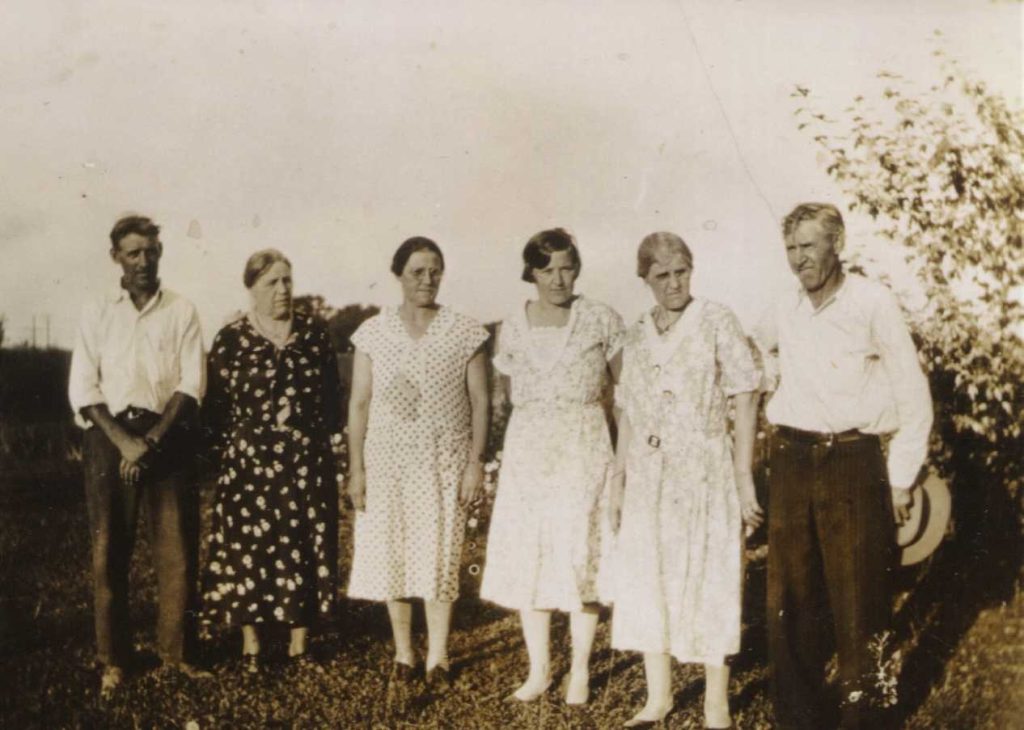
L-R Men are either Anders or Charles, 1st, 2nd, and 4th woman are Anna, Ida, or Selma, 3rd woman is Helen Johnson Chelberg. Photo Courtesy of Scott Chelberg
The photo above is dated circa the late 1920s, it was helpful in validating that the children from Gust and Anna Matilda did stay in contact with their step-sibs (Helen) after their parents’ deaths. So, I was now confused as to why living relatives today had no knowledge of them. What had become of Oskar, Teodor, and their siblings – Johan, Carl, Anna, Ida, Selma, Charlie, and Nellie that I had no paperwork on?
A PROJECT LEADS TO THE ANSWER
To be honest, I didn’t spend much time researching the lines after I scanned the documents as I was busy starting my genealogy business and working full-time as an educator. During the pandemic, I began taking the time to update my family lines. When we relocated last summer to Indiana and I joined the Indiana Genealogical Society, I decided it was time to upload biographies of my husband and my Hoosier relatives to a project the society was promoting. If it wasn’t for that project, I would still have not known what happened to Oskar and Teodor.
As I prepared to write the bio for my husband’s great grandfather, Anders Ludvig “Gust” Johannesson/Johnson, I knew I had to find additional info as for most of Gust and his first wife, Tilda “Anna Matilda” Christ Johansdotter’s 10 children, as I only had two death dates. It was time for more intense research.
LIST ALL YOU HAVE
The info I had on Oskar and Teodor was the baptism certificates naming their parents, the 1920s photo, Oskar’s entry in the 1920 US federal census as “Willie Jonshon” and I thought, little else. Boy was I wrong.
I had tried in the past to find him in 1910, 1920, 1930, and 1940 US federal censuses and been unsuccessful. Then it hit me – Oskar was not going by Oskar Wilhelm by 1900, he was called Willie. I began looking for him as William Johnson.
In the 1920 census, I found a William Johnson living in Garrett, Indiana with a wife and child that might have been Willie. I now live just a few minutes from Garrett so I immediately thought this couldn’t be him. My side of the family was from this region, not my husband’s. Besides, after Oskar’s father’s death, his step-mom and step-siblings had all stayed in northwestern Indiana; Garrett is in the northeastern section. How could I determine if Oskar – Willie – was the married William living across the state?
Indiana marriage records were helpful; the Garrett William was born in Miller in the same year noted on the baptism record but he had a father recorded as A. Johnson, a mother L. Swanson, and a birth date of 26 November. The baptism certificate clearly gives his birthdate as 26 January and his parents as G. and M. Johanson. I could reason that the A. Johnson might stand for August as others in my husband’s Swedish lines often used the nickname Gust instead of the formal August. It was time to list all the information I had on Oskar’s parents.
Oskar’s father’s baptism record in Sweden clearly shows he was named Anders Ludvig, with no August or Gust anywhere. That’s the name he used when he emigrated, too. I never found a first marriage record but he was married second as Gust and that’s how he was recorded in his first US census, in 1900. His death certificate informant was his second wife who gave his name as August and not Anders. So, like Oskar, Anders Ludvig Johannesson/Johanson/Johnson changed his name and eventually became Gust Johnson. Perhaps his second wife did not know his given name; maybe he decided to be called Gust after his birth month, August. Who knows? I likely will never discover the reason. Oskar’s marriage certificate for a father named A. Johnson was now consistent with later records for his father.
Unfortunately, Oskar’s mother died prior to vital records so I have no idea where he came up with the name L. Swanson, though there is a Svenson listed as a witness on his baptismal record. His stepmother’s name was Lovisa, later changed to Louise, but her maiden name was Carlson. Oskar’s birth mother had died when he was 5 so perhaps, he was not able to remember correctly her given name and was thinking about his stepmother’s first name instead of his birth mother thus, he gave her first initial.
Where the November birth month came from is also a mystery.
The marriage location, birth month, and mother’s name made me continue to question whether I had the right man or not. Stay tuned, you’ll learn the answer next week.
Two weeks ago I blogged about the discovery I made regarding submitting a short biography to my state genealogical society about my pioneering ancestor’s life. I’ve had several readers request ideas on how to get started.
First, relax! You aren’t writing a book so there is little time involved. I think the hardest part is to decide who to select to begin with. For my project, I decided to start with my husband’s lines and select the ancestor that was the earliest pioneer in the area. I then wrote a bio on his wife, their daughter that is my husband’s direct relative, the daughter’s husband, and so on down to his parents. I then did the same for my lines. But that was just me! You can pick anyone you like and go in any direction. Sure, typically in genealogy it’s best practice to go backward in time from present to past but if you already have the research done it makes no difference in who you select to highlight.
Second, if you are submitting the bio to a website then make sure you understand and follow their directions. If you aren’t sure, send a query before you waste your time and theirs.
If the site has a form filler, as mine does, it’s simple to bring up your tree and just type in the info that the form requests. I have two screens on my computer and can definitely use a third (hint, hint hubby!) so this makes the writing easy. If you have one screen only, you could toggle between your tree and the site or borrow a laptop/iPad/kindle to bring up the tree on that device. You can also do a screen print of the ancestor’s information and print but let’s keep that as a last option since we really don’t want to be killing trees for this project.
Next, you are writing in the third person which means you don’t use the word “I.” This is a biography and not an autobiography, which is about you. I’ve written earlier this year about writing your memoir. Biographies are all in the past tense because the person lived then and not now.
Keep it short and simple! Begin with the person’s start in life, such as “James Edward Jones was born on 1 May 1800 in what is now Trumbull County, Ohio. He was the third son and fifth child of Harold and Margaret Ann Hodge Jones.” It’s easy to switch to the next bio by just shuffling the facts presented. Here’s an example: “On 1 May 1800, in what is now Trumbull County, Ohio, James Edward Jones, the third son of five children, was born to Harold and Margaret Ann Hodge Jones.”
If you have information about James’ early life add it. You might not and that’s not a problem; just write next whatever you’ve discovered. It might be a marriage and children that follow. Look at census records to determine the career and location. Review the property records you’ve found and include where the family resided. Perhaps a big event occurred during the individual’s life, such as war, famine, pandemic, etc. that should be included. If the ancestor made a significant accomplishment in his community or the world make sure to note it. Most of our forebears did not so don’t feel that the individual isn’t worthy of memorializing.
End your biography with information from the death certificate, if available, obituary, family Bible, or community death index. Note where the person is buried, if known. If a significant contribution was made to the world, then note that as a reminder to the reader of the valuable service that the person made. One of my husband’s ancestors, Samuel August Samuelson, was injured during the Civil War, continued to fight for the Union with a gunshot wound and broken shoulder, was taken as a POW, and overcame his disability to farm 439 acres. He met an untimely death, being killed on his sleigh by a train that was not following safety guidelines. His community was in an uproar and legislation was enacted at the state level because of the accident that killed him. Due to the unfortunate accident, we’re all a little safer around train tracks these days.
Most of our ancestors, however, were simple, hard-working folks who paid their taxes, voted, and left few other records. I believe they should be remembered, too, for doing the best they could during the trying times in which they lived.
Next week, I’ll begin a two-part blog on how I broke through a 44-year brick wall.
It’s that time of the year again; the dreaded question of what do I get my ancestor-hunting family member for the holidays? Here are 10 gift ideas:
1. Clear Research Bag – I love mine as I can keep everything I need for boots-on-the-ground research in one place. Guards like it, too, as they can readily see you are not bringing in a dreaded ink pen, red especially, into their precious collections. Available on Amazon.
2. Genealogists like to take notes, make lists, research plans, and remember hints that are discovered that don’t quite fit with what they’re currently working on. These notebooks, available in two sizes, are perfect for jotting down ideas and odd finds. Available on Amazon and in a larger format.
3. For the home office, a desk organizer is so helpful! Fill it with the right stuff – mechanical pencils so no sharpener is needed, red pens for underlining important info on lineage society Apps, a transparent ruler to keep those lines straight, plastic clips to hold papers without worrying about rust, a magnifying glass for those hard to read old documents, calculator to determine age, and post-it notes for flagging finds in books. Yes, all are available on Amazon but it’s less expensive at Staples.
4. I’m really trying to save trees but sometimes you just have to print. A ream of acid-free paper, print cartridges, and a packet of sheet protectors are definitely useful. Throw in a binder and your gift is complete.
5. I love my Dymo label maker. I can print out an address quickly for snail mail connections. I’ve labeled binders and file folders so everything can be found easily. In the past, I even used them for citations, then placed the label on a notebook page so when I went to the library, I could take notes under the citation. I use tech now but if your genealogist is old school, a Dymo is a good way to get them started using tech as it’s simple to install and use.
6. Renew their online subscription to a loved genealogy company – in alpha order, Ancestry.com, Findmypast.com, Fold3.com, GenealogyBank.com, MyHeritage.com, Newspapers.com, etc. Go to their website to obtain an eGift Certificate. Many of these companies allow you to purchase now and extend the existing subscription to a future date but check that out before you purchase.
7. Boots-on-the-ground research is still necessary. Get family members together to chip in cash to contribute to the genealogist’s dream archive visit site. In the U.S., it may be Salt Lake City, Utah, Fort Wayne, Indiana, the National Archives in various locations, or perhaps an in-person conference. This gift will just blow them away.
8. Techie, are you? Then use your skills to video record an interview with your genealogist. Flip the tables – they’re always asking you and now it’s time for you to ask them. You can refer to my blog article here for question ideas or make it more personal – ask them “When did you begin your interest in family history?” “What has been the most difficult line you’ve researched?” “If you could meet one deceased ancestor you’ve discovered, who would it be and why?” “What ancestral home location would you love to visit?” “What ancestor just confounds you?”
9. If you’re artsy, then make a gift. My oldest decorated a mug so I can enjoy a cup of tea while I research. I’ve also been gifted over the years with t-shirts and my business logo on the bag noted in item 1. I’d even appreciate a gift basket of healthy snacks. Get creative!
10. Your time – the cost is nothing but the gift is priceless! Sure, you could care less about Great Uncle Waldo who discovered gold in them there hills but your genealogist family member would just love to tell you all about what they discovered. Humor them and schedule an hour or two after the holidays to listen and learn about your ancestors. You might surprise yourself and realize that this gift of heart was also meaningful for you.
Next week, tips on writing a short ancestor biography. Stay tuned!
After building your family tree you most likely have lines that you haven’t researched in a while. With every research hour you put in, you gain expertise. It’s time to go back to the far-flung branches and recheck your initial work.
Sounds like a pain, right?! Nope, I have a fun way to do it.
Since relocating to Indiana I’ve discovered that my state’s genealogical society supports a biography project. It’s called Once A Hoosier. I was surprised to see that not one of my husband or my pioneering ancestors had been included. How did that occur? Well, no one submitted a biography. If you check the location of your pioneering ancestors you’ll probably discover what I did. That means it’s time to get busy!
First, make sure your ancestor qualifies. In Indiana, the ancestor must have been born before 1950, is deceased, and lived in Indiana for part of his/her life or been buried there.
The society makes entry simple as they have a form filler to add the pioneer’s name, vitals, children/their spouses, and a space to type in a biography. You aren’t writing a book here so it’s not intimidating which makes this fun. It’s also a wonderful way to memorialize your ancestors. Most importantly, it’s a great way for you to check your records.
The form filler has no place to add citations. This could be problematic but I’m looking at it positively. We should always check out sources so, if you find an ancestor listed and you’re not able to find a source for the “fact” that was written, you can always contact the submitter for more information. This should be our best practice anyway. Not adding citations to your bio is also saving you time from having to type in a citation. As long as you can support the fact with your personal records, you’re good to go.
As I enter bios I’m fact-checking each of my citations. My husband, obviously by our surname, has a lot of Swedish ancestors. As I was writing a bio for his second great-grandmother Anna Elisabet “Lisa” Torstensdotter Erickson I questioned several pieces of information I had found for her. I had a Swedish baptism certificate and census records that never listed Elisabet as one of her names. Instead, Lisa was recorded. I checked with a Swedish genealogist to make sure I was understanding the records and discovered a lot about Swedish names. You can read more about Swedish names here. Unless you read Swedish, click Google Translate in the upper right-hand corner of the screen for English. Thank you, Annika Höstmad of Find A Swede Genealogy, for translating Lisa’s baptismal certificate and sharing this site.
We really don’t know what family called each other. After careful analysis I discovered where the name Elisabet came from – one immigration document that originated in the U.S. Elisabet was a well-used name in the family so I suspect that she may have formally been named Anna Elisabet but went by Lisa so the parish minister recorded Anna Lisa on the baptism record. Perhaps when she came to America she felt obligated to provide her formal given name. I can identify with that as it’s happened to me; I use my family’s pet name but after September 11th, I had to have many governmental records changed to reflect my formal given name on my birth certificate. So, I have an aka on most of my records now. In Anna Lisa’s case, in 1797 there were no formal governmental records so we’ll never know for sure what her given name was. I included that info in her bio.
If you’re wondering how you can get started on a bio project, simply do an internet search of the location where your pioneer ancestors resided. If a program isn’t offered or charges you and you don’t want to pay for that, then search for a larger regional society that may offer the program. I’ve discovered besides at the state level, that several Indiana counties also accept bios, too.
If you discover that your ancestor resided in a location that does not currently take bios, no worries. You can still write one up. Use any format you like or take one from a society that does offer the program. Then, .pdf it and save it with your ancestor’s records. Easy Peasy!
Do you have a family line that just fascinates you? Mine is the Duers who emigrated from England to New Jersey, moving on to what is now West Virginia and then into Ohio.
I’ve blogged before about the difficulty of identifying individuals as each generation reuses names – John, Thomas, Daniel, Joseph, and John(athan). I have been trying to prove for years that patriot John Duer (1758-1831) had a son, Thomas, who predeceased him. Thomas had a son, John, whose burial location was unknown. Both of grandson John’s wives, Jane and Margaret, were buried in Kessler Cemetery, aka Liberty, in Chattanooga, Mercer, Ohio.
Several years ago I contacted the cemetery staff and they kindly sent me a handwritten listing of burial plots. John Duer was shown buried in row 6 space 23. Unfortunately, that’s not the John I’m seeking; that John was the man I’m seeking’s son John Fred (1836-1939).
While I was in Fort Wayne recently at the genealogical library, I asked my husband to check books for cemetery records in Mercer County, Ohio. John died in Allen County, Indiana, across the border from Mercer as that is where he owned property later in life and had his will probated. No obituary has been found for him. His will omitted many of his children from his first marriage. My theory was that he was buried in an unmarked grave either in Adams County, Indiana, or in Kessler Cemetery.
My husband is not interested in genealogy and sometimes, not having a background makes for the best finds. He didn’t bother using the indexes provided in the back of the books. He scanned every page for the name John Duer. He also was looking for alternative spelling as he was aware that the original spelling was Dure. In Judith Burkhardt & Gloria Schindler. Mercer County, Ohio Cemetery Records of Liberty Township (1987) he hit gold! The last entry on the last page (52) noted in Row 15: “Next several stones missing, sunken in ground or unreadable John Duer – Unreadable”
Wow! It’s likely this was the John that I was trying to find. He wasn’t listed on the Kessler Cemetery sheet sent to me because the document only went to row 8. I had no idea I hadn’t been sent the entire cemetery listing.
I definitely need to take a trip to Kessler to see the stone for myself. I’m not holding out hope I’ll be able to glean information from the stone that was unreadable 34 years ago but I still need to make the attempt.
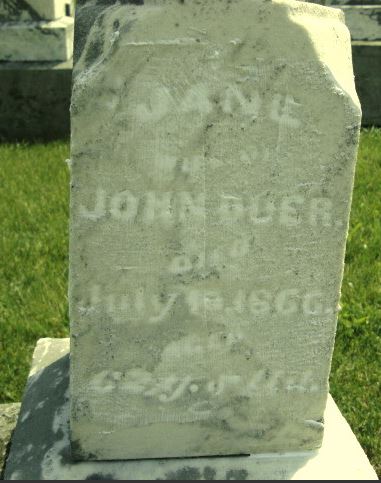
Interestingly, the Burkhardt & Schindler book also noted that the first wife, Jane’s, tombstone death year was 1888 which is a mistranscription. Her stone is shown above. Actually, that death year on her stone is probably also in error. John married second 11 December 1864 to widow Margaret Martz Searight. It is likely that his first wife Jane died in July 1861-4; no divorce record was found by staff who searched in Mercer County.
I definitely need to check for myself and also search divorce records in Adams County, Indiana, where John purchased a property in 1860, leaving Jane off the deed. When they lived in Holmes County she was listed as an owner with him.
I suspect her tombstone was not added until after the Civil War as the family had several sons and sons-in-law fighting for the Union. I’m thinking 1866 was the year they had the tombstone installed. Or, there was a divorce I haven’t yet found.
Boots on the ground are still necessary and it’s definitely exciting to step away from the computer to make a find in person. Kudos to my husband who made this exciting discovery for me. Happy Hunting!
We don’t take much time to think about clouds. As a tropical storm passes to my south, I notice only grey skies today. Genealogists sometimes look to the heavens and think, where did you leave that record, great-grandpa? Those aren’t the clouds we’ll be discussing. I’m talking about tech servers that are accessed “out there” on the internet. It’s a place where your data is kept for you to retrieve anytime, anyplace.
Technically, the cloud is a misnomer; your internet-stored data is housed in a physical place somewhere on earth and not up in the big fluffy grouping of water vapor. Why is paying a company to keep your data a good idea? If you only store your data in one location, such as your lap or desktop, you risk losing all of it if the device fails. It’s unpredictable when that may occur – spilled beverage, power surge, or just system age can make your hard work disappear in a heartbeat.
Backing up to a portable hard drive or a stick is a good idea, but are you really going to do that after every new task you are working on? Will you take that bulky drive with you when you are researching in an archive? Will you carry it to your family reunion this summer to show your kin what you’ve been working on? Not likely. Both storage methods are useless without the computer itself.
The cloud enables you to access your information from any device, even if it isn’t yours. I’m not saying that is smart or safe to do that; the best practice is to only sign in to a secure device! The option, though, is available and at times, might be lifesaving.
For example, your family member was just injured and is in the emergency room. They want to know when the individual’s last tetanus shot was given. I can’t remember that stuff, especially under times of stress. I can access the cloud on my phone and retrieve the record if I have saved it there.
You probably have been using cloud technology and don’t realize it. Apple iCloud, Netflix, Yahoo, and Google Mail all keep your data in cloud storage.
There are many cloud storage companies, known as computing service providers, available to choose from. Which should you select? Whichever meets your needs and budget. The big 3 are Amazon, Microsoft, and Google. I’ve used them all but like the Dropbox app on my phone. I can scan a sales receipt, upload photos I’ve taken, or retrieve anything I’ve saved to share quickly with just a few clicks.
Saving to the cloud is easy from your computer. You can download the software to use on your desktop or you can sign in via the internet to your account, then drop and drag your information. I have noticed a slight time delay between my desktop and laptop. The transfer is not instantaneous but fairly quick. When I used to work away from home, I would place my unfinished documents in the cloud and by the time I drove home, about 45 minutes later, they would be there for me to pick up where I left off.
If you’ve uploaded a family document to Ancestry.com, MyHeritage.com, or any other genealogy program, you’ve used the drop and drag feature. It’s quick, easy, and secure.
How secure? I did take my laptop with me when I volunteered a few weeks ago to finish up a task for the organization where I was volunteering. I signed on to the shared internet from that location. A few days later I decided it was time to update my Dropbox password. When I logged on to the site through the internet, I noticed a sign on to my account from a location I had never visited. I panicked, thinking someone had hacked my account. I updated the password and through an option on the site, blocking the unknown location from accessing my account again. What I hadn’t realized in my panic was that the organization I was at used their own cloud servers that happened to be in the location I wasn’t familiar with. Duh! My data had been safe all along; Dropbox was simply letting me know where the servers I had used were housed.
I highly recommend saving your genealogy documents to a cloud environment. Definitely back up periodically to a hard drive, as well! The more you save the more options you have to retrieve your hard work.
I will be taking a hiatus from blogging. We have some major life-changing news brewing that I’ll be writing about in the upcoming weeks. Until we reconnect, you can always reach me at genealogyatheart@gmail.com. Happy Hunting and hopefully, we’ll be back together soon.