When the Universe Writes Back: A Halloween Follow-Up

As promised, my synchronicity streak isn’t done with me yet.
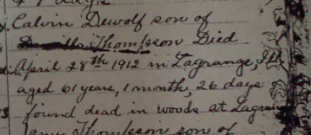
Bible Entry for Calvin DeWolf in Thompson Family Bible

Back in March, I mailed a request to the Cook County, Illinois Vital Records office seeking the death certificate of my husband’s second great-uncle, John Calvin DeWolf. He’s an intriguing figure. A cryptic entry in his mother’s Bible notes simply that he was “found dead in the woods in LaGrange.” That line alone opens a dozen genealogical rabbit holes:

Dead how?
Accident?
Sudden illness?
Suicide?
Foul play?

Why was he in the woods at all?
Where was he buried afterward?
Why has no obituary surfaced?

Online databases are silent. Newspaper searches cough politely and excuse themselves.

So I sent in my request… and then, nothing. Months passed. My check went uncashed. My mailman and I eyed each other suspiciously. I eventually chalked it up to a postal mishap.

Fast-forward to late July, when I traveled to Chicago to obtain several vital records in person for my family’s dual-citizenship pursuit. While there, I re-requested John Calvin’s death certificate. I handed over the form. I paid the fee. The clerk assured me they’d be in touch.

Every other record from that day has since dutifully arrived in my mailbox.

Except John’s.

And then last Tuesday, while writing the chapter on John Calvin’s parents for my upcoming book Echoes of Britannia, I footnoted the matter:

“Death certificate requested; not yet received. Someday, perhaps, the record will surface.”

I sighed, closed the my Word doc, and moved on.

Two days later, yes, exactly two, an envelope from the Cook County Vital Records office appeared in my mailbox. My heart did a little leap. Could this be it?

Not quite.

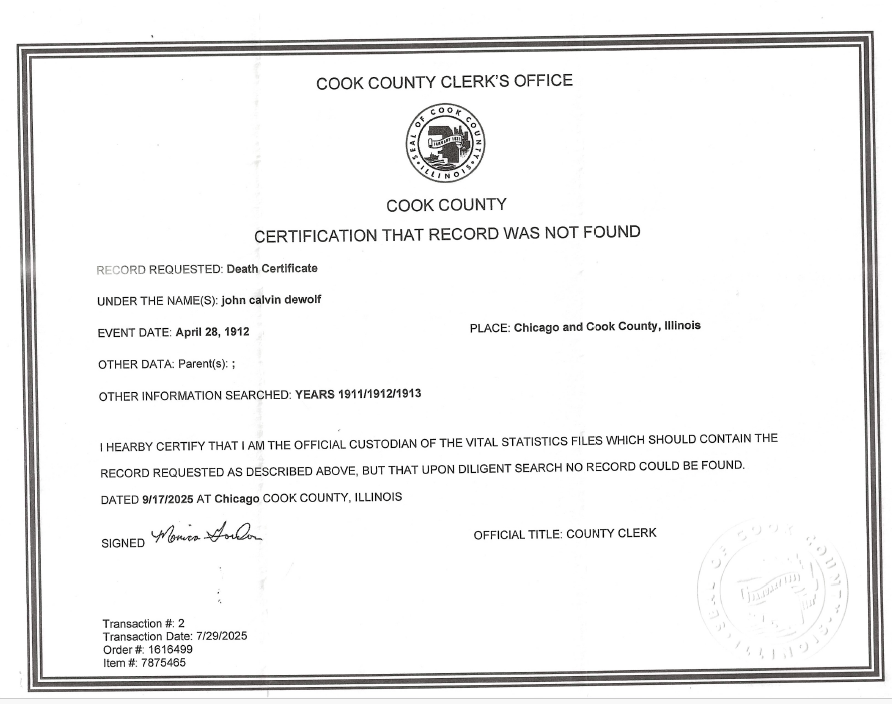
Inside was a Certificate of No Finding.

According to Cook County, they have no death record at all for John Calvin DeWolf.

So where did he die?
Was it reported?
Was it covered up?
Was it recorded elsewhere?

His half sister who owned the Bible at the time of his death and likely made the entry clearly believed he was found in LaGrange. The Bible entry says so. But the county has nothing.

The mystery deepens.

And the timing? After seven silent months, the response was generated on the very day I finally wrote about him.

Coincidence? Maybe. But these synchronicities love to show up when I start telling a story.

Of course, I’m not done with John. Next stop: IRAD, for coroner’s records, inquests, and investigations. Somebody, somewhere, documented what happened.

Because records hide.
But they rarely disappear forever.

Earlier this month, the same thing happened with my mom’s Cook County, Illinois birth record. I had requested it in person in Chicago in late July. They couldn’t find it which was no surprise to me as my mom and grandmom had both said the birth was only registered with the Roman Catholic Church, an accepted practice in 1918. On the anniversary of my mom’s death earlier this month, I finally received a response from Cook County. It was a record of no record. Thanks, mom! Sometimes are family tell us the truth and we can confirm it over 100 years later.

At times, family history feels less like research and more like a conversation across time. We chase records, but every now and then, the records seem to chase us back. These little moments remind me that discoveries don’t always happen in archives. Sometimes they appear in unexpected envelopes or on memorial pages when we least expect them.

They’re often hidden in plain sight, waiting for the right moment to surface.

If you enjoy reflections like this, I’ve begun sending a short once-a-month note to curious-minded family historians. You can join me by messaging me at genealogyatheart.com. It’s a quiet circle, and you’re welcome there. I’ve also begun a FaceBook and LinkedIN page so we can interact frequently. Hope you’ll join me there as well!

Happy Halloween, dear readers.
May the ancestors keep whispering and may you always listen.
Happy Halloween: The Synchronicity That Saved My Blog

My readers tell me, year after year, that my Halloween synchronicity series is their favorite tradition. Which is why, by August, I was in a quiet panic. The kids were back in school, stores were already pushing candy corn, and for the first time in my genealogical career… nothing weird had happened to me.

Nada. Zilch.

I considered scrapping the whole thing and writing a single line, “Sorry, folks, nothing to report this year” and calling it good. But that felt wrong. These uncanny little moments can’t be summoned on command, but I still held out hope that one would arrive just in time.

It did. On August 14th.

I was volunteering at the Association of Professional Genealogists table during the Jewish Genealogical Conference in Fort Wayne. Since I’d signed up for the whole week, I was allowed to attend a few sessions during breaks. I’m not Jewish, though occasionally my DNA results tease me with a percentage or two that disappears the next time I test, but I found every talk fascinating.

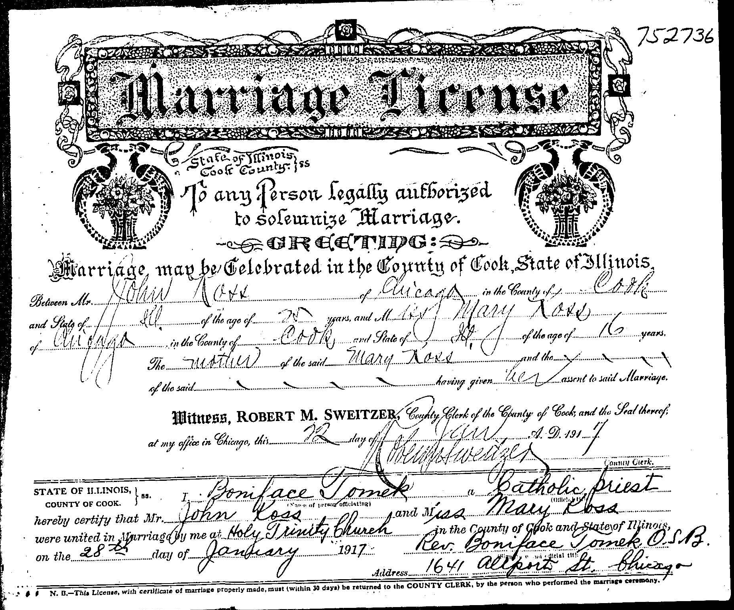
Meanwhile, in my own research life, I was deep in the throes of acquiring certified vital records for my family’s dual citizenship application. Two notarized forms were already on their way to Croatia to obtain my grandmother’s birth record. That left one gaping hole: my grandparents’ 1917 marriage record from Cook County, Illinois.

I had the index entry from Ancestry.com, names, date, location, marriage license number, but when I visited the Cook County Clerk’s office two weeks earlier, they couldn’t find the record. I paid for the search anyway, but they gave me no timeline of when they could do deep research.

At the conference, I mentioned my predicament to a fellow genealogist, who knew someone with database access. The news came back: my grandparents’ marriage record hadn’t been digitized. Neither had the record for the couple immediately after them.

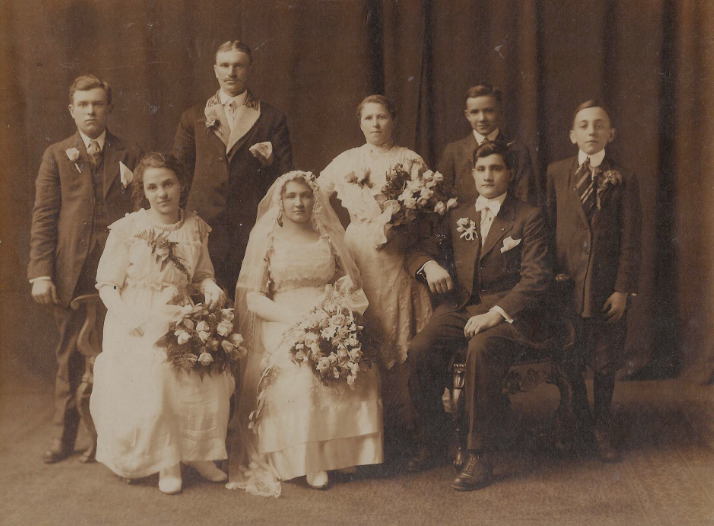
Lost? Misfiled? Never returned? Theories abounded. One person even suggested they’d never married. (“It was staged,” she said of their wedding photo. To which I thought: Really? That would be an awfully elaborate prank for this couple.)

No one had a solid lead. And I needed that record, not just to prove the marriage, but to identify the church where it took place. Chicago city directories for the period were scarce. The Chicago History Museum couldn’t help. The Archdiocese would search closed-church records for $50 a pop, but that was a quick road to the poorhouse.

Then came my first odd nudge of the week. While exercising, I heard my grandmother’s voice in my head: Look at the back of the pictures. Sure enough, on the reverse of what looked like an engagement photo, there it was “Chicago Heights.”

I brought the photo to Sherlock Kohn, a fellow conference-goer and photo expert, who confirmed the clothing was period-correct. She suggested the Chicago History Museum for studio leads. I kept chasing, but the record stayed stubbornly hidden.

A second genealogist offered another tip: years ago, FamilySearch had donated pallets of old microfilm to the Allen County Public Library (ACPL). Maybe, just maybe, my record was buried there. I tracked down Adam, one of ACPL’s librarians, and he gamely searched the microfilm. Blank images.

At this point, you’re probably thinking, Lori, just search FamilySearch online. Oh, I had using the index with every permutation of the last name and around the date the marriage occurred, and nothing.

So I decided: I’d comb through every 1917 marriage image by hand. First, though, I made a side trip to birth records for my mom, two hours later, I had confirmed my mother’s birth was indeed only recorded by the church, just as she and my grandmother had said. (Cook County, Illinois later confirmed this – I got the “certificate” of no registered birth on the date my mom had died 24 years ago. Weird, huh?!

By then it was late. I was tired, discouraged, and dreading the thought of cold-calling every Catholic church in South Chicago. Still, before leaving, I opened the 1917 marriage film on FamilySearch, locked to home users, but accessible at ACPL. I scrolled to the end of one reel. No luck.

Then my computer glitched. As a non-resident, my ACPL guest account was on a timer. It flashed “10 minutes remaining” and kicked me out of FamilySearch. When I logged back in, I had 7 minutes left.

The next reel contained 1,278 images. No way I could check them all. So I did the only thing left, I scrolled, stopped, and clicked at random.

And there it was.

My eyes fell immediately on “Mary Koss.” Without even scanning the rest, I gasped loud enough to turn heads in the reading room. “Sounds like you found something,” a man seated across from me said. A woman down the row called, “We aren’t finding anything, do tell!”

I was near tears.

Adam hurried over. I showed him the record, and he smartly told me to write down the film and image number. Then he handled the printing as the machine wouldn’t cooperate (with help from a kind patron who wanted to donate her library account to me) while another researcher kept my computer from timing out so I could email it to myself.

Out of 1,278 possible images, I had landed on the one I needed, completely blind. Missed in indexing, out of sync in databases, invisible to every search I’d tried. And yet, here it was.

Thank you, Grandma!

And here’s a link of another uncanny find I didn’t have – ENJOY!

And to you, dear readers: Happy Halloween. May the coming year bring you your own uncanny genealogical coincidences – just when you need them most.

When the Cloud Collapsed, Genealogy Continues

Guess we now know which Genealogy software companies use Amazon! MyHeritage.com and Findmypast.com are up and running. (2 PM Eastern)

I hope this is a wake up call to all of you who haven’t SYNCHED or DOWNLOADED your trees elsewhere!

All of the software companies are working. I’m able to access all of my info because I’ve saved it other than Ancestry.com and FamilySearch.org.

When the cloud service is restored you may want to read my blog articles on how you can prepare for the next time. Here’s the how to for FREE – Legacy Family Tree does not synch but you can upload a downloaded .gedcom from Ancestry. This means you won’t have pictures of the census or any other media but you will have the information about your ancestors. This older blog article talks about a previous version of Family Tree Maker, I’ve updated to the latest and greatest which fixed the problem I encountered and provided the work around. I don’t use FTM’s vault, a cloud service, but you might want to consider it given what’s happened today with Ancestry. I no longer use RootsMagic since version 8 as later updates would not allow me to synch with Ancestry. They do have a free version for smaller trees you could download. I do appreciate that their tech folks recommended I try downloading my tree with the free version to see if the problem was corrected; it wasn’t but they are aware of it and working on it. Click here for the free version.

Your genealogy research does not have to stop when a part of the internet breaks. Go make a cup of tea, write up what you’ve been working on, and make a plan for the future so you don’t get caught without access to your information. Here’s links to an older blog about writing up your research using AI. If you aren’t comfortable with AI, here’s an alternative. Remember, once upon a time there was no “online” for us to use to help us with genealogy.

The Hidden Discoveries of Writing Your Research

AI Image

As genealogists, we spend hours pulling records, analyzing handwriting, and piecing together family connections. Most of that work happens in the collecting stage, we hunt down wills, census pages, land deeds, and church registers. But it isn’t until we write that we begin to see what those records are really telling us.

Writing forces a shift in how our brains work. Collecting records is like gathering puzzle pieces. Writing is when you finally flip the pieces right-side up and begin to see the picture. Patterns emerge that you hadn’t noticed before. Gaps in the timeline become obvious. A stray witness on a deed suddenly matters because you’re weaving the story instead of cataloging the fragments.

I saw this firsthand with my ancestor Daniel Hollingshead. I had collected a mountain of records: tax documents from Cheshire, court cases, marriage records from Barbados, and family land deeds in New Jersey. It wasn’t until I began to write his story that the threads pulled tight. Suddenly, the narrative was clear:

  • A grandfather’s failure as a tax collector plunges the family into crisis.
  • An uncle flees to Barbados after funds are stolen.
  • A young Daniel joins the military, is posted to Barbados, and marries into sugar wealth.
  • He returns to New Jersey with enslaved people, rising socially but carrying moral shadows with him.

The facts were always there in the records. But the story, the irony, the Atlantic World connections, the moral reckoning , only emerged when I tried to explain it in writing.

That’s the hidden power of writing: it doesn’t just preserve what you’ve learned, it teaches you something new. Writing sharpens your research questions, reveals new avenues to explore, and brings ancestors to life in ways a database never can.

So the next time you feel stuck in the research grind, try writing a short biography or family sketch. Even a rough draft will show you what you’ve missed. You might be surprised at what discoveries are hiding , not in the archives, but in your own words.

Saving Google Photos

AI Graphic

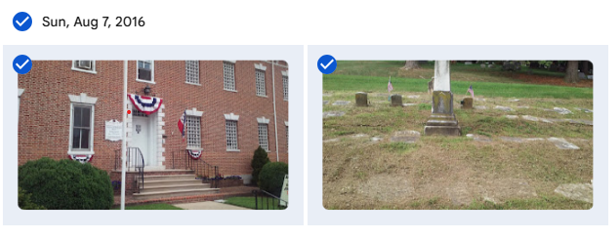
Are you tired of Google telling you that you need to purchase more storage? Are they threatening to shut down your email? One way to lessen the storage is to remove your photos from Google Photos. You can do this in batches which makes the task quicker. Here’s a quick how to. The photos below were taken on Sunday, August 7, 2016. I want to save all of them so I click the checkbox next to the date. If you don’t want to save all, click the checkboxes next the pictures you want to save:

  • Click the 3 dots and select download
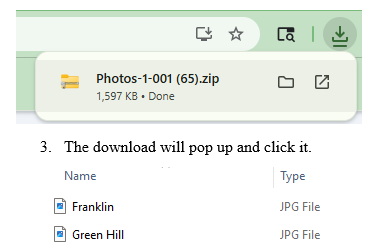
  • The download will pop up and click it.
  • Now, drop and drag to your Desktop. There you can rename – I add the date.
  • I create a folder by year (Right click your mouse, click “New” “Folder” and name the folder by year.
  • When done with saving the photos for that year, I drop the folder into Dropbox.
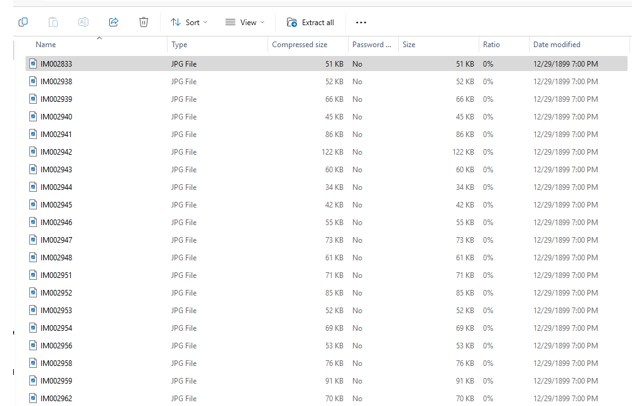
  • If you have a lot of pics, you can easily extract them at one time. Simply click the “Extract All” icon:
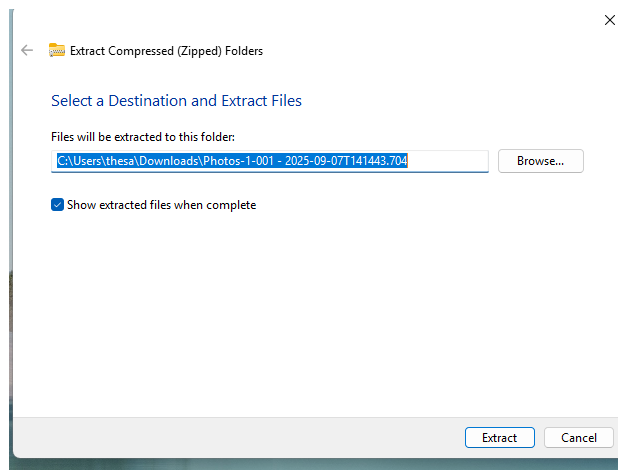
  • Make sure you have created a folder to place them in or they will be all over your desktop!
  • Just select the folder from Browse and click “Extract.”

Next you’ll want to delete the Google Photos you’ve saved.

  1. Simply click the dates again and the checkmarks will return.
  2. Click the 3 dots and select delete.
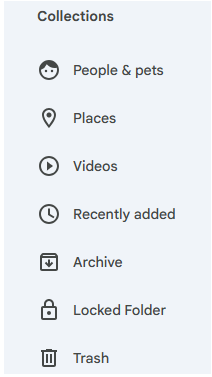
  3. The deleted photos will remain for 60 days in Google Photos Trash; if you need to clear up space immediately, on the side bar, under Collections, scroll down (it’s hidden) to Trash:
  • 4. Clicking on Trash will bring up all the photos you deleted. To lessen your storage numbers, click empty trash and they will all permanently disappear – make sure you are ready to get rid of them as you will not be able to retrieve them after emptying trash.

I’ll be honest, my storage numbers did not significantly drop after deleting large amounts of photos but they have stopped harassing me to buy more space! I also have a lot of emails saved which I plan to move out of Gmail. Will give you the process in an upcoming blog.

As an added safeguard, back up your Dropbox to a stand alone hard drive!

Fall Genealogy Tasks

AI Graphic

The weather hasn’t yet cooled and I’m not complaining but it is officially fall.

Before I get back to writing my next and final (hooray!) family genealogy book on our Great British lines I decided I had to practice what I preach and take care of some pressing tech tasks that I have put off for way too long. The first was really bothering me as it was boring and there are so many more interesting things to do in genealogy then preserve photos.

Long ago, in 2002, a world that was radically different then today, my cell phone saved all of my photos to a desktop program called Picassa that Google later purchased. I used that product until 2018 when Google rolled it into Google Photos. That’s when my problems began.

When Picassa ceased to exist it lost some of my photos, years 2002, 2007, 2010, and 2019. I wasn’t worried about 2002 & 2007 as my kids were still in school and I was still scrapbooking so I have those photos. I digitized the scrapbooks so we were good. 2010 & 2019, not so much. Sure, other family members probably have some of the photos but I always was the main photographer so much of that is lost. I know, it could be a lot worse but still, not happy about it.

The next issue was with the rollover, some of my photos were doubled and even tripled. New photos were created from group shots – just the heads of whatever the tech decided to select. Then it began creating memory albums. Now that doesn’t sound bad but it became a problem because it used up space and Google, tying all their products together, kept reminding me I needed to purchase additional space from them or I could no longer have a functioning email.

Occassionally, I’d go into photos and delete some of the duplicates and albums but they just would pop back up. On my to-do list was to remove ALL of my Google photos, store them in Dropbox, and back them up to a standalone hard drive. BORING. but. necessary.

For Valentine’s Day, one of my kids gave me a picture frame where you can store and see changing photos. This gave me the impetus to get the photos out of Google. Next week I’ll print the detailed directions on how you can do that fairly quickly and easily, meaning not saving one photo at a time which I initially was doing.

I also realized that I needed to synch my Ancestry.com tree as it’s been awhile since I did that. I no longer use RootsMagic and since I last synched, I got a new desktop so I didn’t have Family Tree Maker downloaded to it. Now FTM has come out with their update (in May 2025 but it’s called 2024, go figure). I somehow missed the promotions but they have one remaining, half price for current license members so I took advantage of it ($40 instead of $80). I decided if I was going to save Dropbox to the stand alone drive I might was well include my Ancestry tree since I’ve just blogged about how I was working at updating it. Yes, it’s still a work in progress but I’d rather save what I have as I’ll never be done with it.

Next up was to delete everything on my stand alone drive as it was all old and not relevant so I turned it back to factory settings. Took hours!

Meanwhile, one of our adult kids had their credit card stolen and the thieves, being really stupid – (Jose Lopez – I am calling you stupid!) bought items in their own name and then had it sent to our kids’ address. (Now you see why I am calling Jose stupid – really, does he want to get caught? Don’t even need a forensic genealogist for that one.)

Jose or whoever was the original thief, was fairly smart at the beginning. Only purchased from stores the kid always uses so for the first two weeks the scam wasn’t noticed. Then, boldness hit and the thief began using it for large sums at stores never used by the kid. By the time it was noticed thousands of dollars of items had been purchased but thankfully, some get to be returned to the companies since they arrived at the kid’s house. (Jose, did you think you were then going to be a porch pirate, too?) Kid called the credit card company for a dispute and the police to file a report in case Jose was local and was going to be paying a home visit. Cop informed us that a local woman got taken for $499,000 the previous week because they also stole her social security number and took out loans. What a nightmare!

That made me realize it was time for me to update some of my own financial practices.

  1. You may have some items on recurring charges. We’ve decided to use a separate card for those because it’s a major pain to have to contact those vendors to change an account if your card is shut down.
  2. Since the card was stolen locally (we know this for reasons I’m not disclosing so the guilty can get their due, too bad, Jose, that bed you bought won’t get you a good night’s sleep in jail because it’s already been returned) we decided to use one card just for local purchases. It’s a card with a good reputation to notice fraud quickly so we won’t have to dispute lots of charges when (not if) it get’s compromised.
  3. We’ll use another reputable card for online only purchases.

If you’re thinking, that’s a back up for a back up and yes it is, just like we do to save our genealogy data. This led me to realize it’s been awhile since I updated my passwords so I spent time doing that as well.

Last task I haven’t completed but is equally important, albeit BORING, is saving many of my emails. Lots of them contain genealogical info and I want to make sure the info is saved to the correct ancestor’s file in Dropbox. That’s my next project and by then, well, it’ll probably be time to redo the cycle.

With the colder weather u perhaps coming next week this is a gentle reminder, dear reader, to take a look at your items to do and start plugging away at them.