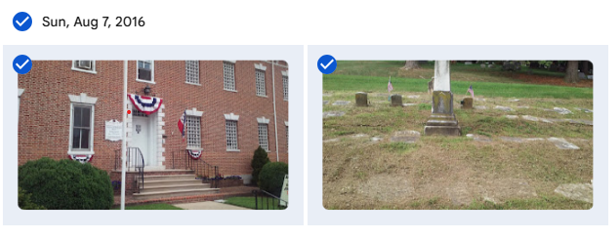
Are you tired of Google telling you that you need to purchase more storage? Are they threatening to shut down your email? One way to lessen the storage is to remove your photos from Google Photos. You can do this in batches which makes the task quicker. Here’s a quick how to. The photos below were taken on Sunday, August 7, 2016. I want to save all of them so I click the checkbox next to the date. If you don’t want to save all, click the checkboxes next the pictures you want to save:
Click the 3 dots and select download
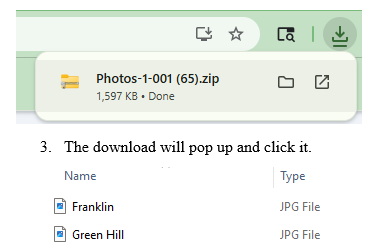
The download will pop up and click it.
Now, drop and drag to your Desktop. There you can rename – I add the date.
I create a folder by year (Right click your mouse, click “New” “Folder” and name the folder by year.
When done with saving the photos for that year, I drop the folder into Dropbox.
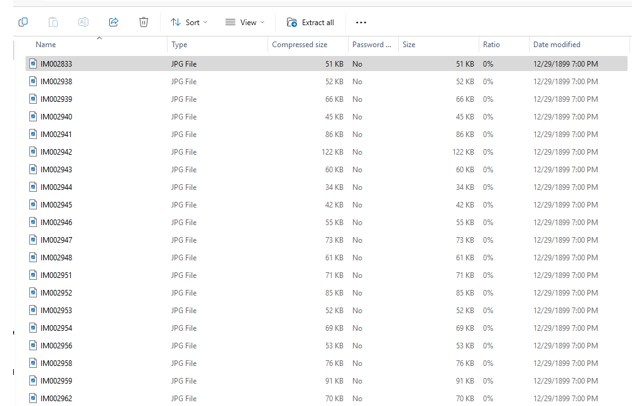
If you have a lot of pics, you can easily extract them at one time. Simply click the “Extract All” icon:
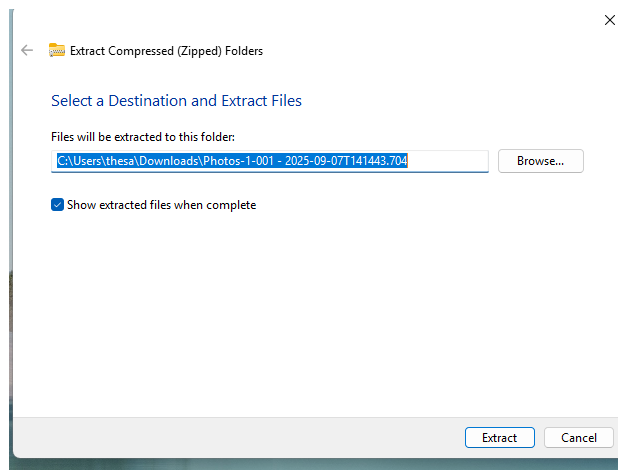
Make sure you have created a folder to place them in or they will be all over your desktop!
Just select the folder from Browse and click “Extract.”
Next you’ll want to delete the Google Photos you’ve saved.
Simply click the dates again and the checkmarks will return.
Click the 3 dots and select delete.
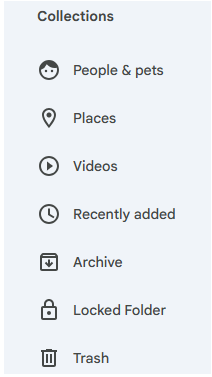
The deleted photos will remain for 60 days in Google Photos Trash; if you need to clear up space immediately, on the side bar, under Collections, scroll down (it’s hidden) to Trash:
4. Clicking on Trash will bring up all the photos you deleted. To lessen your storage numbers, click empty trash and they will all permanently disappear – make sure you are ready to get rid of them as you will not be able to retrieve them after emptying trash.
I’ll be honest, my storage numbers did not significantly drop after deleting large amounts of photos but they have stopped harassing me to buy more space! I also have a lot of emails saved which I plan to move out of Gmail. Will give you the process in an upcoming blog.
As an added safeguard, back up your Dropbox to a stand alone hard drive!
The weather hasn’t yet cooled and I’m not complaining but it is officially fall.
Before I get back to writing my next and final (hooray!) family genealogy book on our Great British lines I decided I had to practice what I preach and take care of some pressing tech tasks that I have put off for way too long. The first was really bothering me as it was boring and there are so many more interesting things to do in genealogy then preserve photos.
Long ago, in 2002, a world that was radically different then today, my cell phone saved all of my photos to a desktop program called Picassa that Google later purchased. I used that product until 2018 when Google rolled it into Google Photos. That’s when my problems began.
When Picassa ceased to exist it lost some of my photos, years 2002, 2007, 2010, and 2019. I wasn’t worried about 2002 & 2007 as my kids were still in school and I was still scrapbooking so I have those photos. I digitized the scrapbooks so we were good. 2010 & 2019, not so much. Sure, other family members probably have some of the photos but I always was the main photographer so much of that is lost. I know, it could be a lot worse but still, not happy about it.
The next issue was with the rollover, some of my photos were doubled and even tripled. New photos were created from group shots – just the heads of whatever the tech decided to select. Then it began creating memory albums. Now that doesn’t sound bad but it became a problem because it used up space and Google, tying all their products together, kept reminding me I needed to purchase additional space from them or I could no longer have a functioning email.
Occassionally, I’d go into photos and delete some of the duplicates and albums but they just would pop back up. On my to-do list was to remove ALL of my Google photos, store them in Dropbox, and back them up to a standalone hard drive. BORING. but. necessary.
For Valentine’s Day, one of my kids gave me a picture frame where you can store and see changing photos. This gave me the impetus to get the photos out of Google. Next week I’ll print the detailed directions on how you can do that fairly quickly and easily, meaning not saving one photo at a time which I initially was doing.
I also realized that I needed to synch my Ancestry.com tree as it’s been awhile since I did that. I no longer use RootsMagic and since I last synched, I got a new desktop so I didn’t have Family Tree Maker downloaded to it. Now FTM has come out with their update (in May 2025 but it’s called 2024, go figure). I somehow missed the promotions but they have one remaining, half price for current license members so I took advantage of it ($40 instead of $80). I decided if I was going to save Dropbox to the stand alone drive I might was well include my Ancestry tree since I’ve just blogged about how I was working at updating it. Yes, it’s still a work in progress but I’d rather save what I have as I’ll never be done with it.
Next up was to delete everything on my stand alone drive as it was all old and not relevant so I turned it back to factory settings. Took hours!
Meanwhile, one of our adult kids had their credit card stolen and the thieves, being really stupid – (Jose Lopez – I am calling you stupid!) bought items in their own name and then had it sent to our kids’ address. (Now you see why I am calling Jose stupid – really, does he want to get caught? Don’t even need a forensic genealogist for that one.)
Jose or whoever was the original thief, was fairly smart at the beginning. Only purchased from stores the kid always uses so for the first two weeks the scam wasn’t noticed. Then, boldness hit and the thief began using it for large sums at stores never used by the kid. By the time it was noticed thousands of dollars of items had been purchased but thankfully, some get to be returned to the companies since they arrived at the kid’s house. (Jose, did you think you were then going to be a porch pirate, too?) Kid called the credit card company for a dispute and the police to file a report in case Jose was local and was going to be paying a home visit. Cop informed us that a local woman got taken for $499,000 the previous week because they also stole her social security number and took out loans. What a nightmare!
That made me realize it was time for me to update some of my own financial practices.
You may have some items on recurring charges. We’ve decided to use a separate card for those because it’s a major pain to have to contact those vendors to change an account if your card is shut down.
Since the card was stolen locally (we know this for reasons I’m not disclosing so the guilty can get their due, too bad, Jose, that bed you bought won’t get you a good night’s sleep in jail because it’s already been returned) we decided to use one card just for local purchases. It’s a card with a good reputation to notice fraud quickly so we won’t have to dispute lots of charges when (not if) it get’s compromised.
We’ll use another reputable card for online only purchases.
If you’re thinking, that’s a back up for a back up and yes it is, just like we do to save our genealogy data. This led me to realize it’s been awhile since I updated my passwords so I spent time doing that as well.
Last task I haven’t completed but is equally important, albeit BORING, is saving many of my emails. Lots of them contain genealogical info and I want to make sure the info is saved to the correct ancestor’s file in Dropbox. That’s my next project and by then, well, it’ll probably be time to redo the cycle.
With the colder weather u perhaps coming next week this is a gentle reminder, dear reader, to take a look at your items to do and start plugging away at them.
I bet with the approaching holidays you and your loved ones will be taking loads of pictures! Back in the day, it was exciting to get the film developed. Sort of like reliving the same experience over. Now, I take so many photos that I use my cell camera for mundane tasks. What is the name of that weed or is it a native flower? Snap it and check and app. Love that item in a store but aren’t sure the price is right. Click the pic and then look for it elsewhere.
Although these new uses for a camera are wonderful, they aren’t if we are treating the important photos we take carelessly. Do you ever save your phone photos? If so, where?
Here’s what I’ve been doing since Google Photo lost some of my pictures several years ago. I now have my photos saved to a different Cloud. That way, I can remove them from my phone. Why do I do that? Because I’ve had phone accidents where I couldn’t retrieve data, and I don’t want my precious photo memories gone forever.
When my kids were young, I was a scrapbooker and I saved the best of the best by including them with a story of the event. It took a lot of time, but it was fun. I’m not sure it was worth it, though, as I’ve passed them on to my adult kids who have no space for them. One is in boxes in an attic and the other complained about having to move them twice this year while doing renovations. Those, too, ended up in the attic for a while. Sigh.
During the pandemic one of my kids gave me a photo album that can only hold one picture on each page. The idea was to only save a small amount of the very best photos from my overseas travels. I was pining to travel, and this was a way to get me to relive what I had done and plan for what was to come. And oh boy, did travel come! In the past year and a half, I’ve visited Germany twice, Croatia, Slovenia, Macedonia, Sweden, Denmark, Ireland, England, Scotland, Wales, France, and Canada.
The weather outside is frightfully cold so I’ve ordered two more albums and will spend my time indoors reliving those memories by printing from my printer using photo paper and affixing those special pics into the book. They really are genealogical treasures as on my travels I always make time for family research.
The beauty of these albums is that they don’t take up much space and I’ll be passing on to future generations my findings as I write a sentence or two of what the location is about. Next week I’ll be writing about my most memorable learning experiences this year. It will be my last post of the year.
Happy New Year! Hard to believe this is my last blog of 2023. I’ve been writing about using Artificial Intelligence in family history research for the past few weeks. I hope it has been helpful and taken the fear out of the tech. Whenever I’ve talked about it with my personal FAN Club, I get the same reaction which is either a sign of the cross and the question, Haven’t you seen the terminator movie? to Oh, I want to learn how to do that. Absolutely no reactions in between!
Which I think is quite interesting because I’m a middle of the roader. I love the time saving aspect and the assistance in handling large amounts of data to analyze but I also am very cognizant that this tech is still in it’s infancy, makes mistakes (like people do), and due to lack of transparency from the companies involved, we have no idea what training information was used. So, it could have been an item that was under copywrite, it could have been biased information, or it could have been false information.
That said, I still think it can be useful. I really miss an early Google AI attempt called Picasa. I had saved all of my family photos there and it could identify family members that were infants I could not. I have two sets of twin cousins and in some of the photos I can’t tell them apart. Picasa was able to separate them out individually.
Today, AI can also create pictures. I haven’t tried to input photos from say, 1890, and ask it to take the person in the photo and create a new picture in 1820 period clothes but I suspect that can be done. Sounds interesting and want to get started?
Through ChatGPT I use Dall-E. It has become one in the same since November. Before that, Dall-E was Beta but now they are joined. Here’s how to use AI to get a picture.
In the chat box, ask to “Create a picture or photo of” whatever. You can be specific or not.
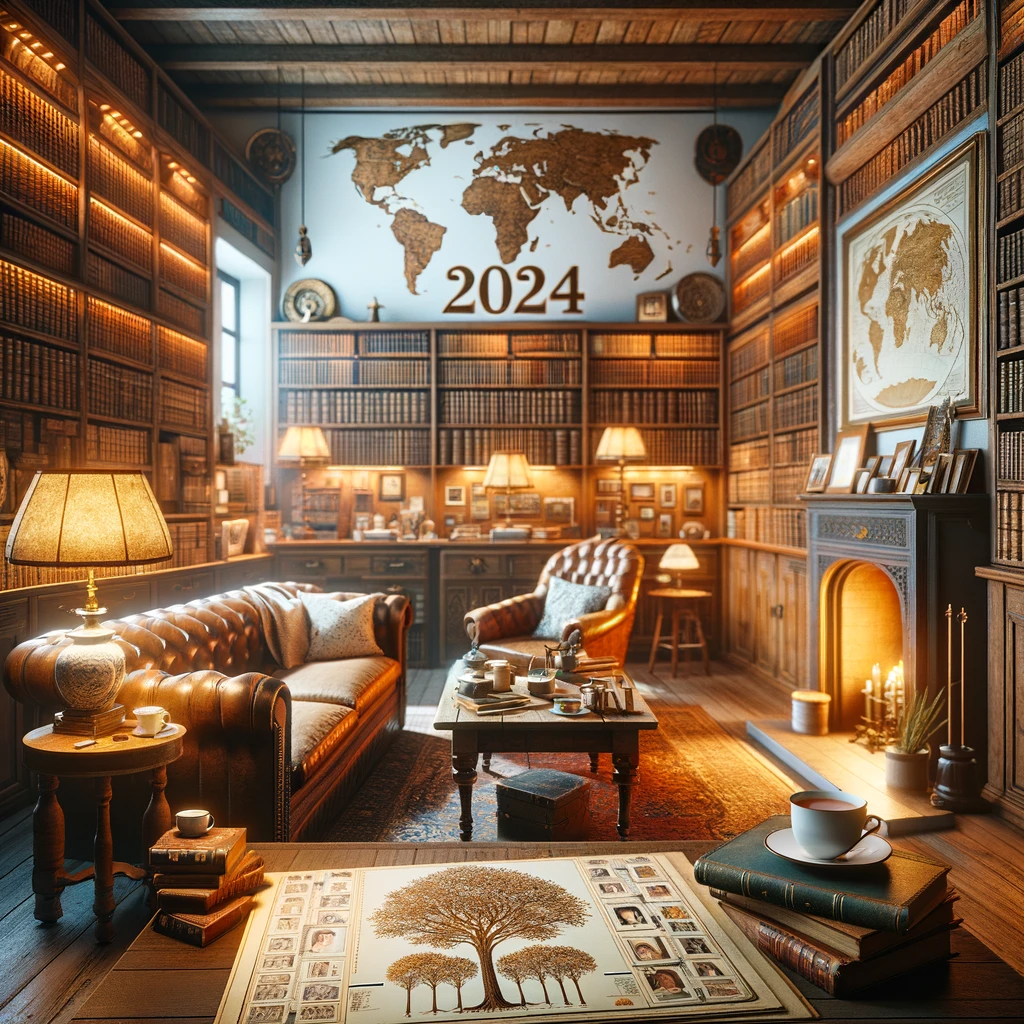
When you get a response you might want to edit the picture. You can have the AI do that by specifically stating what you want altered. In the photo above, I asked to update the first image with the word “2024” added. I never told it where to add but perhaps you wanted it front and center. You can then tell it to add a calendar showing the month of January and the year 2024 displayed.
I will be one of seven professional genealogists giving a lecture at an upcoming genealogical conference later in 2024. I will be using AI to create some of the slide pics. For some slides, I had an idea but for others, I let AI create for me with only the slide title as the instruction.
Ethically, I believe that I need to credit AI for the pictures, just as I would source any photo that I use.
I hope you are enjoying the holidays with family and friends. I look forward to 2024 and providing you with more heartfelt and informative blogs. All the best to you and yours!
I’ve blogged many times before about the Field of Honor project in the Netherlands who memorializes service personnel that were killed in the line of duty during World War 2. They had originally planned a 75 year memorial event for early May that had to be cancelled due to the pandemic.
On Memorial Day, they held a small event for 30 people that was attended by the King and had a flyover. They reached their goal of obtaining 7500 photos of the interred; thank you to all that helped with the research!
You can learn more about the organization and the ceremony here and here.
They have set a new goal of 8000 photos for the larger event that was postponed until next spring (hopefully). Please continue to send photos by checking their website.
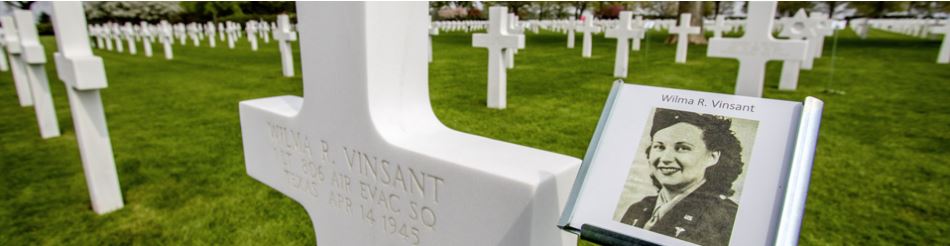
Just 75 years ago this spring, WW2 came to a close. The Faces of Margraten project, spearheaded by the nonprofit Fields of Honor Database in the Netherlands, is attempting to locate 7500 photos of U.S. service personnel who sacrificed their lives to end the conflict. Between May 2-6, 2020, at the American War Cemetery and Memorial in Margraten, the photos will be displayed at the gravesite or the Memorial Wall for those who were missing in action.
As of today, the organization is only 180 photos short of their goal. Do you know of a family or community member who was interred in Margraten? If so, you can send a photo of the deceased to info@degezichtenvanmargraten.nl.
I became involved last summer when I received an email from the organization inquiring about a distant relative found in my Ancestry.com tree. I didn’t have a photo but after checking out the organization, decided I needed to help. All it took was an email to the hometown library and a request to check a local newspaper for a photo in the obituary. The following day, I received the photo which I forwarded to the Fields of Honor Database. I then tried to find photos for the Indiana soldiers. I was able to find 21. I don’t live anywhere near Indiana but I remember my high school had a memorial to the alumni who were killed in combat. That memory made me want to help find the Indiana folks. One of those 21 photos happened to be an alumni of my alma mater.
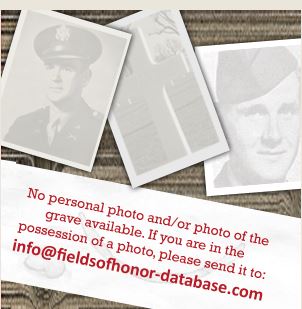
Want to help but not sure how? First, go to the Fields of Honor Database then click on an alphabet letter. For example, I clicked on “A” and then the first entry, AARON, John D. If you see the following:
then a photo is needed. To find a photo I use the same genealogy skills I would to find information about any ancestor I’m researching. Here’s the steps I would take:
1. Review what is known – From the memorial page I see that John D. Aaron was born in Chismville, Logan, Arkansas and he enlisted in Kansas in 1943. He was killed 27 Nov 1944 near Barmen, Germany.
2. Look in the obvious places first (in alpha order) – Ancestry, BillionGraves, FamilySearch, Find-a-Grave, Fold3, MyHeritage, etc. to get more info. I like to start with the 1940 US Federal census because I can get an age and education level for the soldier and discover where he/she lived (1935) prior to enlistment. Why? So I can look at year book photos.
This is what I find for John D. Aaron using Ancestry:
I’m going to check out the third entry because it’s a close match name, age, and places – born in Arkansas but living in Oklahoma. That record is a little disappointing:
1940 U.S. Federal Census, Bristow, Creek, Oklahoma, population schedule, p. 5A (handwritten), line 39, John D. Aaron; digital image, Ancestry.com (http://www.ancestry.com: 29 Feb 2020); citing NARA microfilm publications m-t0627-03288. b
because John only went to grade 6, meaning no picture in a high school year book.
If a year book photo is not available, I check out the online family trees for the individual. On Ancestry, he’s found in 23 family trees. If you find a photo, contact the poster for permission to use and then send to the project. If there is no photo but you find a tree naming the individual, contact the owner to ask if they have a photo and explain why you’d like one. But don’t stop there, we all know it can be YEARS before someone will respond to your query.
Interestingly, the first tree I went to on Ancestry has an obit. When I go to Gallery to get the citation, I find a note from the family member who provides his email address with a note that he is looking for a photo to be included in the Faces of Margraten project. Small world! Since I know someone is actively searching for this photo, I’d go back to step 1 and pick another individual to research.
3. Ramp up your search by contacting a local library, genealogy organization, hometown newspaper or high school. Briefly email the organization what you know and why your searching for a photo. Sometimes newspapers put the photos in a special section, other times with the obituaries. Besides newspapers and year books, photos have been located in library clipping files and family donated materials. The local staff can help direct you to another archive if necessary. I’ve even had small town libraries tell me that they know of family members who still reside in the area and they’ve reached out to them for a photo. Isn’t that heartwarming?!
My biggest learning experience with this project was that the American Gold Star Mothers organization, founded in 1928, does not have an archive containing soldier information. That’s a shame since many of the U.S. government records were destroyed in the 1973 fire in St. Louis. Makes me appreciate the Netherlands organization even more for memorializing the fallen.
Now it’s your turn to pitch in and find a photo. I’d love to hear of your success; leave a comment or email me at GenealogyAtHeart@gmail.com with your soldier’s name and how you made the discovery.
Two weeks ago I wrote about genealogy patience. This is a follow up that I’m having difficulty writing because I’m so overwhelmed with joy at the moment I can hardly contain myself! Now this story is also just plain weird and I think proves that the universe has a wicked sense of humor so I hope you enjoy what I’m about to relate.
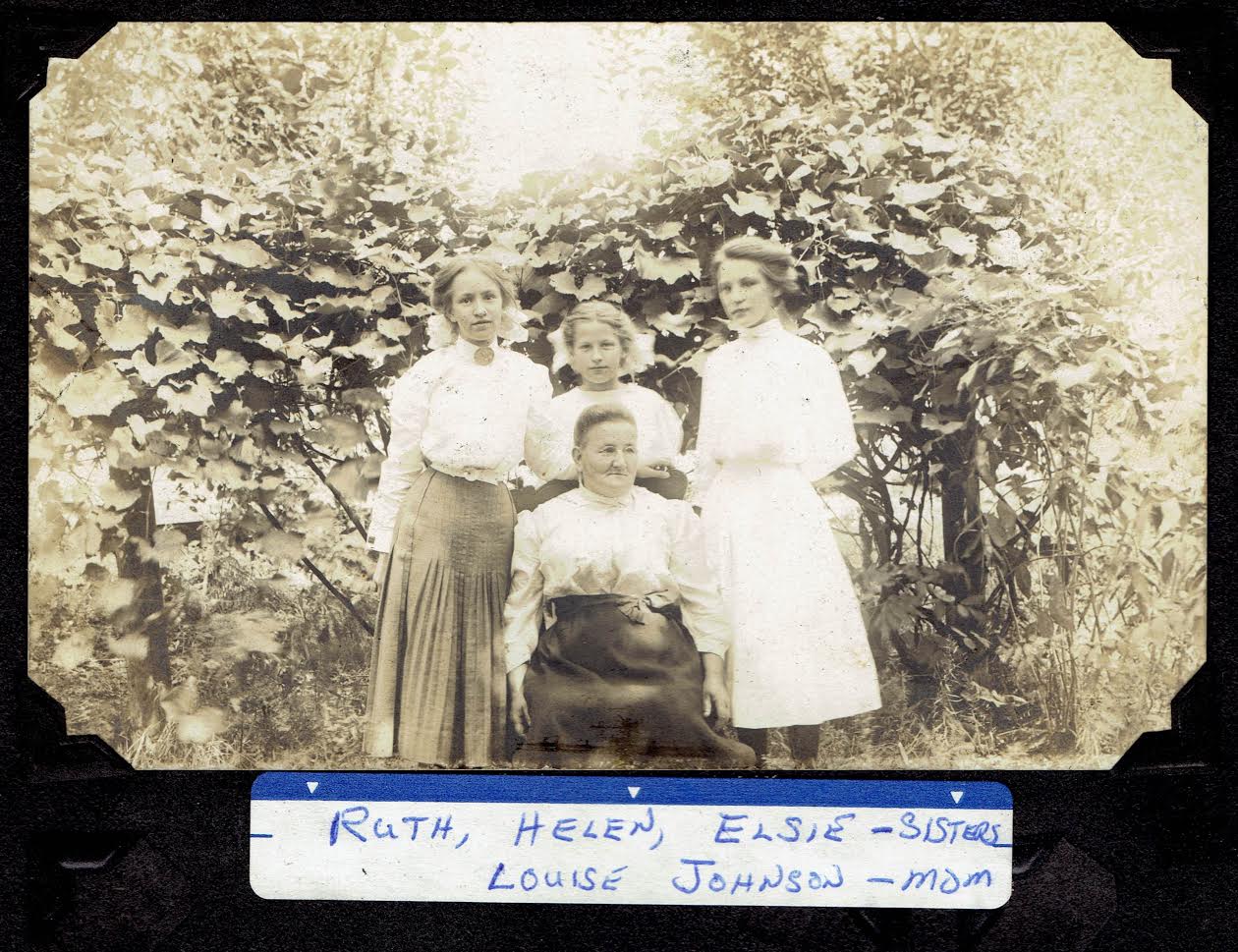
I have searched for a picture of my husband’s maternal Great Grandmother Lovisa “Louise” Carlson Johnson for years (pictured above with her three daughters). When a DNA match was discovered two years ago in August I sent an email asking if the match had a picture. He responded this year on Halloween that he didn’t think so but would check with another family member who had a box of unlabeled photos and would get back to me. I put it out of my mind as I wish I had a buck for every time a family member said, “I’ll check and get back with you.” My people procrastinate and they never seem to followup up unless I keep bothering them. I figured, with the holidays approaching and people getting busy, I’d wait til after Thanksgiving and send a gentle reminder.
I went about my business and was volunteering two weeks ago at a local genealogy library event assisting interested patrons in finding their roots. I had helped 2 wonderful retired teachers when things got really slow. I considered leaving but the event was supposed to continue for one more hour and I don’t like to cut out early when I’ve committed so I decided to bring up Arkidigital.com, a Swedish genealogy site, that is awesome. I used to belong but found most of my husband’s Swedish records so I didn’t renew. Since it was free for the weekend I decided I’d revisit and see if they had added any new records. I was still bringing it up when a new patron stopped by. So, you can probably guess that the woman had deep Swedish roots. What a coincidence, I thought, and told her I just happened to open up the free site. She was interested in discovering information about her great grandfather who settled in Minnesota. She thought he had changed his name at Ellis Island so she wasn’t sure how to verify the story.
I didn’t need Arkivdigital for that so I went in search of naturalization records and World War I and II draft records to see if we could find a clue. There it was – he hadn’t changed his name at all. What she had thought was a last name appeared to be a Confirmation name that he had stopped using between 1917 and 1942. He had emigrated under the name he had arrived with in the U.S. and continued using it; it is on his tombstone.
By the time we had found the evidence, the event was ending so I showed her how to go to Arkivdigital to search for his birth record in Sweden. Turns out, she was also a former educator and she told me a funny story of her attending a conference in Wales several years ago. I replied I wanted to go there, to Croatia and to Sweden to see family’s old haunts but I couldn’t find a tour that went where my husband and my people lived. She told me she had gone on a fantastic trip to Sweden through a group out of Minnesota and gave me their website. I told her I’d check it out when I got home.
On the way home I stopped in a store to pick up a few items and yes, they were already playing holiday muzak. What was on was Grandma Got Run Over By a Reindeer. Geez, I thought, what a dumb song. I couldn’t get it out of my mind.
I got home and told my husband I’d love to go to Sweden next summer and was going to check out a tour group. Sure enough, the tour went exactly where we needed to visit. Wow, I thought, that’s coincidence number 2 for the day – the last lady just happens to give me the info that I’ve been looking for. I sent the company an email.
After dinner I decided I’d bring Arkivdigital back up and search for a bit. I had my tree up on one screen and the website I’d be searching on the other when an Ancestry little leaf appeared. As I’ve written several times, I typically just ignore the hints but this time something told me to check it out. It was for my husband’s paternal great grandfather, Samuel Samuelson, who had died in 1908. It was a link to Find-A-Grave. I already had that info but clicked to go to Find-A-Grave anyway. I’m so glad I did because a man interested in history had recently posted a newspaper story from a Chesterton, Indiana paper that is not available anywhere online regarding the circumstances surrounding Samuel’s death. The information hadn’t been there the last time I looked (so you have to go back and look over sites again or you might miss something important). I had the death certificate which noted accident – skull crushed but I assumed that was the result of a farming accident of some sort. Nope, the accident explained that Samuel and a neighbor were crossing a train track when the sleigh they were in was hit by the train. Both men and horse died. Okay, so here’s the weird, twisted part – I couldn’t get the reindeer song out of my head. I was humming it when I read this. I got a sick feeling – I’m humming a song that’s supposed to be funny but I just discovered someone’s gruesome death in a related accident. That was the 3rd coincidence that day. The individual who posted the article had also posted the obituary which said, “…his youthful looks and manner, his good nature, and never failing sense of humor made him a delightful companion…”. Somehow, I thought he would be amused by this twisted occurrence. And learning about his personality, the man sounds just like my husband.
By this point I was just done with genealogy for the day so I thought I’d check my email and then call it a night. There was an email and it was from the DNA match who said he’s get back with me – he had found a few pictures that were labeled and they were of my husband’s maternal great grandma! It must have been Sweden Day as the photos he sent me were of different stages in the woman’s life. He promised to send me a thumb drive with all the photos of other relatives he had but warned me that most weren’t labeled.
I just got the thumb drive – my, oh, my, what a wonderful early Christmas present! There was my husband’s maternal grandparents wedding photo which was also the earliest photo of his grandfather I had ever seen.
There were photos, labeled, that had stepchildren of his great great grandfather. There were church records! Someone had gone to a long closed church and photographed the handwritten membership list. There is so many genealogical gems that I haven’t even gone through everything yet.
Oddly, he had even sent photos of my husband’s paternal side of the family who isn’t even his relation. I guess I shouldn’t have been surprised but in 1917, they all had attended a wedding for one of his relatives. Living in the small farming community, it shouldn’t have been surprising a wedding would have brought neighbors together. I just never expected to find so many of my husband’s great and grandparents in these photos.
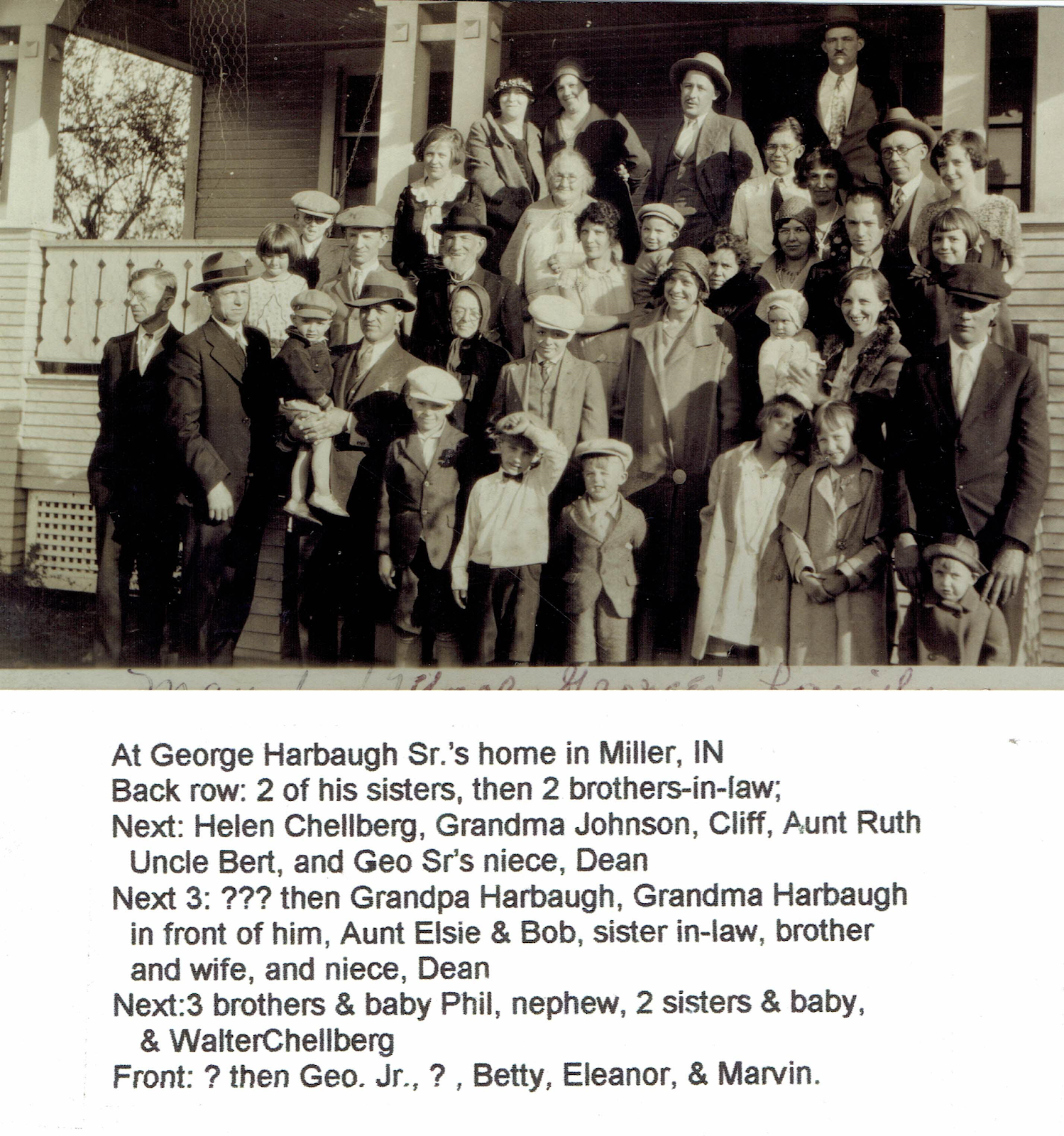
But that’s not all! I had a grainy photo of the Harbaugh family reunion but I could never make out most of the individuals because someone had moved the camera as the photo was taken. It was also a far shot and the people were so tiny. Enlarging the photo only made it more blurry. Turns out I had the first photo and the photographer decided to take a second shot. I can tell as the man in the front row far left has turned to walk away from the group. Unbelievably, the photo I just received has names attached and is clear as can be:
Check out the man in row 2, third from left that looks like Abe Lincoln. That would be my husband’s maternal great grandfather. It is the only photo known to be in existence of him! His wife is right in front of him. I had a grainy photo of her from a church group shot taken about 10 years before this one. All of my husband’s great aunts and uncles are also pictured and we never had any of their photos, either! The mysterious Louisa, who I had originally contacted the DNA match for a photo, is also shown.
So my patience really paid off and I highly encourage you, this upcoming holiday season, to ask for the stories – photos – documents – DNA tests – that will enhance what you’ve already discovered and give you a more complete story of your ancestors. Happy Hunting!
You know that Bible verse Matthew 7:7, “Ask and it shall be given to you, knock and you shall find?” I believe it was really written for genealogists. I would add to it – “though not immediately.”
In August, 2017, I sent an email query to a DNA cousin on Ancestry. I recognized the surname, Chellburg, and knew immediately the relationship. I was hoping to find a picture of my husband’s great grandmother, Louvisa “Louise” Carlson Johnson. Louise had lived in the house my husband grew up in and when my husband’s parents were relocating, I claimed all the photos and letters that had been stored in a suitcase in the basement. Of course they weren’t labeled. We were able to identify just about everyone, however, and no photo was ever found to be of Louise. Maybe she was camera shy or perhaps, when she moved in with another daughter the last year of her life, the pictures went with her. I was really hoping the last scenario was the case.
Over the years, I’ve checked with all the closer relatives for a photo and no one had one so when the DNA match came up I immediately sent off a message. Hey, I followed the Biblical directions – I asked and the email served as an electronic knock and then, well, I guess no one was home because I didn’t get a response.
Two years, two and a half months later I get an email back with the answer (paraphrased) – Sorry, I haven’t been on in a while. I don’t have a picture of Louise but I have one of her husband, Gust Johnson. I think another cousin, who’s 92, has the photos. He’s got a lot but none our labeled.
Big surprise there – another box of unlabeled photos. My husband had actually reached out to the older relative a few years ago but he didn’t respond. Now I’m hoping that the DNA match can connect with him to find a photo.
I am many things but patient is not in my makeup so the waiting really is the hardest part of genealogy for me.
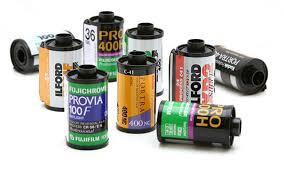
I just read an article that I think you might find interesting – Lost Rolls America is about those rolls of film you have hanging around the house that you never take to get developed.
A few years ago I had developed all of the rolls and disposable cameras (remember those?!) that were in my home. Most of the photos were field trips my children went on and the pictures weren’t all that exciting. My family still laughs, though, at the weird occurrence that happened when I took the films in to be developed.
I was next in line at the camera counter at my neighborhood Walgreens when a woman came in and sighed loudly behind me. Turning, I saw she was clearly in a hurry. I smiled and said something about the line was moving quickly. She said she was late and hoped it did. Then she saw all the film and disposable cameras I had in a gallon size baggie. I told her she could go ahead of me.
Just at that moment the customer who was being waited on finished. The hurried woman needed to buy batteries but the kind she needed they didn’t have. She said something like, “That’s just great, now what am I gonna do?” I suggested she run to the Battery Store a few miles away as they seem to have every kind imaginable. I added, “Just be careful driving;” as she did seem to be in such a hurry. She said “Thanks,” walked away and as I started dumping the contents of the baggie on the counter she came back. “Excuse me,” she said. Both the clerk and I looked up. “I know this will sound strange, but you have a lot of dead people following you.” The clerk looked at her like she was out of her mind. I just laughed and said, “I’m sure I do. I’m a genealogist and it’s probably family.” Turns out she was a fortune teller. She gave me her card and told me she’d give me a free reading for my kindness. I never took her up on it.
Maybe I should have; those dead people following me sure didn’t answer my genealogical questions! Perhaps you’ll get lucky and those rolls of film will help you answer yours. Happy Hunting!
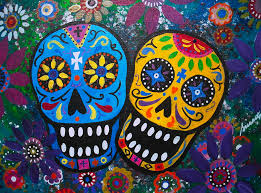
If you haven’t seen the Disney movie that came out last fall, Coco, then you must do it soon. I’m not the kind of person that watches the same shows again and again but I have seen Coco 3 times. Here’s why I think Coco is important to genealogy and will help you with your research:
Customs – the story takes place in Mexico on the eve of Dia de Los Muertos, the Day of the Dead. Even though my family never celebrated that holiday, we sure celebrated many others. Think back to your own childhood and identify customs that your family practiced. Did Aunt Marge always bring a special dish? If so, ask why before it’s too late. I regret not writing down the words in Croatian that my grandparents said before Christmas Eve dinner. I know it was brought with them from the Old Country but unfortunately, that custom is now lost to me.
Photo clues – One of my favorite parts of Coco is the altar of photos. I don’t have that layout but I do have a family tree of photos on the wall in my office. Those photos are of couples going back 5 generations. Around the tree I’ve placed pictures of large family gatherings to include more of the extended family. I also received as a Christmas gift a metal tree that holds smaller photos. I’ve placed pictures of many of those couples as infants on this stand alone tree. By seeing the “big picture” you can often identify people in other photos that were considered unknown.
In Coco, the main character, Miguel, accidentally discovers a displayed photo had been altered and the missing person is critical to his story. That part of the film made me laugh as my family does the same thing Miguel’s family did! I inherited some photos from a deceased second cousin and one of them was torn vertically to remove someone. I’ve never been able to find a copy of the intact photo but from the dress of the remaining individual, it appears that it was taken before a cantakerous divorce. There’s a story behind every missing person in a photo and it pays to try to uncover it.
Making Wrong Assumptions – Like Miguel, I’ve been down the wrong trail of who I thought was family. Aided by spirits, he was able to uncover the truth. You don’t have to hire a medium to find the answer – simply take a DNA test. One of my husband’s cousins is doing a Lazarus project on a line through Gedmatch. I’ll be writing about it soon but in the meantime, if you aren’t familiar with that term, it’s trying to “raise the dead” by comparing the living’s DNA. The results can help you insure you’re researching your direct family lines.
FAN Club – Miguel learns all about a neighbor of his great grandfather and that connection with his family is a key to the story. What I especially like about this genealogy tip is that the connection isn’t an immediate neighbor or made through a religious organization, such as being a baptism sponsor. This connection is career related and sometimes we overlook that. Checking out union records, membership in business associations and even competitors in an industry could provide you with a wealth of information about an ancestor’s life.
Family Stories – We all have our legends and just like Miguel’s, they get convoluted in the retelling. To separate the facts from fiction in yours, first write down the story as you remember hearing it. If possible, ask another family member to tell you what they remember of the story. There will be some differences and note those. Next, research to see if there were records for the event mentioned. Newspapers, court documents, and even almanacs can help you determine the factual basis of the story. Getting the correct story may help you find that missing marriage record or place of death so this approach is well worth the effort.
Uncovering Buried Memories – The most poignant part of the movie for me was when Abuelita identifies her father, Miguel’s great grandfather. Miguel is so gentle when talking with his senile grandmother and to get information before it’s too late can’t be stressed enough. I interviewed my maternal grandmother and mother before their memories became difficult to access. In hindsight, I wish I had recorded it instead of taking notes. If you haven’t interviewed your older relatives plan on doing that soon.
Our Gifts – Miguel loved music while the rest of his living family did not. His genealogical journey helped him understand where his talent came from. By looking deeper into your family’s history, you’ll uncover much more than just birth-marriage-death info – you’ll discover people you wish you’d met and others who you’d love to understand why they made the choices they did. Some people we can closely identify with, others, not so much. They’re all a part of us and we’re all connected. Like Miguel’s family, we need to make peace with the past so the future can be brighter.