Heirloom Preservation

I have been so busy the past week! My family and I attended an archaeology camp all week and today is my local genealogy society’s annual conference. I’m blogging today on a previously written article that an organization had no space for as a sidebar. Enjoy!

Without a doubt, heirlooms are loved. Some are valued because they are a tangible connection to a deceased loved one. To others, the object reflects a simpler time or awe that the item survived a specific event. Heirlooms are important to us because they belong to our personal past, marking our family’s social group and reminding us of those caring individuals who came before us. Holding a book that your grandfather used to read to you can ignite a sense of security. Using your great-grandmother’s recipe can provide your whole being comfort. Heirlooms deserve to be treasured! 

Here’s how to keep your priceless object preserved for future generations:

Research the item:

  • Gather and place in chronological order all stories that have been written about the object. After reading each account, list discrepancies, noting who made the claim. Tales written closest to the time of the event may be slightly more accurate as memories can fade. Keep in mind that eyewitnesses aren’t always credible. A very young child may not understand the situation they are observing; an adult may embellish or fill in what they can’t clearly recall.
  • If no stories have been written, write it down! Ask family members for their memories; record or have them write down their version of the item’s history. 
  • Research names, dates, and places associated with the item as you would while researching your family tree. Think of the heirloom as an extension of your family history. 
  • Know that some items cannot be fully researched. My great grandmother’s hurricane lamp, purportedly bought in the summer of 1913 at Marshall Field’s in Chicago, had been passed to me with no receipt. I can pinpoint my family to Chicago, have personal knowledge that my grandmother shopped at the store and have the lamp appraised to identify a time range of its origin but it’s unlikely I will ever know for certain where the item was purchased.

Store your item safely:

  • Items last longer when stored in climate-controlled conditions that monitor temperature (60-70 degrees Fahrenheit) and humidity (not to exceed relative humidity of 75). In Florida, this likely means don’t store your precious belongings in your garage, attic or shed. 
  • For paper, photographs, or fabrics, store items in acid free containers.
  • Use cotton gloves when handling items that may be damaged by skin oil, such as old photographs, film, or metal. For other items, make sure your hands are clean before touching.

Have an emergency plan:

  • List your most irreplaceable items and their location. In an emergency evacuation, your list will be invaluable in making sure you don’t forget a priceless item in your panic. Keep the list with your important papers that you would take with you so you can easily remember what to pack.
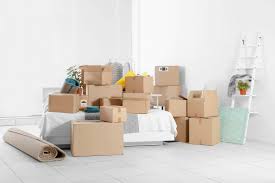
  • If your item is too bulky to take, have a backup plan to keep it as safe as possible. Place your smaller items in durable plastic storage containers. Wrap larger items in a waterproof tarp. Elevate objects to avoid flood damage. Place them along an inner wall away from windows and doors.
  • Make sure items you want passed to the next generation are identified. Keep a copy of your evacuation list with your will, noting the name of who you are bequeathing the object. An alternative is to place a label on the bottom of the object with the name of the original owner, year it was acquired if known and who you’d like the new owner to be. When your loved ones are cleaning up after you, they can easily identify a family memento from a tchotchke. In the meantime, your treasure can be kept in its usual location where you may continue to enjoy it.
Scanned Your Photos? Think Again!

Today’s blog is all about what I wish I had known about preserving my family photos and certificates. Hoping this will help you avoid my mistakes.

The story begins in December 2001. On the day my mom was interred, I met my stepmother to acquire items my father had left to me when he died five years earlier. Step-mother had refused for years to mail me the items even though I offered to compensate her. My emotions were raw from the burial that had to be rushed due to an impending snowstorm. Husband and I, with our two kids, then drove through our old neighborhoods to see our childhood sites. We stopped briefly to visit my beloved kindergarten teacher and then it was on to my stepmother’s home. The visit was what I had expected it to be; I soldiered on with the thought running through the back of my mind, “This will be over soon.” Hubby put the two cardboard boxes of my father’s remaining possessions in our trunk and we drove south towards home. When we had driven far out of town we stopped at a hotel for the night; I looked through the boxes quickly and discovered photograph albums, certificates, a diary, war medals, work pins, and a few toys.

Arriving home on New Year’s Eve, the items went into a closet as I knew I needed time to look through them carefully. My mindset wasn’t ready to do that.

Two years later we moved to a new city and the boxes were placed on the top shelf of a hall closet. Someday I would have time to go through them.

Fast forward to Summer 2008. Hurricanes had hit my area and we had lost a huge oak tree in our backyard. Luckily, it fell away from houses. If it had fallen 180 degrees instead onto my house, the kitchen and closet where these heirlooms were stored would have been devastated. I knew I had to scan and do it quickly.

When faced with a crisis you must prioritize and be on terms with your decision. My priority was my children so I scanned the many scrapbooks I had made for them first. Then I moved on to my maternal side’s two photo albums. Next would be my husband’s family’s photos which were in a large album. The summer was going quickly and I was left with one week before I had to return to my education job. I rushed to scan my father’s photos.

I knew I had a few more items to scan, my mom’s address book, and my dad’s World War 2 diary, but time was up.

I saved the scanned photos to DVDs, Ancestry.com, and to Google Photos. I mailed DVDs to far-flung relatives in the hope that if the originals and my DVDs were destroyed, family in other parts of the U.S. might be able to have a copy I could get back or I could still see them online.

Last Sunday, I got the brilliant idea to buy a cart that was on sale that matched our home office furniture. I intended to clean the office closet by placing stationery items in the new cart. Hubby loved it and thought it would be a good place to move our printer/scanner so we’d have more desk space. Then we decided to move the router. Of course, there were cable issues so my simple organizational strategy turned into much more than I had bargained for.

Once we got back online, the office closet had a lot of space. Hmmm, it was cold and rainy so why not move some of the items from that hall closet into the office as that’s where I keep binders of my family’s records. The hall closet is odd-shaped and tall so I had to have hubby and son get the ladder and hand me down the boxes.

I opened the first of my father’s photo albums and compared the pictures to what I had uploaded years ago to Google Photos. The pages were not there. Neither were the next five pages. I then looked on Ancestry.com and some of the missing Google Photos were on Ancestry but not all of them. I also noticed that none of the photos I had taken with my phone since July 2021 were being saved on Google Photo. What was going on?

At first, I thought maybe I had exceeded space on Google as I blogged last year about their policy change but that wasn’t it; I had plenty of space. I checked with family and friends and they said they had noticed similar gaps. One relative said she had lost a year of her pictures that had been stored on Google Photos. A friend told me she had lost photos when she changed phones and hadn’t checked the settings. I hadn’t gotten a new phone and hadn’t messed with settings; I see that there is now an “upload” button on my Android. I’m thinking this is a result of Google’s policy change in June and they no longer automatically upload. Lesson 1 – check now and upload any phone photos if you use Google Photos. It will only upload a few at a time so be patient.

But what about the missing pages that I had scanned in 2008? I know I didn’t miss scanning all of those pages as some are on Ancestry.com. Lesson 2 – save somewhere where you alone control what’s added. I am now additionally saving to Dropbox.

Last week, I decided to create albums on Google Photos to help me quickly recheck all of my uploaded pictures to the hard copies I have on hand. That took a few days. Meanwhile, my office is now filled with items I have yet to double-check. Lesson 3 – once you scan and upload to where you are going to save, double-check to make sure that the item scanned clearly and was saved where you want it.

This adventure had not been fun; it is boring to have to double-check everything. I can’t stress enough how important it is, though. This time around I’m also scanning the covers of the albums and the inside pages as I have discovered notes my father left there. Lesson 4 – Those written words are as important as the photos contained in the album. It lets me know about his thoughts and feelings.

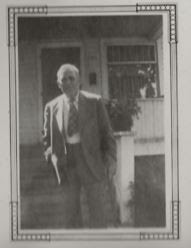
I decided to save my photos in Dropbox in a different way than Google Photos. Google saves by the date they were uploaded, regardless of the year the photo was taken. In Dropbox, I’m saving by surname.first name.item description. I copy the photos into a Word document so I’m able to include additional information. I’ve typed who the photos belonged to, how I acquired them, the size of the album, its condition, the number of pages, etc. For the few albums that identified the people, I typed under the photo a transcription. Lesson 5 – what’s nice about this is you can use the find (control + F key) to locate an item quickly. That’s how I discovered the picture above. My father had simply written “grandpa” under the photo.

It is not my grandpa; it’s my father’s grandpa meaning it is my great-grandpa, Theobald Leininger. I only had one picture of him, given to me by a distant family member. It was an awful photo – he is on the end of a group picture and mostly cut off but I was happy to have it. Lesson 6 – if I had only rechecked my photo album and thought about the captions from my father’s viewpoint and not my own I would have realized I had this photo for 20 years.

Since the weather outside remains frightful, I’m going to be spending whatever time it takes to get these items all scanned and saved. Trust me, the hardest part is getting started. I have one box completely done. Seeing my progress motivates me to move forward. Perhaps soon, my office will be clean and neat and I can go back to more “fun” genealogy tasks.

Independence Day Memories

Happy 4th of July weekend!  Can you believe we are only 5 years from celebrating our sestercenntenial, aka 250 years?  Many of you may remember the 200 year celebration in 1976.  I can tell you what I wore when I picnicked in the city park and got a slice of a giant birthday cake donated by bakeries.  That was the start of our family’s now tradition of eating fried chicken with all the fixins’ instead of BBQing, which we had done when I was very young.

We began this year’s commemoration by attending our city’s First Friday celebration last night.  BC (Before Covid), our town had a street fair every First Friday evening.  Local bands play on the 3 blocks that our closed on the main street through the old business district, with a few side streets also blocked to traffic for the occasion.  It looked like rain so hubby and I decided to arrive earlier than we used to.  There weren’t quite as many vendors or visitors as before but it was early.  As soon as I saw one of my favorite Italian restaurants had reopened we knew that’s where we were eating.  It just happened that was the last restaurant we ate at on March 13, 2020 – our last day onsite at our worksites.  Our adult kids had chastised us the following day for risking eating out the night before but we had been cautious by dining at an outside table.  We got the same table last night and the experience was surreal.  I actually got teary eyed when the first course arrived.  

We’re hoping the weather holds up for us to have our traditional picnic tomorrow followed by watching the fireworks.  Independence takes on a new meaning for us this year as we reacclimated ourselves in our community.

In genealogy, we focus on the past without thinking much that our past was our ancestor’s present.  If you have a holiday custom, like our picnic food, it once was done first.  Spend some time researching when the first occasion was and why.  I know we weren’t allowed to bring portable BBQ grills to the park which was why my mother changed the menu.  We wanted to arrive at the park early as a spectacular firework show was planned to mark the bicenntenial.  We wanted a good parking spot and viewing location so we didn’t miss that special event.  

Next is the most important part of the story – WRITE IT DOWN!  It is wonderful that you made the discovery of the custom’s origin but it will be forgotten for future generations if you don’t record it.  You don’t have to write at length.  A brief note in your family tree program added as an event will commemorate your finding and/or memory.  A few family historian will certainly appreciate you took the time to save the memory.  

Time Sensitive – Saving Your Ancestry.com Messages

With only 3 days left before Ancestry.com pulls the plug on your access to old messages sent to you in their system, you’ll need to follow the instructions below soon or your old correspondence will be lost.

It’s quick and easy but times a wastin’!

First, after logging in, click on the envelope icon on the right side ribbon next to your sign on.

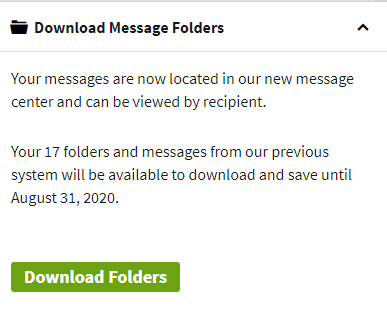
Next, you’ll see swirling circles while the page loads.  On the bottom left the following message will be displayed:

Click the green button “Download Folders”
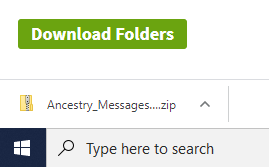
It doesn’t take long.  Underneath the button your messages will be downloaded to your computer as a zip file:

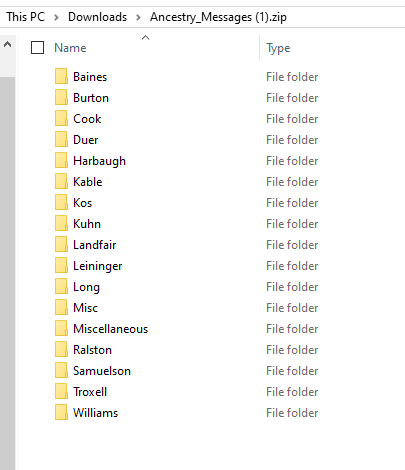
Clicking the zip file will display any folders you may have created to save correspondence.  Mine looks like this:

It is saved to your computer’s download file.  Go to the Download Folder on your computer, find the file and drag it to where you want to save it.  For the purpose of this blog, I just moved it to my desktop but will be placing it in a Cloud.  

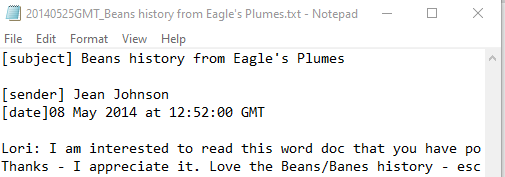
To view a message, simply click on it.  In the Baines folder, the message will be saved to look as follows:

Yes, just like the comedian “Mr. Bean,” I have Beans in my family!  

This simple task will take you less than 5 minutes.  Why would you not want to save information from far flung family members?  It’s also a good way to go back through old correspondence as a missed clue may be unveiled.  Many of my messages contain email addresses and if I haven’t written to the individual in awhile, I might not be able to locate the address quickly if I need to in the future.  Since you just never know where genealogy is going to take you, I’d rather be safe then sorry by saving the data today.

Photo Hints You Might Find Hiding in Your Home

I just read an article that I think you might find interesting – Lost Rolls America  is about those rolls of film you have hanging around the house that you never take to get developed. 

A few years ago I had developed all of the rolls and disposable cameras (remember those?!) that were in my home.  Most of the photos were field trips my children went on and the pictures weren’t all that exciting.  My family still laughs, though, at the weird occurrence that happened when I took the films in to be developed. 

I was next in line at the camera counter at my neighborhood Walgreens when a woman came in and sighed loudly behind me.  Turning, I saw she was clearly in a hurry.  I smiled and said something about the line was moving quickly.  She said she was late and hoped it did.  Then she saw all the film and disposable cameras I had in a gallon size baggie.  I told her she could go ahead of me.

Just at that moment the customer who was being waited on finished.  The hurried woman needed to buy batteries but the kind she needed they didn’t have.  She said something like, “That’s just great, now what am I gonna do?”  I suggested she run to the Battery Store a few miles away as they seem to have every kind imaginable.  I added, “Just be careful driving;” as she did seem to be in such a hurry.  She said “Thanks,” walked away and as I started dumping the contents of the baggie on the counter she came back.  “Excuse me,” she said.  Both the clerk and I looked up.  “I know this will sound strange, but you have a lot of dead people following you.”  The clerk looked at her like she was out of her mind.  I just laughed and said, “I’m sure I do.  I’m a genealogist and it’s probably family.”  Turns out she was a fortune teller.  She gave me her card and told me she’d give me a free reading for my kindness.  I never took her up on it. 

Maybe I should have; those dead people following me sure didn’t answer my genealogical questions!  Perhaps you’ll get lucky and those rolls of film will help you answer yours.  Happy Hunting!

Genealogy Cleaning Hints

Since returning home from vacation, I have been on a genealogy cleaning spree.  Although I hadn’t planned for this, I discovered a few days before I left that I really had to make it my priority when I returned.  While packing, I was frantically looking for items in the closet when I got hit in the head by falling journals. Ouch!  If that wasn’t a wake up call I don’t what would be.

Cleaning is not fun but the results are wonderful!  I have also been fortunate that the heat index has been in the extreme and when the temperature drops, it’s pouring.  With both of those curtailing my outside activities, I hit the office closet first for a redo.  Because I live in an area prone to hurricanes, I keep records in either plastic tubs that I can quickly transport to the car when we evacuate, or in binders high up on a shelf.  The binders contain vitals by surname and though they would be a loss, the original exists safely elsewhere with a scanned copy I placed online, on my computer and backed up on a portable device. I’ve tried various organizational methods but found this one works best for me.

Recently, I switched my journal and magazine preferences to online only; no point in killing trees when I can access and read the articles anywhere.  I decided to donate my saved hard copies to my library.  That helped clear the shelf and gave me more space to acquire more vitals!  (Family eye rolls here). 

I also keep office supplies in this closet so it was a great time to take an inventory.  I made a list of items I’m getting low on, such as labels, that I can acquire at sale prices hits.

Once the closet was done, I tackled a file cabinet I use for business projects.  I updated my portfolio of work samples to include recent projects and replenished forms.  I don’t keep many copies of forms but I like to have a few available in case the printer is down or electricity out.  (In my area, the electricity goes out frequently – 3 times in the last 5 days due to severe electrical storms.)

I then tackled the electronics which was the least favorite part and took the longest of this process.  I started with thumb drives.  I have a lot of them and I decided I really needed to go through and make sure that I had saved to the appropriate place.  After checking that I had, I deleted the files from the thumb drive so I have a clean one to use on my next research trip. 

Actually, looking through the drives was a wonderful walk down memory lane.  I discovered several drives that held a probate record from colonial New Jersey that is the only record that shows two generations of Duers connected.  The reason I had the document on different drives was because of unusual events at the time I discovered the document’s existence.  I had been researching at a local library a different ancestor when I struck up a conversation with another researcher who was working on DAR lineage paperwork.  I mentioned my desire to prove the Duers and she brought up the document – she had remembered the name as she was working on a different New Jersey family from the same area.  It was the first time I had known of this document’s existence and I copied her copy to a thumb drive but she did not have the complete document.  I then began my search for the original which wasn’t on FamilySearch.org but was available at LDS sites.  Of course, the nearest LDS Family History Center to where I was would close in a few minutes so there was no way I would get there in time.  The next day, I grabbed a different thumb drive and drove to the site, found the record and thought I had saved it all but when I returned home discovered one page was missing and oddly, it was the page she had missed.  That meant I had to return and save again.  A few days later I was back and again resaved.  I was so paranoid I brought the page up twice from the thumb drive before I left to make sure it was saved correctly. Even though it appeared at the LDS library, it disappeared by the time I got home.  This happened before clouds so thumb drives were the best option for saving. Hubby suggested that maybe something was wrong with the thumb drive so I grabbed two others and we headed out, in a violent thunderstorm, to another LDS site much further from our home as that was the only one open.  The volunteer said he was about to close as he didn’t think anyone would have ventured out in the inclement weather.  I again located the document and this time, saved it to two different drives.  For whatever reason, it saved correctly and I was able to open it when I returned home.  Now on this cleaning spree, I deleted them off four different drives.

Next, I cleaned my download file on my computers, then cleaned the desktop.  Next, I went on my three clouds and placed documents I had saved over the past year into folders.  I then logged on to various organization to which I belong and downloaded and saved syllabuses for workshops that interested me but I hadn’t had time to attend.  I plan to review them and watch the saved webinars if I needed more information.

This was followed by cleaning up my email account.  I sent some follow up emails regarding projects that I haven’t gotten responses from in the past month and put mail I was done with in the appropriate folder.

I was feeling quite proud of myself so I went on to perform updates, which I hate doing because I’m inpatient of the time spent and the possible problems that result; for some reason, updates to our printer sometimes freezes the computer.  While doing the updates, I realized I had neglected updating several of my tree software programs as new versions were available.  All was well until I remembered that Roots Magic was linked to Ancestry and I hadn’t bothered to update changes I made to Ancestry in the past year.  I almost had a heart attack when I clicked “Only show changed people” on Roots Magic.  On a positive note, I was able to see how much progress I’ve made in my family tree but on a negative note, my goodness did I have a lot of work ahead of me to get the files saved to my personal computer.  I seriously considered just redownloading my entire Ancestry tree but I knew with all the media I had, it would take at least a week as it had the first time I did it.  I worried that the program would crash, especially with the electrical outages so I opted to painstakingly go through every individual and update.  The majority of my cleaning time was completing this project. but I think it was worth it as I’d be crushed if something happened to my online tree at Ancestry.  Having a backup, with all the media, is vitally important to me.  Having it saved in numerous places is also worth the effort.

I am happy to report that I am ready to return to researching, my true love.  I can’t wait!

Here Today Gone Tomorrow, The Ever Changing Access to Online Records

Ahh, the balance of the universe!  Maybe it’s just me but I’ve noticed lately that the more that the web grows genealogy sources, the more sources I relied on in the past have disappeared.  I’m definitely not a doomsday prophet but I found my experiences yesterday as a wake up call to change some of my practices in the future. If I don’t I’ll be facing disaster someday. Here’s what happened…

I was going back over a line I hadn’t visited in five years.  When I do that, I start with my gateway ancestor, in this case, Mary Ann Hollingshead, and I recheck my saved sources.  I predominately use Ancestry.com so I click on the Gallery feature and look at the documents I previously uploaded.  Then I go to the hints area and look at all that I had saved as “Maybe” or “No.”  I always keep the hint setting on but my tree is so large I don’t have time or desire to check every hint that populates. Weekly, as part of my genealogy cleaning chores, I go through any hints that are shown over the previous seven days and just dismiss them.  They don’t really go away; they are saved under the individual that the system matched them to.  That’s a nice underused feature, I believe, as you can always go through them at your leisure to examine each one closely when you have the time.  

Next, I go back to Facts and check the citations that I had linked to the timeline.  For sources that I created from outside of Ancestry.com records, I always but the link so that I can easily review the information and note if anything has changed.  That’s where I noticed the first of the serious changes to the web.

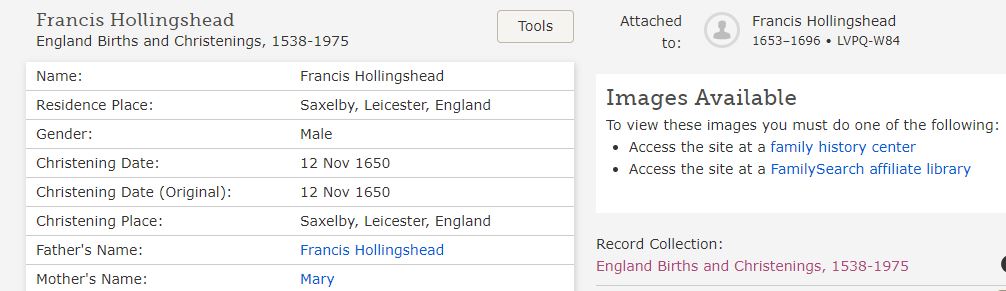
I went to Francis Hollingshead and was checking the link I had made to FamilySearch.org for England Births and Christenings, 1538-1975.  I used to be able to see the actual page of the document but not any longer:

As you can see on the right side above, I must go to the Family History Center to view.  Now I wish I had saved every FamilySearch.org document I have ever found and that’s a lot!  It never dawned on me that the information would not be readily available from home.  All I could think of was Job 1:20 “…The Lord gave and the Lord has taken away…”.

I did notice that some of the documents were available through FindMyPast.com so I could (and will) go there to snip and save them to my Gallery but not all can be found that way, as the one above shows.  

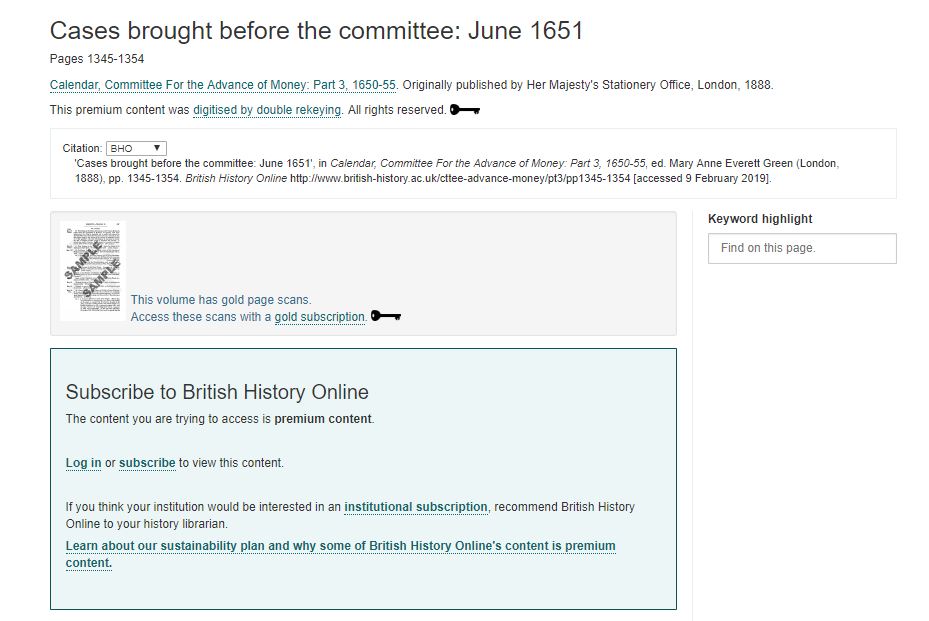
As I went farther back on the Hollingshead line I discovered that British History Online now charges for many documents that once were available for free:

Back in the day, they asked for support through a donation but now they have Premium, Gold, 5-year Gold and 10-year Gold access.  What I was trying to reach was Gold level.  I only needed one document so it wasn’t worth it to me to purchase a subscription.  I had saved in my citation a transcript which is fine for my purposes but if I had known it would go away, I would have snipped and saved the original and transcribed under it.  Live and Learn!

Yes, I did try the Wayback Machine to see if I could gain access to these docs and the answer is unfortunately, no.  For the British History Online document, only once was it saved and that was in 2015 but you had to log in to access.  I tried my old log on but it no longer works.  

The next issue I discovered was of a document I had saved in my Gallery.  I had the page snipped but I had neglected to include the book’s title page.  No worries, I thought, as the link was for Internet Archives.  Of course, I happened to hit them just as they went down for maintenance so I couldn’t get the information I needed.  The book wasn’t available through any of the other online sources so this just required me to wait awhile to get what I needed.

It’s not just older documents that are no long accessible.  Google+, which ties to my Blogger account, is disappearing soon.  With it goes all of my former reader comments.  I’m glad that I save all of my posts to my genealogyatheart.com website so they will still be available but unfortunately, there’s nothing I can do about the comments.

Genealogy is definitely a practice in patience.  Sometimes it’s years before you find the record you seek or connect with a long lost relative that holds the key to discovering a generation back.  With organizational changes, patience needs to extend to how we save the documents we find at the time we make the discovery.  I’m fortunate that there were only a few records I wasn’t able to access in the 18 generations I checked.  I’m hopeful, going forward with the procedure changes I plan to implement in my practice, that won’t be an issue again.

UPDATE 23 Feb 2019:  I spoke today with a FamilySearch rep at a local genealogist conference I attended.  He stated that some of the records are no longer available from home due to copyright agreements with the holders of the original data.  He also stated, if you have found yourself having difficulty viewing some of the records online because they become fuzzy, simply record where you are then click out of the database and go back in.  When you restart go directly to the record you left off and it should be viewed clearly.  If not, you can report it.

Add Death Cleaning to Your Genealogical Toolbox


I’m sure my faithful readers are wondering why my posts have been scant lately. The summer has just been a whirlwind! Travel, family stuff and work have kept me away from this blog. I’m happy to report that the past month I’ve been doing my own version of Swedish death cleaning.

If you aren’t sure you know what that is, check out this older NBC article. I’m not planning on dying any time soon but the opportunity presented itself (pre death as an opportunity, hmmm) for me to unload many family treasures that have been held on to for generations and pass them along to a younger family member that is interested in them. Hoorray!

It’s a mixed blessing seeing these items go. Holding the old recipes cards of long deceased female family members in my hand always stirred in me that connection of past to present as I prepared a much loved family dish. I’ll miss that but I’m happy to know that not only the past and present are at play with this decision to pass them along, the future is also impacted and that’s awesome from a genealogist’s point of view!

I just began this process so I’ll be engaged in it for a few more weeks. This pace is perfect for me and my genealogy. I’ll be reanalyzing some of my documents as these cherished objects are looked at one more time. For example, we have some old Bibles in German from the 1800’s. Using the copyright date helps be determine the extent of German language usage by the family member who owned it. I know who owned it because of the name recorded on the front page. No, there is no record in the Bible of births/deaths/marriages so this won’t help me with family connections. Why the German language connection is important at a particular time period is because it will help me perhaps discover additional information in a local German newspaper that normally wouldn’t come up through a Chronicling America search. I can also explore churches in the area that had a service in German since I’ve been unable to find church records for that person. Thinking outside the box with a find can help you discover a wealth of valuable information and insights into an ancestor.

Some items I just can’t part with yet so I’ve placed a label on the bottom of the item with who it originally belonged to so when I really am dead, my family doesn’t have to guess as to what items are historical and what isn’t. Maybe I’ll part with those before my death but just in case, they are identifiable.

So as you enjoy your last beach weekend or cookout of the summer, I’ll be happily going through my treasures and creating a new treasure chest for a loved one. Kind of like being a nice pirate!

Awesome Genealogy Resources I’ve Recently Discovered


Brrr, it’s been freezing in Florida! I’m spending most of my free time curled up on the sofa in front of a fire with a cup of cocoa and my laptop and Kindle catching up on reading I put off during the holidays. I want to share some of my amazing finds that could benefit your research:

Do You Understand Family Relationships? Trying to explain to a non-genealogist how someone is related can be difficult. I’ve discovered a wonderful pdf and a fantastic article recently published by Genealogy in Time. Check out The Key to Understanding Family Relationships and become an expert!

Burned courthouses, wars and vermin aren’t, unfortunately, a thing of the past that impedes our needed record research. What Would You Take?, an article on Genealogy Bank, focuses on the sometimes split second decision of what to do about your research when disaster is only minutes away. We don’t like to think about it, but this article is a must read for everyone.

So, your DNA results are being returned and your family is scratching their heads in confusion. Maybe this article will help – How DNA Testing Botched My Family’s Heritage that I found on Gizmodo is thought provoking.

Genealogy TV Show That Can Benefit Your Family

I’ve been watching this season’s Our American Family show and thought the style of the presentation would be an awesome way for families to record their own history. With the holidays upon us, check out a few of the episodes, then video your family at the next gathering. I’ve blogged previously about using helpful media to use and interview questions that can help get grandma talking. Once you’ve got the recording, putting it together could be a wonderful present for your next year’s holiday season!