
Ancestry.com New Features

I tried Ancestry.com’s new feature, Thru Lines, last weekend and I’m not impressed.  If you aren’t sure what it’s about, you can watch their brief video here.  What set me off was the comment “For a few short minutes and without doing any research, you can have a whole new network of ancestors and living relatives.”  Not in my opinion!  If only genealogy were so simple. 

Here’s the issue I have and which I wrote in my survey result to Ancestry – say everyone in your family believes that your shared Great Great Grandpa was John Smith Jr..  You all know this because it said so in an unsourced family book written in the 1940’s.  Some of your older relatives even remember the author and he was an honest, hard working genealogist.  He knew that John Smith Jr. was his Great Grandpa because his mom told him so and she never lied.  So there, it’s the truth and nothing but the truth.

Now along comes Ancestry’s Thru Lines and since everyone copied everyone else’s tree on Ancestry because it’s simple to do so, everyone has John Smith Jr.as their 2nd time Great Grandpa and now everyone’s DNA results PROVE it.  Except, it proves nothing at all.

All Thru Lines proves is that you are all related.  If everyone has a wrong name listed everyone with shared DNA will connect to that wrong name.  Perhaps John Smith Jr. was adopted.  All of the shared descendants are related to the adopted individual but not to John Smith Sr.  Thru Lines is going to give you other relatives you “might” be related to.  This just perpetuates the wrong information.

I tried it with one of my adult children’s DNA results and it connected to my husband’s grandmother.  Was that accurate?  Yes, because far flung family members have also tested and they connect to grandmother’s parents.  We also have the paper documentation of the relationship.  All Thru Lines did in this example was confirm what my documentation already showed. 

Two other features are in the works, New and Improved DNA Matches (I can only hope) and Tree Tags, which is something I’ve been wishing for a long long time.  Tree tags is adding info you’d like others to know, such as – “This is not a confirmed relationship.” I would absolutely love that.  I actually wanted a color coded option so I could make my confirmed relationships in green and my tentative ones in yellow or red.  I understand that some folks have difficulty with color so tagging is a nice alternative.  As soon as I’m able to test these features, I’ll blog my opinion. 
Three Resources You Might Not Have Tried Yet

Last weekend, my local genealogical society held their annual seminar with the main presenter being D. Johsua Taylor.  Josh mentioned 3 resources that I had never used so I’m passing the information along as they may be helpful in your researching.  

Warning – the first and last isn’t readily available so it might take you some time to find them in your locale.

Early American Imprints is a collection in two series of single page documents, such as advertisements, pamphlets and sermons, from 1690-1800 and 1801-1819.  There is a searchable database produced by Readex.  Unfortunately for me, there is no facility in my county that has access but I did email a library at my closest state university and discovered they do have it and allow the general public to view it.  I can’t wait to check it out!

Archive Grid, owned by OCLC, is like WorldCat and this free resource is available to you from home.  The beauty of Archive Grid is that you can obtain catalog descriptions from collections housed around the world, not just the U.S.  Through a key word search or by browsing a selected topic, who knows what genealogical gems you may uncover.  I’m thinking this might be a wonderful way to shed light on some of my brick wall ancestors who left little records behind.  

ArchiveFinder is similar to Archive Grid but is available only through libraries.  I haven’t found a local source yet and will ask my library consortium if they could fund it in the future.  Why I would like to check it out is because the database includes manuscript collections that I wouldn’t know are available without this resource.  Josh recommended asking your library if they are a part of C19 – libraryspeak for an index that libraries often subscribe to.  ArchiveFinder is available with a subscription to C19.  

GenealogyAtHeart Hint – keep a Word doc or spreadsheet on your computer of resources you want to search for at various archives so when you’re headed out the door on an errand, you have a list of what to check while you’re passing by that library.  Sure, I call or email the library if it’s urgent but often I come across a book I’d like to review for a possible connection to an ancestor I’m researching but the facility is closed at the time I discover it or I just don’t want to make the drive to the next county for just a look.  I actually print the lists and keep them in my car so if I happen to be going that way, I can stop in.  I record the call number (from WorldCat), the book title, the author, the publication year, and most importantly – the name of the ancestor I think it pertains to.  I can always look up the call number or title in the library but if I can’t remember who I’m looking up, it’s a waste of my time.  Don’t forget to remove the resource from the list on your computer when you get home.  Happy Hunting!

Using an Index to Find What I Didn’t Know Existed

Genealogist purists do not like using indexes. I ‘m glad I’m not a purist as I recently found an interesting record by accident while using an index.

Monthly, I get an email from Familysearch.org with updates about the site. I always check out the section that lists the newly available online records. I find this especially important since the organization has stopped mailing microfilm to be viewed locally and a trip to Salt Lake City doesn’t seem to be in my immediate future so I need to keep checking to see when records of interest to me are available online.

One of the new links was to Ohio Wills and Estates to 1850: An Index by Carol Willsey Bell. I have many Ohio settlers from the early 1800’s and I wanted to use the index to make sure I didn’t overlook a probate record.

I understand the danger of simply citing an index as there might have been an error in recording the information. Personally, I view indexes like Ancestry hints. I might get lucky and I might not so let’s roll the dice and hope for the best.

I was searching for a probate record for Edward Adams, my elusive 3rd great grandfather who showed up in Perry County, Ohio about 1815 when he married Mary “Polly” Dennis Hodge, widow of John Hodge who had been killed in the War of 1812. Edward died shortly after being elected county auditor and was replaced in October 1822 according to the History of Fairfield and Perry Counties, Ohio.

I was delighted to find an entry on page 1 in Ohio Wills and Estates for Edward (Estate-1825 Perry Common Plea Minutes 64, page 10, page 68) and an Evi on page 2, who I was hoping to link together. I also found a Samuel I had not known about. One of Edward and Polly’s sons was named Evi, an unusual male name. The adult Evi in Perry County would have been about the right age to be a younger sibling of Edward so I was excited to see an entry for both men. I had also found a Susan Adams in the 1830 census in Perry County and I wondered if there was a connection. I’m now thinking she was the wife of Samuel. Reviewing my notes I noticed I had never checked the Common Plea Court records in Perry County and that’s where the index was directing me.

I quickly returned to the search engine at Familysearch.org and opened the microfilm for the Common Plea Court. I click on Minutes v. A 1818-1820 Minutes v. B 1820-1822 and without paying close attention to the middle of the title, noticed that the last entry was for 1828-1831. What I missed was that not all the records were filmed. And of course, some of the records I needed weren’t there.

Obviously, Bell had seen the complete records when she was recording the information for her book. This gives me hope that the records are somewhere out there where I may one day find them.

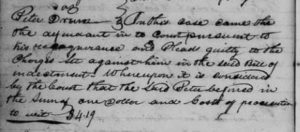
The limited info I did find showed that Evi was the administrator for Edward so I was pleased in that connection although it did not state their relationship. But I’m not disappointed at all because instead of finding what I was seeking, I discovered instead a court record for my 4th great grandfather, Peter Drum (1750-1837), which was on the page where I thought I’d find Edward’s estate info.

1
I’m unable to find the bill of indictment so I don’t know what he was pleading guilty to. I did look up the fee of $4.19 and in converting it to today’s dollars – it’s about $20.00.

Here’s the weird part…the day before I had emailed the Fairfield County, Ohio Pioneer Society for a followup as earlier this year, I had submitted a lineage society application for Peter Drum and I had not heard from the organization. I could have used the above record as further proof of his residence but I hadn’t known it existed. The day after I found this record I received a response that the application for Peter Drum was accepted and I would receive more information in December.

Now I intend to go page by page through these court records to see if there are other interesting discoveries to be made. So glad winter is coming!

1 Court records, 1818-1854 Minutes v. B 1820-1822 Minutes, Peter Drum, Familysearch.org (https: familysearch.org: accessed 28 Oct 2018) p.2.

Free Genealogy Resources


Ancestry.com has kept their promise and is continuing to work on restoring Rootsweb.com, which they now own. Recently, an updated Rootsweb Wiki has become available and it’s free!

Rootsweb is one of the original Wikis – places on the web that allows for collaboration in editing and structuring revolving around genealogy. Back in the day, say circa 1999, I had several trees posted there and I reached out for help via the Message Boards. I was rewarded with lots of suggestions, hints and occasionally, a tidbit of a genealogy gem that propelled me forward.

In its present form, links are provided to pages that provide important information about the records (Censuses, Immigration, Military, Vitals, Various Types), Societies, and Research (Town, County, State, African American, Jewish). It’s a wonderful place to gain an Ah ha moment and might just explain why you can’t find Great Grandpa Ed in the 1900 U.S. Federal census.

Two additional resources that are extremely valuable are The Source: A Guidebook to American Genealogy and Red Book: American State, County and Town Sources. Check those out if you aren’t familiar with their content.

Like it was in the past, you can contribute your input to make the Wiki even better.

I highly recommend taking a break from the summer heat and visiting the Rootsweb Wiki.

MyHeritage SuperSearch Update


For a number of years, Ancestry.com has provided users with the ability to add their input regarding incorrect info on record indexes. Recently, MyHeritage has devised a similar feature that will allow for corrections of spellings or transcription errors.

Simply click “Suggest Alternatives” and add your info. You’ll need to type the first and last name of the individual to be corrected, use the drop down menu to select the reason and add your two cents in the comments. If you’re like me, your ancestor’s names were never recorded the same as some of them were doozy’s to spell – Leininger, Bollenbacher, and even short ones like Duer seem to have been problematic for those enumerators.

Here’s an additional tip – keep a list of all the many, varied and unusual surname spellings that you find as that could help you in the future when you’re stuck. I add them to an Excel spreadsheet with tabs for my preferred spelling of the surname and a column where I found the name spelled differently. Happy Hunting!

Genealogy Without Power

Hurricane Irma is long gone and our power has finally been restored! Four days without electricity was challenging. I honestly don’t know how our ancestors, females especially, survived Florida’s heat and humidity back in the day in those long dresses. The cold water to bathe in doesn’t help!
We were fortunate, as were most of our neighbors, in regards to physical objects being spared. All we had was a leaning fence which we’ve since fixed, a broken mailbox as the wind tore off the door, several dents in my car hood and lots of vegetation debris to rake up. Our next door neighbor lost her mother the day after the storm and our neighbor behind us welcomed a new baby. Nothing like adding more stress to an already difficult time! The cycle of life continues…
For me, I can’t even remember the last week I spent at home and didn’t do any genealogy. It has to have been years ago. Genealogy is so dependent upon online tools today that there was little I could do without electricity.
I was trying to limit my cell phone usage to conserve it so my response to a few clients was terse. Two responded they didn’t know I lived in the storm’s path. One had found me online and the other through a former client. There was no need for them to know my physical location but it still surprised me that they hadn’t.
I love to read out of print books but I had to limit that, too, to conserve battery life on my Kindle. I could use my laptop for a bit to work on the current e-Book I’m writing but it’s an old laptop and the battery life is short so I decided not to do that.
I had gathered all of my most precious documents and did spend about an hour reshelving them in our office. That was the extent of my time invested in genealogy. Now I’m backlogged and better get to work!

Gedmatch How To

Since I last blogged I explored Gedmatch. It was simple (and free!) to use and I highly recommend it. Here’s how:
First watch the Youtube video Gedmatch Basics. There is no handout but you really don’t need one.
I had already created an account on the site but if you haven’t, you can make one as you’re watching the video.
Once you’ve logged in to Gedmatch, look on the right side where you’ll upload your DNA files. I had one 23andMe and one Ancestry to upload and compare.
If you’re not sure how to get your DNA files, don’t worry! The video and the Gedmatch site will direct you to the provider and step you through downloading it to your computer and then uploading it to Gedmatch.
Now you’re ready to analyze what you’ve uploaded. Not all features are available immediately but that’s okay, what you’ll be most interested in is the 1 to Many which compared shared DNA to everyone who’s uploaded on the site and the 1 to 1 which compares two people. I was interested in 1 to 1 as I uploaded my son and my results.
Your options to view the results are position, graph or position with graph. I chose position with graph. I like seeing the color comparison; my son preferred the position table only. See the picture at the top as that shows what you’ll see for position with graph. The yellow denotes the match from person 1 to person 2 is half, the green are full matches. There’s a lot of green looking at all 22 chromosomes and the rest yellow as our relationship is mother-son.
Check the bottom of the data to see the estimated relationship, how many segments matched and the largest matching segment.
There are other analysis tools available which I haven’t checked out. I plan on doing that when I get my daughter tested as I’d like to compare her to my son.
DNA offers continue this week – Ancestry and FTDNA both have promotions for $69.00.

We’re still waiting for hubby’s results to be returned from 23andMe.

MyHeritage DNA Upload Trouble Shooting


I took a wonderful webinar through the Association of Professional Genealogists on Thursday evening on DNA and Ancestry given by Jennifer Anderson Zinck. Although my husband and I tested through Ancestry before their new tests became available in October 2014, our earlier results are still available through the DNA tab on the ribbon. I had thought Ancestry was no longer supporting their older tests so I was pleasantly surprised.

Understandably, the old results aren’t going to be a part of their new communities and circles. I decided to upload that old data into MyHeritage.com’s new DNA feature as they recently began accepting data from other companies.

To upload, click on the MyHeritage DNA tab’s dropdown “Upload DNA data NEW.” Click the pink box “Start.” Click if you are uploading your data or someone else’s. In my case, I was trying to upload my mtDNA. Then, click the Service Terms and Consent Agreement. Next, click the pink box “Upload.” Ancestry downloads the results as a csv file which my computer didn’t like. I converted it to an Excel file as that is what it is and uploaded it.

The pop up told me “DNA uploaded successfully.” Good thing I decided to click “Manage Kits” before I uploaded hubby’s data. Surprise, surprise – my kit was marked “Invalid.” I thought that might be because I had changed formats so I went back through the steps and uploaded the csv file. Again, I got the “DNA uploaded successfully” but in checking further, it was marked as “Invalid.”

I called MyHeritage at 1-877-432-3135. Don’t get confused by the voice mail options! I wasn’t needing billing or accounting (1) or sales (2) and the third option, tech support, says to call back between 7 am -5 pm. Since it was 9:15 AM I thought the phones might be down. The message repeats twice but just hold on because you’ll eventually be placed in the queue for assistance. I was number 9 and the wait time was about 15 minutes.

I told the tech guy the process I had followed and it turns out that MyHeritage does not accept mtDNA or yDNA, only autosomal, which we hadn’t taken. I suggested that the type of test be written on the site to save phone calls and wasted time though autosomal is the way to go now and there probably aren’t a lot of folks like us who have older tests.

So, if you have an autosomal DNA test done at a competitor’s site, you might want to take advantage of MyHeritage’s free offer. Getting your data out to another site just might unlock secrets you never knew existed.

Thank You Familysearch.org!

I love Familysearch.org for so many reasons – the wiki, the records, the tutorials, the ease of use, I could go on and on. I mentioned this at a recent local genealogy conference I attended to my tablemates and was surprised to learn that they had not signed up for a free account. Then yesterday, I was volunteering at an Ask-A-Genealogist Day at a library where I met several folks who had never heard of the site.

One gentleman was so excited he called his wife and brother to tell them about the records we found on his grandparents. A very sweet woman teared up when I showed her a marriage license her grandfather had signed – she had never seen his childlike signature before. He died before she was born and had been uneducated but her grandmother made sure she had the money to go to college so she’d have a better life. I forwarded the link originally sent out by Thomas MacEntee about the upcoming Irish research workshops that Familysearch is offering all week that I bet St. Pat would have attended if he were alive! Another man told me his wife will be so happy as he wanted to make a trip to Ireland ala WDYTYA and she told him that was ridiculous since he wouldn’t have archivists drop everything for him. So he’s tuning in, learning and planning to save time and money. Can’t get better than that! Interested and want more info on this event? Click on this for the flyer.

Trust me, Familysearch has not solicited for money or sent beaucoup annoying emails as many other genealogy based groups do. Why should you register on the site? After creating an account you’re able to connect with others who are pursuing the same lines you are. BillionGraves is now synching with Familysearch so there’s another reason. It’s easy, it’s free and it’s a valuable genealogical tool. You’ve lost an hour today so insure you don’t lose more time – sign up at Familysearch.org today.

Youtube and the Genealogist


A source that I under use for genealogy is Youtube. Lisa Louise Cooke reminded me at a local seminar I attended about the valuable information that is available on the site.

There’s two ways to find what you’re looking for – do a Google Search (duh!) or use the search button on Youtube. If I type in Google the following – youtube genealogy – I get 8,660,000 results. Using the search bar on Youtube, I receive 190,000 results for the word genealogy. Most of those hits are instructional videos. Youtube can assist your genealogy more personally, though, and help you find information you didn’t know was out there.

Try this: In the Youtube search bar type a surname you are interested in and the words “family history” in quotes. I did this with my Leininger surname and the first link is to a family reunion in Ohio. Bingo! Need to know who has the family Bible or a photo of great grandma? The folks you’ve found on Youtube just might hold the key.

You don’t stop there, though! I then decided to check out video to be more specific of the location since Ohio is a large state. I entered “Celina, Ohio” Kuhn (another family surname I’m interested in and the residence of the family) and more hits are available.

This is a wonderful way to reconnect with family that remained in the hometown, see what the area looks like today and the time investment is minimal as many of the videos are less than 15 minutes in length. Enjoy!