For the past two weeks I’ve been blogging about the importance of personalizing your AI. Last week I wrote how to accomplish that with ChatGPT. Even if you only have a free version, it’s important for you to customize. I also strongly encourage you to have a free account with all of the AIs so you can check their work as some are stronger in one area than another.
Here’s how to personalize with
CLAUDE:
Click on the lower left circle that is your profile icon. Select Settings. Click General. In the box, tell Claude your instructions to use every single time you being a chat.
GEMINI:
Click on the lower left profile icon. Then click on the right setting icon for new pop up window seen above, look for Personal Intelligence. Next click Instructions for Gemini. Insert your instructions in the box.
PERPLEXITY:
Like, ChatGPT and Claude, click on the lower left profile icon then click Account. Next click Personalization. Complete the information under Custom Instructions
Now you’ve saved yourself from having to retype the same instructions repeatedly. Remember, if you provide a conflict in an instruction in the chat box from what you’ve written under personalization, no worries! The prompt box will override what you have in personalization. If you do find yourself having to give the AI repeated instructions, then go back to the personalization setting and update. Happy Researching!
In my last article, I explained why every genealogist should customize their artificial intelligence assistant before asking it to help with research. Think of it as introducing a new research assistant to your way of working.
Now let’s put that idea into practice with ChatGPT.
The entire process takes only a few minutes, yet it can dramatically improve the quality and consistency of the responses you receive.
Step 1: Open Your Settings
Sign in to ChatGPT.
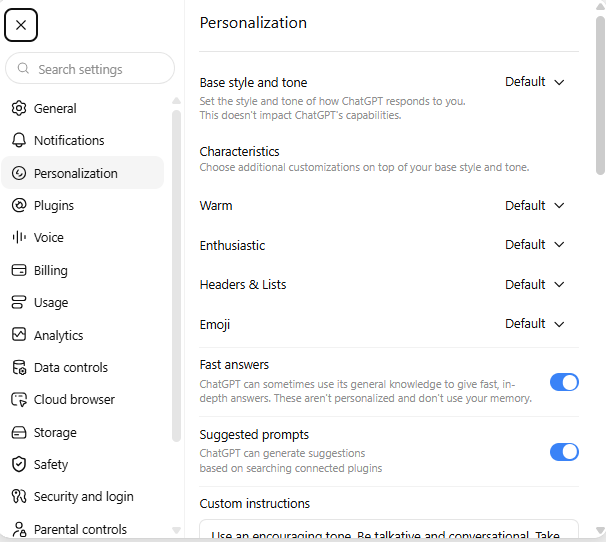
Select your profile icon in the lower left corner of the screen, clicking on the circle.
From the dropdown, select Personalization. This is where you’ll find the options that allow ChatGPT to adapt to the way you work.
Click on Personalization and scroll down to the box under Custom Instructions. That’s where you will put in your directions.
Step 2: Tell ChatGPT About Your Work
Don’t write a biography.
Instead, tell ChatGPT what it needs to know in order to work effectively with you.
For example, you might include:
• I am an intermediate genealogist researching families in Ohio and Pennsylvania.
• I prefer Chicago-style source citations.
• Always distinguish between facts, evidence, assumptions, and hypotheses.
• Never invent missing information.
• State clearly when evidence is inconclusive.
• Use military-style dates such as 21 March 1850.
• Write in a conversational but professional tone.
Notice that none of these instructions reveal private information. They simply describe how you want your AI assistant to approach its work.
Step 3: Explain How You Like Information Presented
Formatting matters.
If you frequently ask ChatGPT to create timelines, research plans, proof summaries, tables, or blog posts, mention that in your instructions.
For example:
“I prefer timelines arranged chronologically.”
“Separate proven facts from working hypotheses.”
“Use headings and short paragraphs for readability.”
The more consistently you work, the more useful these instructions become.
Step 4: Don’t Try to Tell It Everything
One mistake I often see is people creating pages and pages of instructions. My research assistant, Geni, informed me that someone uploade 60 pages here.
Resist the temptation.
Long instruction lists often include information that is rarely used or eventually becomes outdated.
Instead, include only those preferences that affect most of your conversations.
You can always provide additional instructions for a particular project when needed.
Don’t forget to hit SAVE!
Step 5: Update Your Settings Over Time
Your settings should evolve.
Whenever you notice yourself making the same correction repeatedly, consider adding that instruction to your saved preferences.
Perhaps you always ask ChatGPT to avoid speculation. Maybe you repeatedly remind it to cite sources or to identify conflicting evidence.
If you’re saying the same thing over and over, your settings probably need an update.
Remember: Settings Are Not Magic
Custom instructions improve consistency, but they do not replace careful review.
I still verify every citation, read every record myself, and evaluate every conclusion before I publish or share it with a client.
AI is an assistant, not a substitute for genealogical judgment.
A few minutes spent customizing ChatGPT today can save hours of rewriting tomorrow.
In the next article, we’ll compare how Gemini, Claude, and Perplexity allow you to personalize their responses and discuss which features are most useful for genealogists.