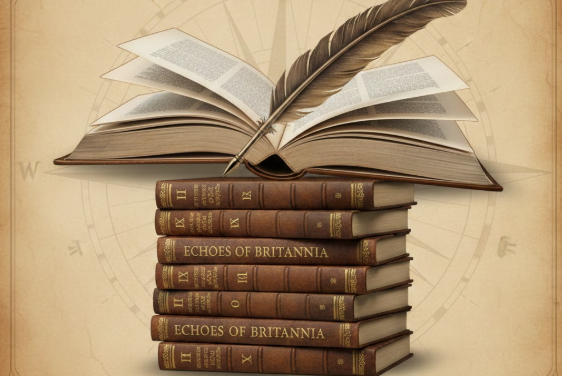
At 5:51 p.m. on 1 February, I finished the final narrative for my latest work, Echoes of Britannia.
It was a genuinely momentous moment. For the first time, I have written a narrative for every ancestor I can currently identify. That mattered to me more than I can easily explain. I wanted to leave my research to my descendants in a way that restores my forebears’ humanity after generations of being flattened into little more than names and dates inside a software program.
Treating their lives seriously mattered. Some of them made choices I wouldn’t have made. Some lived in ways that feel foreign or uncomfortable to modern sensibilities. But they deserved to be acknowledged. If not for them, I wouldn’t be here. None of us would.
I wanted to record their lives in a durable format, so I chose to present these stories as bound books. Actually, ten bound books. Yes, I did get a little carried away.
When I began sketching ideas last March for a book about my husband’s and my British ancestors, I had no idea how much research I had accumulated over the years. And, in all honesty, some of it was utter garbage. Early on, I trusted unsourced online trees. Some “sources” later turned out to be incorrect or wildly speculative. Pruning my tree was not fun, but it was necessary. I wanted a stable, explainable record; one where the evidence supports the tree, not the other way around. Family history shouldn’t rest entirely on folklore, though the tall tales sometimes earned a place, clearly labeled as such.
Initially, I imagined two volumes: one covering our five primary British ancestral lines as they extended into the United States, and a second devoted to their allied families “across the pond.” That plan didn’t last long. The records I had gathered, baptismal, marriage, and burial registers; land charters; court cases as plaintiffs and defendants; censuses taken hundreds of years ago, contained far too many compelling details to compress into just two books.
As the stories grew, so did the project. Two volumes became ten. Volume 1 focuses on our family in the New World. Volume 2 covers our medieval gentry. Volumes 3 and 4 record the lives of knights and barons.
I thought that might be the end but I quickly learned our “British” ancestors were not always British. Volumes 5 and 6 explore our Anglo-Norman families who arrived in the British Isles around the time of William the Conqueror, who, somewhat astonishingly, turns out to be one of our many great-grandfathers. His lineage alone justified Volume 7: British High Nobility.
Even that wasn’t the end. Our family tree is less a tree than a bush. The final three volumes follow far-flung Continental European ancestors whose descendants eventually migrated to Great Britain.
Along the way, I’ve learned an extraordinary amount about historical eras I once barely understood. I’ll be sharing some of those discoveries here on the blog over the coming weeks.
Although the narrative writing is now complete, there is still plenty of work ahead before publication, editing, cleaning thousands of footnotes, writing an index (ugh), adding photographs, and sourcing every one of them. Still, the hardest part is finished.
There was a recent public discussion about artificial intelligence and genealogy that left me thinking, not emotionally, but analytically, about where our field is right now.
What struck me most was not what was said, but what wasn’t.
Several audience questions centered on whether AI should be used at all, or when AI might someday be capable of returning source citations. Those questions are revealing. They suggest a community still waiting for permission, still assuming capability lies in the future, and still being told to fear a tool that many genealogists are already using responsibly and effectively.
More concerning, however, were moments when concrete ethical scenarios were raised and no clear ethical line was drawn. When real examples involve other people’s data, living individuals, or derivative work, “it depends” is not guidance. It’s abdication.
Genealogy does not function well on ambiguity alone. Our work affects real families, real identities, and real relationships. Ethical frameworks only matter if they are applied when it’s uncomfortable to do so.
Silence is data. So are the questions we choose to answer and the ones we avoid.
What this discussion confirmed for me is something I’ve been observing for months: much of the leadership around AI in genealogy is stalled. Not because the technology is unknowable, but because decision-making feels risky. Talking is safer than teaching. Warnings are safer than methods.
The work, however, is already happening, quietly, responsibly, and outside the spotlight.
And that’s where I’ll continue to focus my energy.
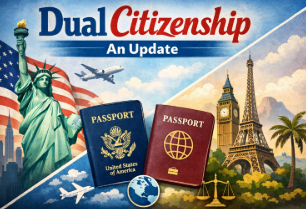
In November–December 2026, I wrote a series of blog posts about my experience obtaining records for dual citizenship. Since then, I’ve received weekly messages from people interested in pursuing dual citizenship themselves.
Let me be clear: I didn’t write those posts to discourage anyone. I wrote them to be transparent.
If I were hiring someone to help me with a complex, expensive, emotionally charged process, I would want honesty about the cost, the delays, the bureaucracy, and the unexpected hurdles. That’s what I aim to provide my clients in every aspect of my work.
One important disclosure: I contract with citizenship.eu and do not take private clients for dual citizenship applications. My role here is to share my experience, not to sell services.
By early December, I had finally received every record I requested, starting back in July. The last document to arrive was from NARA–DC: my grandmother’s ship manifest, which came on December 3. I didn’t blog about that particular request because it was made online but it came with its own challenges. The NARA website doesn’t always cooperate, the government shutdown delayed retrieval, and I couldn’t find a genealogist available to physically retrieve the record in Washington, D.C.
So yes, even the “easy” requests weren’t always easy. I then had to send it off to be apostilled. The record was returned to me 3 days ago.
If you’re considering dual citizenship, here’s what I wish someone had told me before I started.
Contact the consulate before you do anything else. Not after. Not halfway through. Before. This ensures you understand exactly what they require and it puts you on their radar. In my case, I was emailed detailed instructions which were clear and helpful.
Begin acquiring records and brace yourself. This phase is both expensive and time-consuming. I ordered two certified copies of every record and obtained several documents I didn’t initially plan to submit, simply to have a complete, redundant set in case anything was lost or damaged.
My total cost for records was $1317.80. That included my immigrant grandmother’s birth, marriage, death, ship manifest, and naturalization records; my mother’s birth and baptismal records (because no civil birth record existed), marriage, and death certificates; my own birth and marriage records (both church and civil, because my given name differed); my husband’s birth certificate; and the birth certificates of my adult children and their partners. Some of us all also needed to update our passports which were due for renewal.
I also obtained records I didn’t expect to submit, death certificates for my great-grandparents, my grandfather, and my father, along with his birth certificate, just in case questions arose about lineage. I may not need them, but I sleep better knowing they exist. Those costs are not included in the above total.
Every document must be apostilled. This is a separate authentication process that verifies the legitimacy of public documents for international use. Apostilles add both time and cost, and the process varies depending on whether the document is state or federally issued.
All of the records I plan to submit require apostilles, including birth, marriage, death, naturalization, ship manifests, and FBI clearance. Each record must be sent to the appropriate authority; the state records to the Secretary of State, federal records to the U.S. Department of State, along with forms and fees.
So far, my apostille costs total $305.00, with one state still remaining. I plan to handle Illinois in person because mail processing there is painfully slow. My mailing costs alone reached $92.45 and that amount increased when Florida rejected my apostille request because I included a church marriage record they would not certify. That error added a month-long delay and another trip to the post office.
Here’s my strongest advice: always include a prepaid return envelope with tracking. It costs more, but if documents are sent back by regular mail, they can disappear forever.
FBI clearance was surprisingly the easiest step. You complete the application online and should not include your Social Security number, since the document will be sent overseas. After submitting the form, you’re directed to a local post office for fingerprinting. We opted for electronic fingerprints and received results almost immediately, before we even paid the fee while waiting in line at the site.
If electronic fingerprinting fails, you’ll need to use a paper card and mail it in, which adds time and cost. Ironically, the FBI clearance often considered the slowest part, was the fastest, aside from the three months it took for the apostille.
You will need a certified translator. Ask the consulate if they have preferred translators, or research carefully through reliable sources (yes, Reddit threads can be useful here). Certified translators are approved by the courts of the country where you’re applying, and they are expensive.
I haven’t completed all translations yet, but the estimated cost will be around $5,000. Some translators will assist with applications, biographies, and statements of intent; others will not. I chose to work with a genealogist who obtained my grandmother’s baptismal record, a trusted colleague who kindly offered a discounted rate.
This is where patience goes to die, acquiring records from the country of origin is not easier than obtaining them in the U.S.
In my case, it took two months to obtain a single certified record. The office closed for two weeks for vacation. When the genealogist arrived at the scheduled appointment, she was told, incorrectly, that the church had to issue the record. A week later, the church sent her back to the civil office. Then the church had to write a letter instructing the civil office to release the document. Two more weeks passed before the record was issued. Then it took three weeks for international mail to deliver it.
No one was rude. No one was helpful. Bureaucracy is bureaucracy everywhere.
Understand that dual citizenship is a process of hurry up and wait. Once our records are translated, my family will wait until late October for our consulate appointment in Chicago. There, a consular employee will review our documents to ensure we are submitting the correct ones. Copies will be retained by the consulate, the certified apostilled originals with transcription and that apostilled sent overseas (and yes, I ordered extras because I’m paranoid). There is a fee for submission that is reasonable, considering how much was already spent.
After submission, the waiting begins, sometimes two to five years or more.
I also incurred costs for hotel/gas/parking/meals while we tried to obtain records in person. ($703.47).
So far, I’ve spent less than average as typically dual citizenship can cost between $10,000-20,000.00. My cost was less because I sought out the records on my own in all but one case. I also did not hire a lawyer which is sometimes needed, depending on the country and the situation.
So why would anyone willingly endure this?
Everyone’s reasons are different. For my family, it’s about global mobility and connection. We still practice the customs of my grandmother’s culture, and when we are in Croatia, it feels like home. There should be a language barrier because our Croatian stinks but somehow we razumjeti (understand). I’ll be working on improving while we wait for the decision.
Others pursue dual citizenship for healthcare, education, lower living costs, or expanded career opportunities. Business owners may relocate to continue serving existing clients while building new markets. And many younger applicants, especially those in their twenties, simply want options. I hear that sentiment often.
Dual citizenship is not a weekend project, a budget-friendly endeavor, or a fast-track solution to anything. It is expensive, slow, frustrating, and emotionally taxing. It requires organization, patience, and a tolerance for bureaucracy that most people don’t realize they lack until they’re knee-deep in certified copies and apostille forms.
But for those who value connection, opportunity, and the ability to move through the world with greater freedom, it can be worth every delay and every dollar.
My goal in sharing this update isn’t to persuade you one way or the other. It’s to help you make an informed decision. If you choose to pursue dual citizenship, go in with open eyes, realistic expectations, and a very good filing system. And if you decide it’s not for you, that’s not failure, that’s wisdom.
If this process has taught me anything, it’s that knowing what you’re walking into makes all the difference.
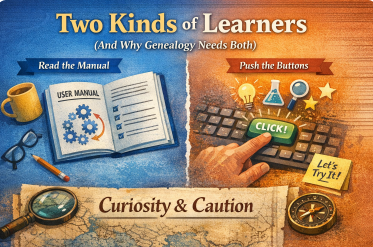
Someone recently observed that there are two kinds of people in the world:
Those who learn by reading the manual. And those who learn by pushing buttons.
My husband calls me “click-happy.” He means it affectionately and accurately. When I’m faced with new technology, my instinct is to explore. To try things. To see what happens. That’s how I learn.
Some people learn top-down. They want the framework first. The theory. The rules. They read, then they act.
Others learn bottom-up. They learn by doing. By experimenting. By poking at the edges and seeing what’s possible, then building understanding from experience.
And over the years, I’ve realized something important: neither of these approaches is wrong.
Most of us are actually a mix of both, depending on the tool and the stakes.
But in genealogy? Let’s be honest. Very few of us learned Ancestry, FamilySearch, DNA tools, or mapping tools by sitting down with a 300-page manual first. We learned by searching. Clicking. Trying. Backing up. Trying again.
And when I look back at some of the most important breakthroughs in my own research: Croatia, the Palatine migrations, strange boundary changes, unexpected court records, whole clusters of “this can’t be right… oh wait, it is” moments, not a single one of them began with a manual.
They began with curiosity.
With clicking.
With trying something that wasn’t in the plan.
The manual tells you how a tool is supposed to work. Exploration shows you what it’s actually good for.
Here’s the part that really matters, though: the real risk in genealogy (and in tech generally) isn’t clicking. It’s not having good habits.
What actually protects your work is not fear. It’s practice:
Working on copies, not originals
Having backups (and backups of backups)
Using version history and undo (Ctrl+Z) after analyzing and discovering your first find wasn’t accurate
Not trusting any single tool, human or machine, blindly
Fear doesn’t protect data. Habits do.
We already live in a world where far more damage is done by accidental deletes, bad syncing, overwritten files, and simple human error than by any new tool. AI doesn’t change that reality, it just joins the long list of tools we learn to use wisely.
And in a field like genealogy, which is built on exploration, pattern-spotting, and following trails that might go nowhere, curiosity isn’t a flaw. It’s a requirement.
Archives don’t come with manuals. Families don’t come with instructions. Records don’t announce what they’re going to reveal.
You find things by trying paths that might not work.
So yes, some people will always prefer to read first and click later. Others will click first and read later. Both approaches have value. But let’s not confuse curiosity with recklessness, or caution with wisdom.
We don’t need fewer curious genealogists.
We need more curious genealogists with good habits.
Because almost every real discovery starts the same way:
If you build enough family trees, you start to notice patterns that don’t show up in history textbooks. Clusters of deaths. Children gone within days or weeks of each other. Young adults who disappear from the records in the same winter. Entire branches that simply… stop.
Before vaccines, epidemics were not rare events. They were a recurring feature of American life. And their story is written, quietly and relentlessly, in our family trees.
Genealogists see this world all the time. We see it in death certificates. In burial registers. In families where three or four children never reach adulthood. We see it in causes of death that barely register emotionally anymore because they’ve become abstract words: influenza, pneumonia, tuberculosis, diphtheria, measles, scarlet fever, small pox.
But these were not abstractions. They were people. Families. Empty chairs at tables.
One of my first family members in America to die of a preventable disease today was my 4th great grandfather’s John Morrison’s first wife and child, Isobel Fraser Morrison and their son, Alexander. Philiadelphia experienced a yellow fever epidemic and the dead were recorded in a book written the following year. John would go on to marry Elenor Jackson Robinson, a widow of another victim, James Robinson.
Mathew Carey. A Short Account of the Malignant Fever Lately Prevalent in Philadelphia, London, England, 1794, p. 148, digital image; Googlebooks.com: accessed 10 Jan 2026.
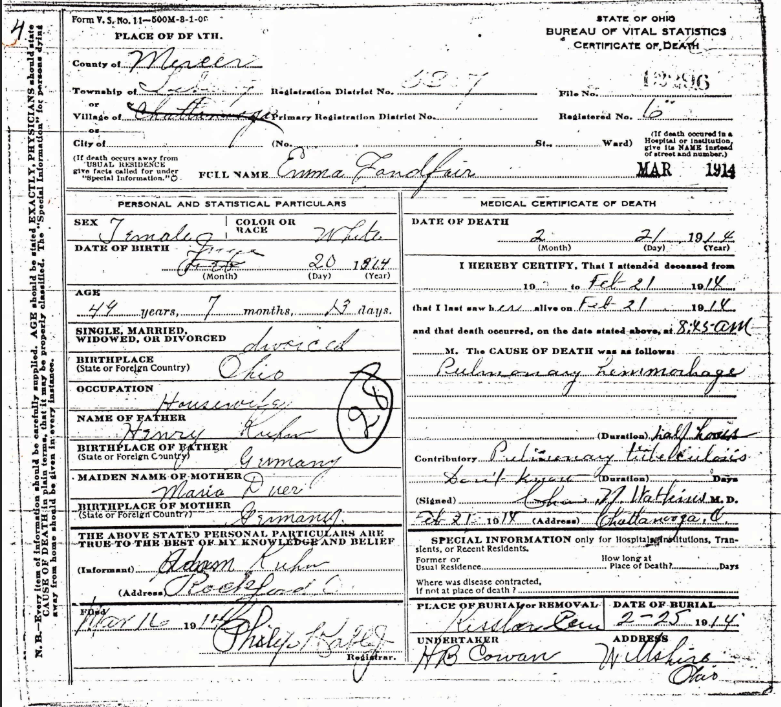
One of my great grandmothers was Emma Kuhn Landfair. Her death certificate lists tuberculosis. That alone would have been enough. But the story doesn’t end there. Like so many women of her time, Emma lived in circumstances that made both illness and survival harder than they should have been. Tuberculosis was the disease that took her, but it did not act alone. The record tells us the official cause. The context tells us the rest.
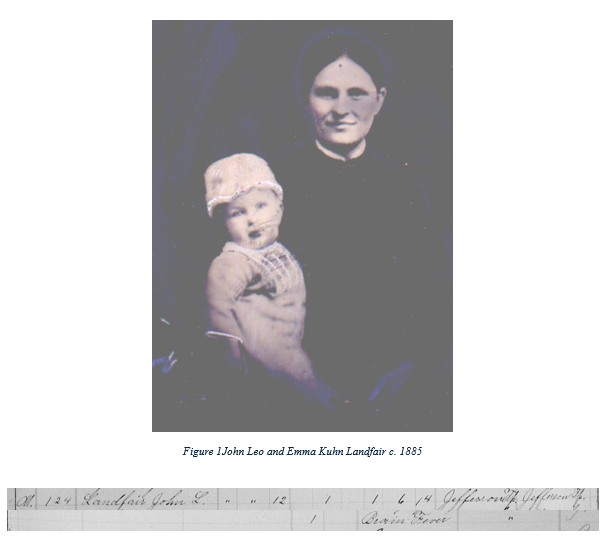
Emma lost two children to disease that could have been prevented today with vaccines. Her oldest son, John Leo Landfair died at age 1 of “brain fever,” likely encephalitis or meningitis.
Ohio County Death Records, 1840-2001, John L. Landfair, 1886, digital image; FamilySearch.org: accessed 10 Jan 2026, image 154 of 173, citing FHIL Film 004017319.
In 1985, the infant son of a former colleague and dear friend contracted meningitis. He survived, but it changed the course of his life, leaving him with permanent disabilities. Thankfully, there is a vaccine for that today.
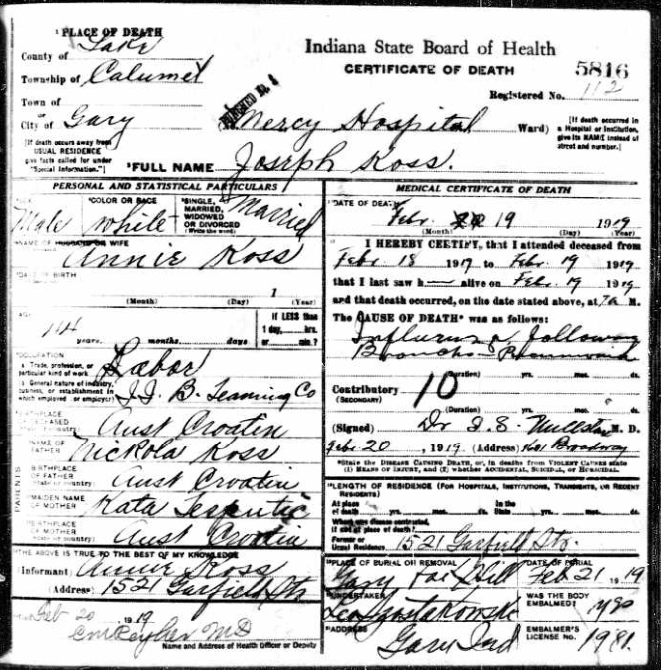
Another family member is Joseph Kos Sr., who died during the great influenza epidemic of 1918–1919. That pandemic is now a paragraph in history books. In real families, it was a before-and-after moment. It erased parents. It left children without fathers and mothers. It rewrote futures in a single season.
A few weeks ago I had community member tell me that she would not get the flu vaccine because she had survived having the flu in the past. Joseph Koss didn’t have an option as no vaccine was available for him. He was just 41 years old when he died.
These are not statistics. These are my people.
And they are not unusual.
Every genealogist who looks closely enough at their own tree will find similar stories.
But the past is not only in our documents. Some of it still lives in memory.
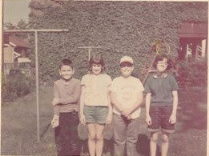
When I was in third grade, a classmate of mine died of meningitis. I still remember him. I still remember the call my mom got from our class’s PTA rep who asked my mom to come to school, which had been cancelled, to clean the room. They burned everything in our classroom in the school’s incinerator, hoping to end the spread of the disease. We didn’t return to class for a week and when we did, all remindings of Michael were gone. But I didn’t forget, I still have his photo.
Michael
Two neighborhood friends, Ray and Carol, survived rubella, but not without permanent consequences. They lived, but they lived changed. I also almost died of rubella myself.
Ray, Lori, Mike, Carol, photo taken by Dorothy Koss Leininger, Jun 1966.
And there was a girl I knew who spent her days in an iron lung due to polio. Many people today have never seen one. I have not forgotten.
These things are not ancient history. They are not medieval. They are not myths.
They are the world as it was within living memory.
And here is the part that is easy to miss: many of the causes of death that appear again and again in our family trees simply stop appearing once vaccines become widespread. Not because people suddenly became braver. Or healthier. Or morally better.
But because we changed the environment in which these diseases could kill.
When prevention works well, something strange happens: people forget what it was preventing.
We forget child cemeteries. We forget iron lungs. We forget winters when families lost two or three children in a single season.
Genealogists are among the few people who still routinely encounter the pre-vaccine world, because we read its paperwork.
This conflict is not new in America, either.
Benjamin Franklin lost a young son to smallpox. He had wanted the boy inoculated. His wife had refused. Franklin later wrote of his regret with extraordinary bitterness. Even in the eighteenth century, Americans were already living this argument. And already paying its price.
This is not a story about politics.
It is a story about memory.
It is about whether we remember what kind of world our ancestors actually lived in or whether we let that world fade into comfortable abstraction.
As we approach America’s 250th anniversary, it’s worth asking what kind of nation we want to remember ourselves as. A nation is not only its ideals and its founding documents. It is also how many children lived to grow up. How many parents made it home. How many families were spared grief.
Our family trees are not just records of who belonged to us.
They are records of who was taken.
The dead cannot tell us what they would have chosen. But they can tell us what it cost when there was no protection.
And they do, quietly, patiently, on every page of our family history.
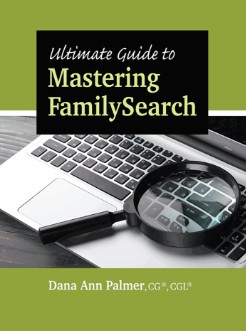
Today’s blog is a book review of Ultimate Guide to Mastering FamilySearch by Dana Ann Palmer. Long-time readers won’t be surprised to learn how this review came about; it was a classic Lorism moment.
Shortly before Christmas, during a snowstorm, my husband braved the walk to the mailbox while I stayed inside working on a client report. “You got a package,” he called. I wasn’t expecting anything; our Christmas gifts were already wrapped and stacked in a box waiting to be transported to one of our adult children’s homes on Christmas Eve. Curious, I abandoned my computer to investigate.
The return address was Genealogical Publishing Company, but I couldn’t recall ordering anything. Inside was Ultimate Guide to Mastering FamilySearch, along with a packing slip clearly intended for someone else. Confused, I emailed the publisher and received a quick reply: I could keep the book, and they’d look into the mix-up. After a couple of emails back and forth, I agreed to write a blog post about it.
Apparently, the universe really wanted me to have this book and you might want one, too.
This is a hefty volume and very much a “start here” guide for those who want to use FamilySearch.org but aren’t, as my husband affectionately calls me, “click-happy.” By that, he means fearless and impatient: I will boldly click my way through a new website without hesitation. If FamilySearch feels overwhelming or intimidating, this book is clearly designed for you.
It’s also well-suited for people who aren’t particularly comfortable with computers. The book is packed with screenshots showing exactly what the pages look like, so readers can follow along visually and reassure themselves they’re in the right place.
That visual-heavy approach did raise one concern, which I shared with the publisher: websites change. A lot. Screenshots age quickly, and I worried the book could become obsolete. I was told that updates would be posted on the publisher’s website if FamilySearch undergoes major changes. Problem solved.
If you’re a beginner but not much of a reader, no worries. Although the book runs 225 pages, most of that is screenshots, arrows, and visual cues. The actual text is limited. Follow the red arrows and you’ll be just fine.
My advice for everyone, regardless of experience level, is to start with the summary on page 222. It’s one of the strongest sections of the book and provides a solid overview. The Table of Contents and Index are also genuinely useful, especially for intermediate users who already know the basics and want to jump directly to specific tools.
I was surprised to see that the book includes information on CETs (Community Owned Trees), which are user-created trees donated to FamilySearch via GEDCOM. These are not the same as the global Family Tree that all users can edit. What isn’t stated and really should be is the usual caveat: like all online trees, errors happen. Beginners especially need to remember that information being recorded does not make it correct.
That said, CETs are typically created and donated by professional genealogists. Are they perfect? No. But they are far more likely to be compiled using the Genealogical Proof Standard and to be fully sourced. I plan to donate my own tree someday, assuming I ever finish my Great Britain research (sigh).
I was equally pleased to see extensive coverage of one of my favorite FamilySearch tools: the FamilySearch Wiki. This is an outstanding resource, particularly when used alongside a traditional search engine and AI tools. The Wiki is often the fastest way to determine what records exist, where they’re held, and what gaps remain. Not everything has been digitized, and the Wiki helps keep expectations realistic.
It’s important to remember that the Wiki is static, it changes only when FamilySearch employees update it. My recommendation is to start there, then move on to dynamic tools like search engines and AI to see what else might be available.
For intermediate users and above, the searching tricks in Chapter 3 are especially useful. We can all use a reminder to use Boolean searching effectively. The book also walks readers through FamilySearch’s AI-powered Full-Text Search tool. If you haven’t had success with it yet, the step-by-step instructions here are worth following. Full-Text Search, combined with DNA results, has helped me solve several brick walls in just the past year.
I was also glad to see a section devoted to Images, which was my favorite FamilySearch feature long before Full-Text Search existed and one I still rely on heavily. One thing I’d add, though, is a warning for beginners: microfilm collections can be confusing. To avoid waste, records from one locality may be followed immediately by entirely different record types from another place halfway around the world. It’s efficient, but it can definitely throw off someone new to the platform.
My only real suggestion for improvement is that the book should begin with a clear, step-by-step explanation of how to create a FamilySearch account. It isn’t difficult, but for users who don’t spend much time online, even that first step can be intimidating.
Ultimate Guide to Mastering FamilySearch does exactly what it promises: it walks beginners, patiently and visually, through a platform that can otherwise feel overwhelming. Its strength lies in its screenshots, structured guidance, and clear explanations of core tools, especially the Wiki, Full-Text Search, and Images.
If you’re new to FamilySearch, not especially tech-savvy, and prefer learning by seeing rather than reading, this book will likely feel reassuring and approachable. More experienced researchers may find it useful as a reference or refresher, though not groundbreaking.
In short: this is a visual instruction manual, not a methodology guide. Used wisely, it can help users get oriented and move in the right direction. Used uncritically, it risks reinforcing the idea that genealogy is about following arrows rather than evaluating evidence. As always, the tool is only as good as the researcher using it.
You’re actively using online genealogy platforms and you want to get the most out of them without wasting time or money. You care deeply about obtaining records, evaluating sources, and keeping your research accurate. And you’re not afraid to question tools when they don’t live up to the hype.
Good. Me neither.
In 2026, I’ll be sharing even more practical tips, honest reviews, and real-world work-arounds to help you research smarter not harder so keep checking back.
I’m also considering launching small, focused genealogy groups based on research needs, along with on-demand videos you can watch anytime. More details will be coming this summer.
And finally, let’s be honest, genealogy can be a lonely pursuit. Some of you may be thinking about joining a lineage society, or simply looking for a place where thoughtful discussion is welcome. Know this: you belong here. Genealogy At Heart is a community, and your comments, questions, and perspectives matter.
If you’d like to receive a free, just for the group monthly newsletter, email me at GenealogyAtHeart.com and I’ll add you to the list.
Here’s to curiosity, clarity, and good records in 2026!
Happy New Year! We start the new year looking forward but it’s also important to look back.
A powerful new chapter in remembrance has begun.
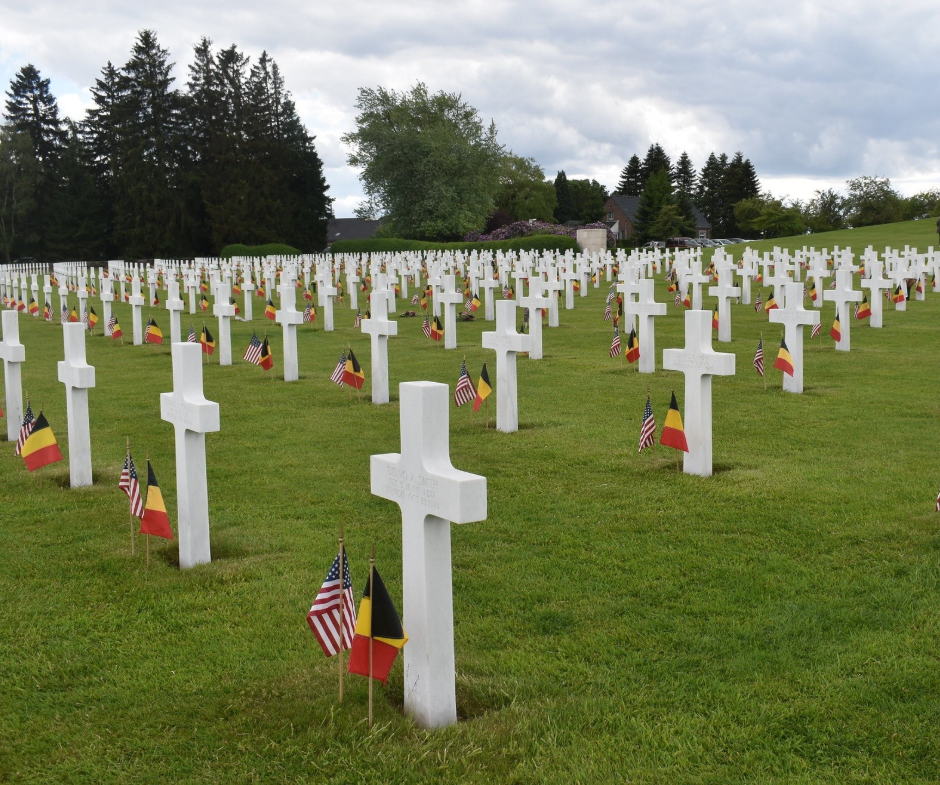
The Fields of Honor Foundation has officially launched its newly redesigned Fields of Honor Virtual Memorial, bringing together more than 15 years of dedication, research, and remembrance into one modern, accessible space.
What began in 2008 with the story of a single American soldier has grown into a living memorial honoring more than 45,000 U.S. service members who gave their lives in Europe during World War II. This new platform unites the former Fields of Honor database with The Faces of Margraten, ensuring that every name is paired, whenever possible, with a face, a story, and a legacy.
The revamped memorial allows stories to be enriched with photographs, documents, and soon audio and video. Related soldiers are thoughtfully connected, and information is easier than ever to explore, share, and download, whether you’re researching one individual or studying history at a broader scale.
The design looks to the future while honoring the past, using familiar colors inspired by the green fields of honor, the red, white, and blue of the American flag, and the marble crosses and Stars of David that mark these sacred resting places.
This achievement would not have been possible without the dedication of volunteers, partners, and nearly 400 donors, many of them relatives of the fallen or adopters of graves, whose generosity made the new memorial possible. The cemeteries themselves continue to be lovingly maintained by the American Battle Monuments Commission.
If you believe remembrance matters and that history should never be reduced to numbers, take time to explore the new memorial and the stories it preserves.
Possible Post Office Locations in Downtown Indianapolis
This is the last in a series on my adventures obtaining family records for dual citizenship. You can read early posts here, here, here, and here.
We had tried to get family documents from Illinois and Indiana in person and used email to obtain records from Florida and Arizona. Unbelievably, the online records had already been mailed to me while I tried to obtain the in person ones. Why? Because some states are more efficient then others. Illinois & Indiana, not so much.
We decided to drive two hours south east to acquire my father’s birth record in Mercer County, Ohio. The clerk was warm and welcoming which was such a change from our experiences elsewhere. A problem surfaced quickly; the record for my dad in their computer claimed he had been born in 1939. Umm, no, he would have been the youngest enlistee in World War II if that was the case. I had a copy of the birth and death certificate which I shared with the clerk. She couldn’t print a certified copy because whoever had input the information into the computer had made a typo. She went to search for a hard copy and found it. It was dated 1939. I believe what happened is that my father went to the office to obtain a certified copy so he could get his Social Security card. The clerk handwrote a new one and when my father looked at it he likely informed the clerk she had added the wrong year for his birth. I suspect she gave him a corrected replacement but kept the error record in the files. So, whoever input the info wasn’t at fault.
It took over an hour and three transferred phone calls to Columbus for someone with tech knowledge to inform the clerk how to issue the birth certificate with the correct date. Meanwhile, others were arriving for records and I was surprised to learn that another person was also seeking dual citizenship.
With record finally in hand we decided to make an attempt to drop off the death records request that Gary refused to accept earlier in the week. So, it was back home again in Indiana. Sigh.
There’s no walk-in service at the Indiana State Department of Health in Indianapolis, and I knew that. What the website didn’t say was that you also can’t drop anything off. Still, I figured it was worth a try.
Two and a half hours later, we pulled into the very last spot on the sixth floor of a parking garage. $35 an hour. But hey, it was next to the elevator. Life was looking good.
Until it wasn’t.
Disappearing Buildings and Imaginary Signs
We couldn’t find the building. The address led us to a large office labeled Bank of America but surprise! It was actually the Department of Health.
Only in Indiana could a government agency masquerade as a bank to “save taxpayers money.” And if I were to complain to a legislator? I can already hear the syrupy voice: “Now ma’am, we did you a big, beautiful favor by saving that signage cost, see?” (They always say “see.”)
There were no address numbers on the building. We finally wandered into another bank across the street, where someone kindly told us where to go.
If I had known what was coming next, I would’ve turned around.
The Plexiglass Purge
Inside the “Bank of Not-America,” a lone woman sat behind a desk topped with plexiglass, an absurd formality, given that it was the only furniture in the entire room besides a circular couch off in the corner.
She did not smile.
“We can’t take that,” she said flatly after I told her I had completed requests for death certificates.
I asked why.
“We don’t offer customer service.”
Well, clearly, that must be the vital records motto throughout Indiana.
I explained I’d driven from the northeast corner of the state because Gary refused to issue the records and whenever I mailed requests, they disappeared into the void.
“We’re very backlogged.”
At that point, my husband, officially done, asked if he could sit down. She pointed silently to the one chair in what was once the vestibule.
I asked where the nearest post office was. My thought: if I mailed it from just a few blocks away, maybe they’d actually receive it. Silly me.
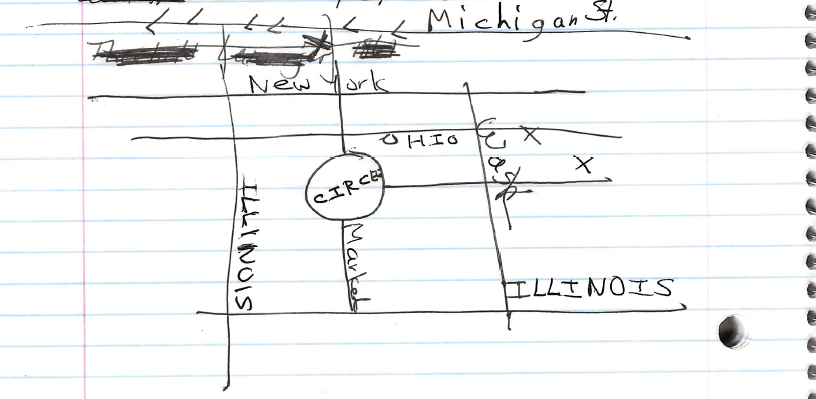
She offered to draw me a map. I handed her my notebook.
That’s when it got weird.
Enter: The Scowler
Out of nowhere, a man’s voice boomed behind me: “What can I help you with?”
Startled, I turned to see a tall man with a very unfriendly expression and a gun. Yep, it was an officer of the law. I had no idea he was even in the room.
I answered, “There’s nothing you can help me with.”
Apparently, that was the wrong thing to say.
He started yelling, “Tone it down! Tone it down!”
I wasn’t raising my voice. I hadn’t even been speaking when began yelling. But suddenly I could see it all: me, tackled to the ground, handcuffed, arrested for attempting to find a post office to send for three death records that the department who issues them refused to take.
The woman at the desk piped up, “She’s a nice lady, she’s not a problem.”
He replied, “I’ll handle this.”
Handle what? Was he going to walk my envelopes to the post office for me? Hand-deliver them to the Department of Health? Please, don’t tease me.
He eventually got bored and retreated to the sofa, where another officer sat watching the show with amusement.
Yep, fun and games intimidating an old lady genealogist. Karma, baby. Let it be soon.
The Map of Madness
The woman finished her map and handed it to me proudly, saying, “I’m not much of an artist, but I think I did a good job.”
I looked at it: three horizontal lines, three vertical lines, a circle, and three X’s because she “wasn’t sure where the post office was.” Also, she misspelled Washington. It had taken her five full minutes to draw this.
I stared at the page, silently. She looked sad that I didn’t appreciate her work.
I asked if it was walkable, thinking I could leave the car parked. “If you’re good at walking,” she said.
Not knowing what that meant, I asked how far it was.
“Maybe five or more blocks.”
Sure. We’d drive.
She said she should probably give me the address as well, there was another post office nearby, but she wouldn’t send me there because “it wasn’t very good.”
(Pretty sure that’s the one where all my mail has vanished into the ether.)
She had to call someone else to find the name and address of the post office she’d just drawn a map for.
I left, sad for the state of public service and even sadder that this was the outcome of my tax dollars.
The Last Gasp
It was now pouring rain.
I parked in what was probably an employee lot behind the post office and left my husband in the car in case it needed to be moved.
Inside: long line. No one at the desk. Classic.
Thirty minutes later, I sent off two envelope, each with certified requests for death certificates, destined for a building two blocks away.
Only in America can it take three days to deliver a letter that far.
It was scheduled to arrive on Saturday when no one is there to sign for it. Of course.
So maybe Monday. Maybe never.
And when it inevitably goes missing? I planned to take my receipt to my local post office, and they’ll tell me I have to go back to Indianapolis to get a refund.
At this point, I’m starting to think dual citizenship was absolutely the right decision. Even with all the hassles. Even with the yelling. Even with that map.
Next week, to begin a new year, I’ll post a a look back at the favorite blog posts selected by readers for 2025. Stay Tuned.
Christmas is a season of joy, wonder, and if you’re paying attention, quiet miracles. I have a holiday story to share that has just unfolded in my own family. Those of you who work in genealogy already understand that the strange, the coincidental, and the improbable often walk hand in hand with real life. Still, what I’m about to share feels like something more.
One of our adult children has always wanted to be a mother. For years, she prepared for a child she hoped would someday be hers, cross-stitching bibs, knitting booties, quilting blankets, and crafting tiny handmade treasures. She remained hopeful, positive, and forward-thinking throughout it all. As her mom, though, my heart often ached. No matter how old your child is, it’s painful to watch them work so hard for something that doesn’t seem to be coming.
I’ve written before about my Granny, my Croatian immigrant great-grandmother, who, in the late 1800s, made a pilgrimage from her small village of Dubranec to Marija Bistrica, a Roman Catholic shrine believed to be a site of miracles. When my husband and I visited the area years later, I was stunned by the distance she traveled. The terrain is mountainous, and for a woman of that era, the journey there and back would have been difficult and dangerous.
Yet Granny believed in miracles. She was hoping for a child who would live. According to my grandmother, Granny’s daughter, triplets had died. In truth, they were likely three separate pregnancies. English was their second language, and surviving records show two boys who died in different years. I suspect the third was a miscarriage.
While standing in that church during my visit, I lit a candle for my own child. It couldn’t hurt, right?
Last January, after modern medicine could not help her conceive, adoption became the next step. A consultation with a lawyer in May was discouraging. The message was blunt: if an adoption happened, and that was a very big if, it would likely take three to five years. Her age worked against her. International adoption was explored, but it was even more expensive and less promising. It all felt like a closed door.
Undaunted, she decided to become a foster mom. She was told she’d likely be placed with a teenager. Her response? That was fine. And if that young person someday became a parent, she would give them all the baby items she had lovingly made over the years. Generosity, it turns out, is another of her gifts.
She was approved as a foster mom the day before Thanksgiving and prepared a room for whoever might arrive. Then, last week, she received a call: would she be interested in a newborn? If so, she needed to attend an interview on 22 December. Of course she was interested but getting away from work was no small thing. In her profession, you don’t simply take the day off. With help from a few trusted colleagues, her schedule was carefully shifted so she could attend the meeting during her lunch hour.
She was told she would hear back the following day. Instead, four hours later, the phone rang. She was informed that she was a new mom.
The day she was selected came one day after my Granny’s birthdate. Go figure.
The next day, after paperwork, we met our newest family member. Our daughter named her after Granny, with a middle name that also carries deep family meaning another story for another time.
And yet, the coincidences continued.
I had never been inside this particular hospital before, but I knew it well. When we relocated from Florida, I had inexplicably chosen a hotel right next to it. Every time I needed to access the main highway, I turned into that hospital’s parking lot. Later, I realized it was the same hospital system my paternal grandfather had used when he lived in the city.
So there was a thread connecting my maternal and paternal lines but it didn’t end there.
When we entered the NICU, I noticed the baby’s whiteboard listed a very distinctive first name: the name of my husband’s maternal grandmother. I asked if that was the baby’s name. The nurse said no. One of the staff had simply thought of it, without knowing why, and wanted something to call her until an adoptive mom was chosen.
That name belonged to the woman who had, in many ways, raised my husband.
I don’t pretend to understand how all of this came together especially during a season known for wonder. I only know that we are profoundly grateful to have this strong little angel in our lives.
We are especially thankful for the biological mother, the DCS and NICU staff, and the community members who have stepped forward with support. If you’re so inclined, we would be grateful if you’d keep this little one in your prayers.